web
You’re offline. This is a read only version of the page.
close
Skip to main content

Notifications

Announcements

No record found.

Community site session details

Community site session details

Session Id :
Customer experience | Sales, Customer Insights,...
Answered

The JavaScript Function is not triggered

(0) ShareShare
ReportReport
Posted on by 360

Hi community,

I encountered an interesting error. I have a custom js library in the account entity. I added js function to phone field.

My js code :

function onChangeTelephone1(fieldname) { // PhoneNumber1
    var phone = Xrm.Page.getAttribute("telephone1").getValue();
    if (!phone) return true;

    var isSuccess = ControlPhoneForTurkey(phone,fieldname);

    return isSuccess;
}

I added the function to onchange event but it didnt trigger.

I tried to fix the problem;
- I created a new library and moved the codes to this library.
- I opened the developer console by adding a debugger to the code, it didn't trigger.
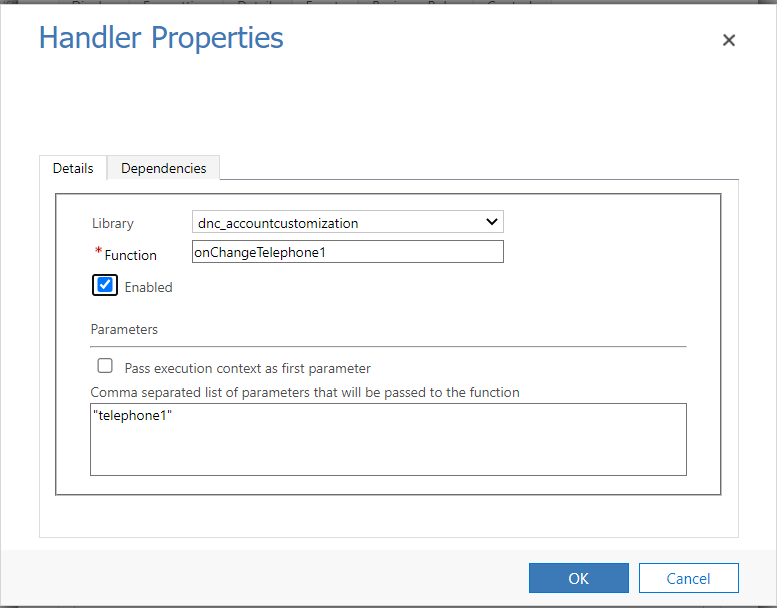
- I confirmed that the library of the function I added to the onchange event of the phone number field on the form is correct.

Despite all this, I could not trigger the code somehow. Moreover, this development was working without any problems 2 days ago. 

I shared screenshots:

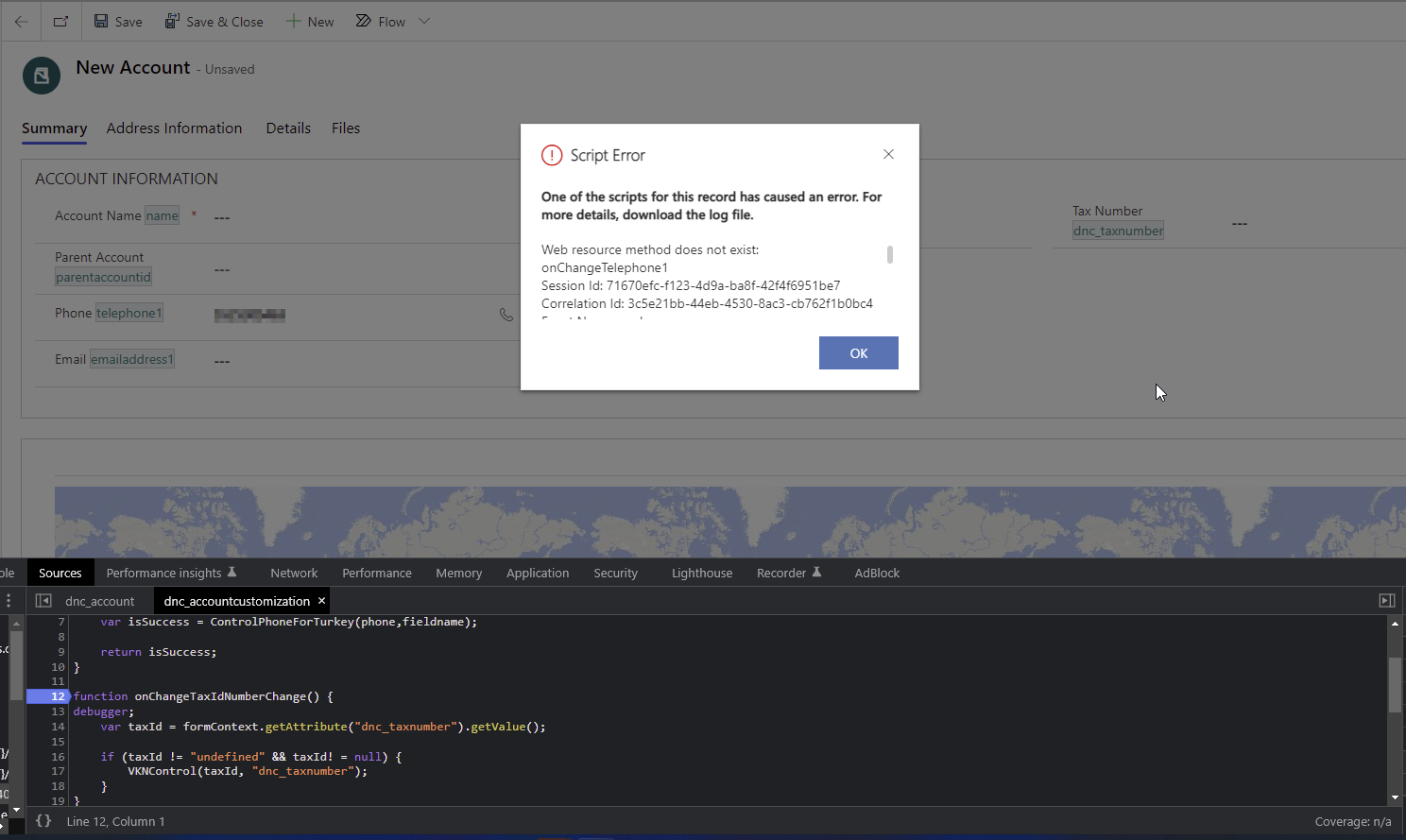
1- Error details (web resources does not contain)
pastedimage1655733302769v1.png

2- OnChange event and library information 
pastedimage1655733363177v2.png

pastedimage1655733409431v3.png

The browser does not enter debug mode even though I have made changes to the field.

Could you please help me ?

Thanks in advance. 

Regards.

I have the same question (0)
  • Suggested answer
    Amit Katariya007 Profile Picture
    10,409 Super User 2025 Season 2 on at

    Hello   ,

    Can you confirm that the given function is present in the Selected library?

    pastedimage1655738340661v1.png

    Thank you,

    Amit katariya

  • Suggested answer
    Bipin D365 Profile Picture
    28,983 Moderator on at

    Hi,

    Make sure web resource library has correct js syntax. Validate using below online tool

    esprima.org/.../validate.html

    Also, I hope you have published your customization.

  • Verified answer
    Community Member Profile Picture
    on at

    Hi,

    I have copy same your code in my trail crm. it is working fine. i have given the debugger as well on the phone number change. Please find the below screenshot for your reference.

    pastedimage1655749366265v1.png 

    pastedimage1655749465492v2.png

    pastedimage1655749494632v3.png

    Please try to clear you cache memory and try again it will be work.

    Thanks,

    Arsahd

    Please like and subscribe my youtube channel and follow my blog as well for interview preparation and more update please.

    https://www.youtube.com/channel/UC3Pe9Y_2SxA9xAmTfuSWQaA/videos

    https://juniorcrmblog.blogspot.com/

  • onurizgi Profile Picture
    360 on at

    Hi Amit,

    Of course I confirmed, It is not possible to choose from the event area without the library anyway.

    pastedimage1655792153900v1.png

  • onurizgi Profile Picture
    360 on at

    Hi Bipin,

    I checked to js code in esprima website. There isn't any error. Validation successed

    pastedimage1655792523061v1.png

    I'm pretty sure I published the code anyway I just re-published it and the problem didn't change.

  • onurizgi Profile Picture
    360 on at

    Hi Arshad,

    It's actually my cache clear. All I skipped was try from a different browser :/ I tried different browser. It was successed. Thank you very much everyone.

Under review

Thank you for your reply! To ensure a great experience for everyone, your content is awaiting approval by our Community Managers. Please check back later.

Helpful resources

Quick Links

Responsible AI policies

As AI tools become more common, we’re introducing a Responsible AI Use…

Neeraj Kumar – Community Spotlight

We are honored to recognize Neeraj Kumar as our Community Spotlight honoree for…

Leaderboard > Customer experience | Sales, Customer Insights, CRM

#1
Tom_Gioielli Profile Picture

Tom_Gioielli 81 Super User 2025 Season 2

#2
Gerardo Rentería García Profile Picture

Gerardo Rentería Ga... 49 Most Valuable Professional

#3
#ManoVerse Profile Picture

#ManoVerse 40

Last 30 days Overall leaderboard

Product updates

Dynamics 365 release plans



