web
You’re offline. This is a read only version of the page.
close
Skip to main content

Notifications

Announcements

No record found.

Community site session details

Community site session details

Session Id :
Customer experience | Sales, Customer Insights,...
Answered

Locked field on editable grid with system admin role

(0) ShareShare
ReportReport
Posted on by 905

Hello,

In the order product i have enabled the editable grid from the order form (since the grid is in the order) and added the custom fields that I created in the active view of the grid, quick create form including the main form that should be modified in-line within the grid.

The fields do not have:

-Any Field level security profile enabled and I am already a system administrator.

-The fields are not from a related entity in the view since they were created under the order product entity of type (Dates & 1 lookup) very straightforward.

After I published and tried to do modifications within the editable grid it shows the custom fields that I created as locked and the strange thing is that the Quantity is open and I can edit it.
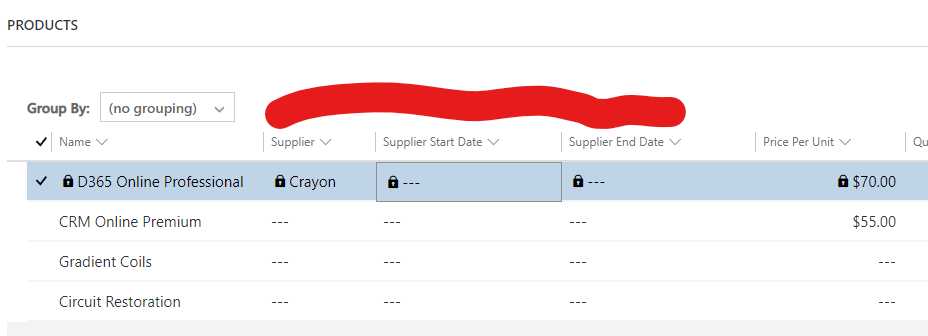
Editable-Grid-Locked-field.png

I am still wondering why I am not able to do changes to those custom fields since I do not even have any special customization on the sub-grid that locks fields.

Can anyone advise what might be the issue?

Any help is greatly appreciated.

Best regards,
EBMRay

I have the same question (0)
  • Suggested answer
    Abdul Wahab Profile Picture
    12,119 Moderator on at

    Hi EBMRay,

    The first and most important question for me is: Are these columns editable in the main form?

  • Suggested answer
    Abdul Wahab Profile Picture
    12,119 Moderator on at

    Hi EBMRay,

    For more details: Column-level security - Power Platform | Microsoft Learn

    pastedimage1669834718546v1.png

  • EBMRay Profile Picture
    905 on at

    Hello Abdul Wahab ,
    Thanks for your reply.

    All of these columns are editable on the quick create/main form and below are some screenshots including one record has those parameters filled from the form and not being able to edit them from the grid:

    pastedimage1669876259131v1.pngpastedimage1669876275099v2.png

    pastedimage1669876342009v3.png

    Column-level security is not applied at all to these columns as field-level security is completely disabled on the column level.

    What might be the issue is it a bug?

    Best regards,
    EBMRay

  • Verified answer
    Abdul Wahab Profile Picture
    12,119 Moderator on at

    Hi EBMRay

    Editable grids

    pastedimage1669877619418v1.png

    supports below

    pastedimage1669877662634v2.png

    For more information: Make model-driven app views and grids (lists) editable by using the Editable Grid custom control with Power Apps - Power Apps | Microsoft Learn

    Is there anything from the list used to lock the column?

  • EBMRay Profile Picture
    905 on at

    Hello Abdul Wahab ,

    Thanks for your prompt response.

    After removing the sub-grid from the order form and add it back again + publishing all customizations were made and cleaning the browser cached finally now the fields are editable.

    pastedimage1669879660958v1.png

    Thank you!

  • Suggested answer
    Abdul Wahab Profile Picture
    12,119 Moderator on at

    Hi EBMRay,

    You are welcome.

Under review

Thank you for your reply! To ensure a great experience for everyone, your content is awaiting approval by our Community Managers. Please check back later.

Helpful resources

Quick Links

Responsible AI policies

As AI tools become more common, we’re introducing a Responsible AI Use…

Neeraj Kumar – Community Spotlight

We are honored to recognize Neeraj Kumar as our Community Spotlight honoree for…

Leaderboard > Customer experience | Sales, Customer Insights, CRM

#1
Tom_Gioielli Profile Picture

Tom_Gioielli 170 Super User 2025 Season 2

#2
#ManoVerse Profile Picture

#ManoVerse 70

#3
Jimmy Passeti Profile Picture

Jimmy Passeti 50 Most Valuable Professional

Last 30 days Overall leaderboard

Product updates

Dynamics 365 release plans



