web
You’re offline. This is a read only version of the page.
close
Skip to main content

Notifications

Announcements

No record found.

Community site session details

Community site session details

Session Id :
Customer experience | Sales, Customer Insights,...
Answered

How to assign KBA to the Case entity based on Case title using Plugin ?

(0) ShareShare
ReportReport
Posted on by 40

Hi cloflyMao,

I have four KBA in my CRM and I want to populate the required KBA according to the Case title (using word matching criteria between Case title and KBA title) to the Case Entity using Plugin.

I am new to this please guide me step by step.

Regards,

Sheershendu

I have the same question (0)
  • cloflyMao Profile Picture
    25,210 on at

    Hi Sheershendu,

    Do you refer to Knowledge Article? I am not familiar with Customer Service module, could you tell me which field can be used to associate KBA and case?

    pastedimage1609309036724v1.png

    Regards,

    Clofly

  • Sheershendu Profile Picture
    40 on at

    Hi Clofly,

    When the criteria is matched(i.e if any word of the case title match with the keywords of any KBA) then Article Public Number of that KBA article should be assigned to the Associated Knowledge Record of a Case Entity.

    Regards,

    Sheershendu

  • cloflyMao Profile Picture
    25,210 on at

    Hi Sheershendu,

    Try following code and check if it works for you:

    using Microsoft.Xrm.Sdk;
    using Microsoft.Xrm.Sdk.Query;
    using System;
    
    namespace DynamicsPlugins
    {
        public class plugin1 : IPlugin
        {
            public void Execute(IServiceProvider serviceProvider)
            {
                IPluginExecutionContext context = (IPluginExecutionContext)serviceProvider.GetService(typeof(IPluginExecutionContext));
                ITracingService tracingService = (ITracingService)serviceProvider.GetService(typeof(ITracingService));
    
                IOrganizationServiceFactory servicefactory =
                    (IOrganizationServiceFactory)serviceProvider.GetService(typeof(IOrganizationServiceFactory));
                IOrganizationService service =
                    servicefactory.CreateOrganizationService(context.UserId);
    
                if (context.InputParameters.Contains("Target") && context.InputParameters["Target"] is Entity)
                {
                    Entity entity = (Entity)context.InputParameters["Target"];
                    if (entity.LogicalName != "incident")
                    {
                        return;
                    }
                    if (context.Depth > 2)
                    {
                        tracingService.Trace("Context depth is: {0}", context.Depth);
                        return;
                    }
                    try
                    {
                        if (entity.Attributes.Contains("title"))
                        {
                            String caseTitle = (String)entity.Attributes["title"];
    
                            string[] caseWords = caseTitle.Split(null);
    
                            for (int i = 0; i < caseWords.Length; i  )
                            {
                                if (findKBA(service, caseWords[i], entity) == true)
                                {
                                    return;
                                }
                            }
                        }
                    }
                    catch (Exception ex)
                    {
                        tracingService.Trace("Error of Plugin: {0}", ex.ToString());
                        throw;
                    }
                }
    
            }
    
            private static Boolean findKBA(IOrganizationService orgService, String caseWord, Entity contextEntity)
            {
                var query = new QueryExpression("knowledgearticle") { ColumnSet = new ColumnSet("title", "keywords") };
                query.Criteria = new FilterExpression();
                query.Criteria.AddCondition("keywords", ConditionOperator.Like, "%"   caseWord   "%");
    
                EntityCollection result = orgService.RetrieveMultiple(query);
    
                if (result.Entities.Count > 0)
                {
                    contextEntity["crfe2_knowledgearticle"] = new EntityReference("knowledgearticle", result.Entities[0].Id);
                    return true;
                }
                else
                {
                    return false;
                }
    
            }
    
        }
    }
    

    Because now I have switched to UCI and it seems that KBA is no longer supported in the new UI, so I tested with Knowledge Article entity instead.

    Please replace knowledgearticle and crfe2_knowledgearticle with property names of your own environment.

    Regards,

    Clofly

  • Sheershendu Profile Picture
    40 on at

    Hi Clofly,

    I debug your code and it is not working properly. I saw that after the if statement its not going into the function i.e findKBA and it's giving some business process error. I am unable to find that error.Please help.

    Regards,

    Sheershendu

  • cloflyMao Profile Picture
    25,210 on at

    Hi Sheershendu,

    Could you share steps so that I am able to reproduce your issue?

    In addition, please check if log file is available to download in business process error dialog for diagnostics.

    Last but not least, what CRM version you are using? Due to my environment is online: Knowledge Base Article entity is deprecated and replace with knowledge Article. So I only tested KA.

    If you are also working with the online, you may need to switch to the replacement entity instead.

    Regards,

    Clofly

  • Sheershendu Profile Picture
    40 on at

    Hi Clofly,

    I am using CRM online version.I am attaching the code of 2nd function.I switched to the replacement entity.Context entity name is Associated_Articles which is the schema name of the associated knowledge record of Case entity i.e where I want to populate the Knowledge Article after matching.

    using Microsoft.Xrm.Sdk;
    using Microsoft.Xrm.Sdk.Query;
    using System;
    
    namespace KBAToCase
    {
        public class KBAPlugin : IPlugin
        {
            public void Execute(IServiceProvider serviceProvider)
            {
                IPluginExecutionContext context = (IPluginExecutionContext)serviceProvider.GetService(typeof(IPluginExecutionContext));
                ITracingService tracingService = (ITracingService)serviceProvider.GetService(typeof(ITracingService));
    
                IOrganizationServiceFactory servicefactory =
                    (IOrganizationServiceFactory)serviceProvider.GetService(typeof(IOrganizationServiceFactory));
                IOrganizationService service =
                    servicefactory.CreateOrganizationService(context.UserId);
    
                if (context.InputParameters.Contains("Target") && context.InputParameters["Target"] is Entity)
                {
                    Entity entity = (Entity)context.InputParameters["Target"];
                    if (entity.LogicalName != "incident")
                    {
                        return;
                    }
                    if (context.Depth > 2)
                    {
                        tracingService.Trace("Context depth is: {0}", context.Depth);
                        return;
                    }
                    try
                    {
                        if (entity.Attributes.Contains("title"))
                        {
                            String caseTitle = (String)entity.Attributes["title"];
    
                            string[] caseWords = caseTitle.Split(null);
    
                            for (int i = 0; i < caseWords.Length; i  )
                            {
                                if (findKBA(service, caseWords[i], entity) == true)
                                {
                                    return;
                                }
                            }
                        }
                    }
                    catch (Exception ex)
                    {
                        tracingService.Trace("Error of Plugin: {0}", ex.ToString());
                        throw;
                    }
                }
    
            }
    
            private static Boolean findKBA(IOrganizationService orgService, String caseWord, Entity contextEntity)
            {
                var query = new QueryExpression("knowledgearticle") { ColumnSet = new ColumnSet("title", "keywords") };
                query.Criteria = new FilterExpression();
                query.Criteria.AddCondition("keywords", ConditionOperator.Like, "%"   caseWord   "%");
    
                EntityCollection result = orgService.RetrieveMultiple(query);
    
                if (result.Entities.Count > 0)
                {
                    contextEntity["Associated_Articles"] = new EntityReference("knowledgearticle", result.Entities[0].Id);
                    return true;
                }
                else
                {
                    return false;
                }
    
            }
    
        }
    }
    

    After matching the Knowledge Article should populate here in the screenshot mentioned.

    5554.Screenshot-_2800_53_2900_.png

    Regards,

    Sheershendu

  • Verified answer
    cloflyMao Profile Picture
    25,210 on at

    Hi Sheershendu,

    Thanks for your screenshot, it let me know that what you want to do is associating case with related knowledge article.

    Please try following code for test:

    using Microsoft.Xrm.Sdk;
    using Microsoft.Xrm.Sdk.Query;
    using System;
    
    namespace DynamicsPlugins
    {
        public class plugin3 : IPlugin
        {
            public void Execute(IServiceProvider serviceProvider)
            {
                IPluginExecutionContext context = (IPluginExecutionContext)serviceProvider.GetService(typeof(IPluginExecutionContext));
                ITracingService tracingService = (ITracingService)serviceProvider.GetService(typeof(ITracingService));
    
                IOrganizationServiceFactory servicefactory =
                    (IOrganizationServiceFactory)serviceProvider.GetService(typeof(IOrganizationServiceFactory));
                IOrganizationService service =
                    servicefactory.CreateOrganizationService(context.UserId);
    
                if (context.InputParameters.Contains("Target") && context.InputParameters["Target"] is Entity)
                {
                    Entity entity = (Entity)context.InputParameters["Target"];
                    if (entity.LogicalName != "incident")
                    {
                        return;
                    }
                    if (context.Depth > 2)
                    {
                        tracingService.Trace("Context depth is: {0}", context.Depth);
                        return;
                    }
                    try
                    {
                        if (entity.Attributes.Contains("title"))
                        {
                            String caseTitle = (String)entity.Attributes["title"];
    
                            string[] caseWords = caseTitle.Split(null);
    
                            for (int i = 0; i < caseWords.Length; i  )
                            {
                                if (findKBA(service, caseWords[i], entity) == true)
                                {
                                    return;
                                }
                            }
                        }
                    }
                    catch (Exception ex)
                    {
                        tracingService.Trace("Error of Plugin: {0}", ex.ToString());
                        throw new InvalidPluginExecutionException("An error occured for SetState plugin "   ex.Message   ex.InnerException); ;
                    }
                }
    
            }
    
            private static Boolean findKBA(IOrganizationService orgService, String caseWord, Entity contextEntity)
            {
                var query = new QueryExpression("knowledgearticle") { ColumnSet = new ColumnSet("title", "keywords") };
                query.Criteria = new FilterExpression();
                query.Criteria.AddCondition("keywords", ConditionOperator.Like, "%"   caseWord   "%");
    
                EntityCollection result = orgService.RetrieveMultiple(query);
    
                if (result.Entities.Count > 0)
                {
                    // Create a new knowledge article incident
                    Guid kAIncident_id = new Guid();
    
                    Entity kAIncident = new Entity("knowledgearticleincident");
    
                    kAIncident["knowledgearticleid"] = new EntityReference("knowledgearticle", result.Entities[0].Id);
    
                    kAIncident["incidentid"] = new EntityReference("incident", contextEntity.Id);
    
                    kAIncident_id = orgService.Create(kAIncident);
    
                    //Associate the knowledge article record with the Case record.         
                    EntityReferenceCollection relatedEntities = new EntityReferenceCollection();
    
                    relatedEntities.Add(new EntityReference("knowledgearticleincident", new Guid(kAIncident_id.ToString())));
    
                    Relationship newRelationship = new Relationship("knowledgearticle_incidents");
    
                    orgService.Associate("incident", contextEntity.Id, newRelationship, relatedEntities);
    
                    return true;
                }
                else
                {
                    return false;
                }
            }
    
        }
    }
    

    The association process is special, you can refer to this article for more details about it:

    https://www.inogic.com/blog/2018/04/how-to-associate-knowledge-article-with-incident-case-programmatically-in-dynamics-365/

    Result:
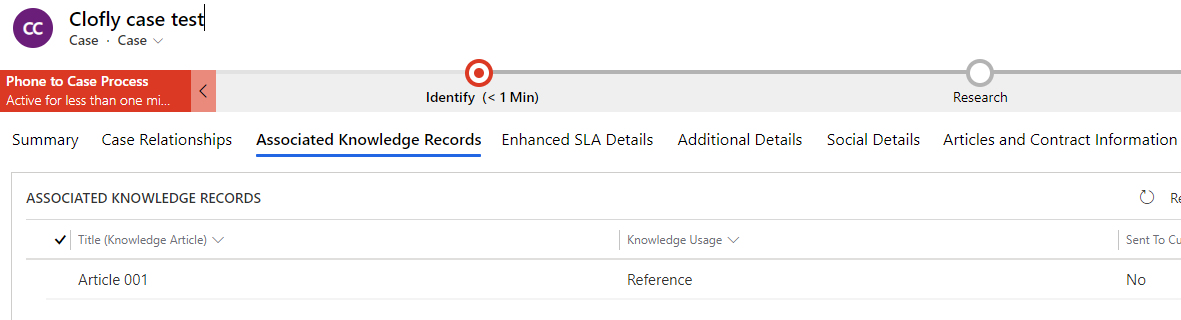
    pastedimage1609829391602v1.png

    In addition, the plugin should execute at PostOperation stage instead.
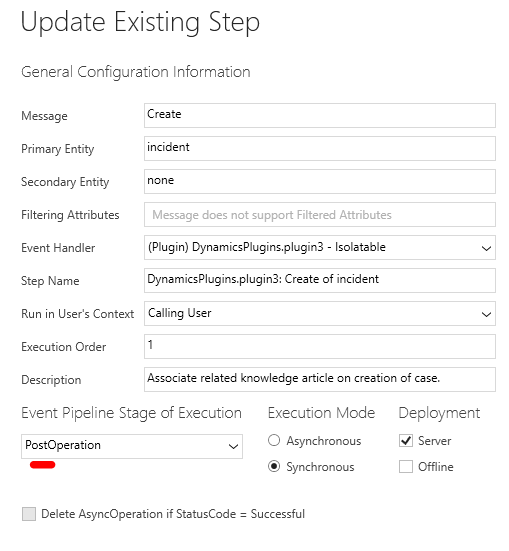
    pastedimage1609829442370v2.png

    Regards,

    Clofly

  • Sheershendu Profile Picture
    40 on at

    Hi Clofly,

    It is working in the Post Operation synchronously when I am creating Case manually but it's not working for automatic case creation. Also it is populating random article from KA in the manual case creation.

    Regards,

    Sheershendu

  • cloflyMao Profile Picture
    25,210 on at

    Hi Sheershendu,

    1. Are you using case creation rules of UCI?

    https://docs.microsoft.com/en-us/dynamics365/customer-service/automatically-create-update-records

    2. Have you check keyword value of the random populated KA? In my code, it will just pick the top 1 record of query result, so if there is other KA with same keyword, the field will be populated with a random record.

    Could you let me know which conditions would you like to apply to query to get the desired record instead of random record?

    Regards,

    Clofly

  • Sheershendu Profile Picture
    40 on at

    Hi Clofly,

    Yes, I am using automatic case creation rule i.e whenever  a mail comes a Case is created automatically. So, in that case KA is not populating automatically.I think for that Plugin should be register in the Post-Operation of Asynchronous mode.But how to do that ?

    I want that if any of the word of Case title matches with the keyword of any KA then it should populate that KA to the Case.

    Regards,

    Sheershendu

Under review

Thank you for your reply! To ensure a great experience for everyone, your content is awaiting approval by our Community Managers. Please check back later.

Helpful resources

Quick Links

Responsible AI policies

As AI tools become more common, we’re introducing a Responsible AI Use…

Neeraj Kumar – Community Spotlight

We are honored to recognize Neeraj Kumar as our Community Spotlight honoree for…

Leaderboard > Customer experience | Sales, Customer Insights, CRM

#1
Tom_Gioielli Profile Picture

Tom_Gioielli 170 Super User 2025 Season 2

#2
#ManoVerse Profile Picture

#ManoVerse 61

#3
Gerardo Rentería García Profile Picture

Gerardo Rentería Ga... 52 Most Valuable Professional

Last 30 days Overall leaderboard

Product updates

Dynamics 365 release plans



