web
You’re offline. This is a read only version of the page.
close
Skip to main content

Notifications

Announcements

No record found.

Community site session details

Community site session details

Session Id :
Finance | Project Operations, Human Resources, ...
Answered

Show Expense report fields on Voucher Transactions in D365 F&O

(0) ShareShare
ReportReport
Posted on by 758

Hi Everyone,

Need urgent help on below issue,

When we open expense report on below path in D365 F&O,

Expense Management > Process expense reports > All expense reports

and navigate to detail level, we see an option for Subledger Journal, upon clicking on it we see the voucher Transactions.
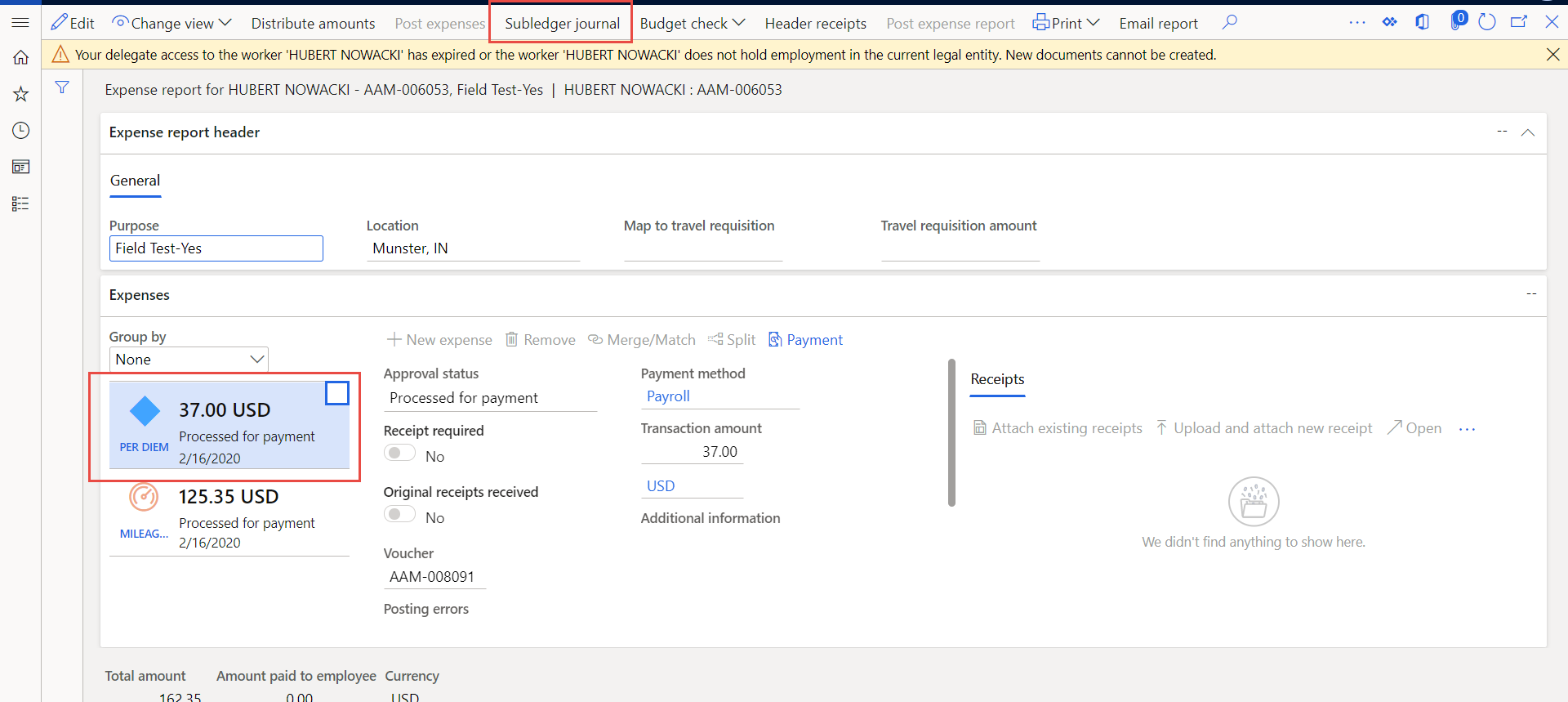
AAMExp.png

The same transactions can be viewed from 

General Ledger > Inquiries and reports > voucher transactions
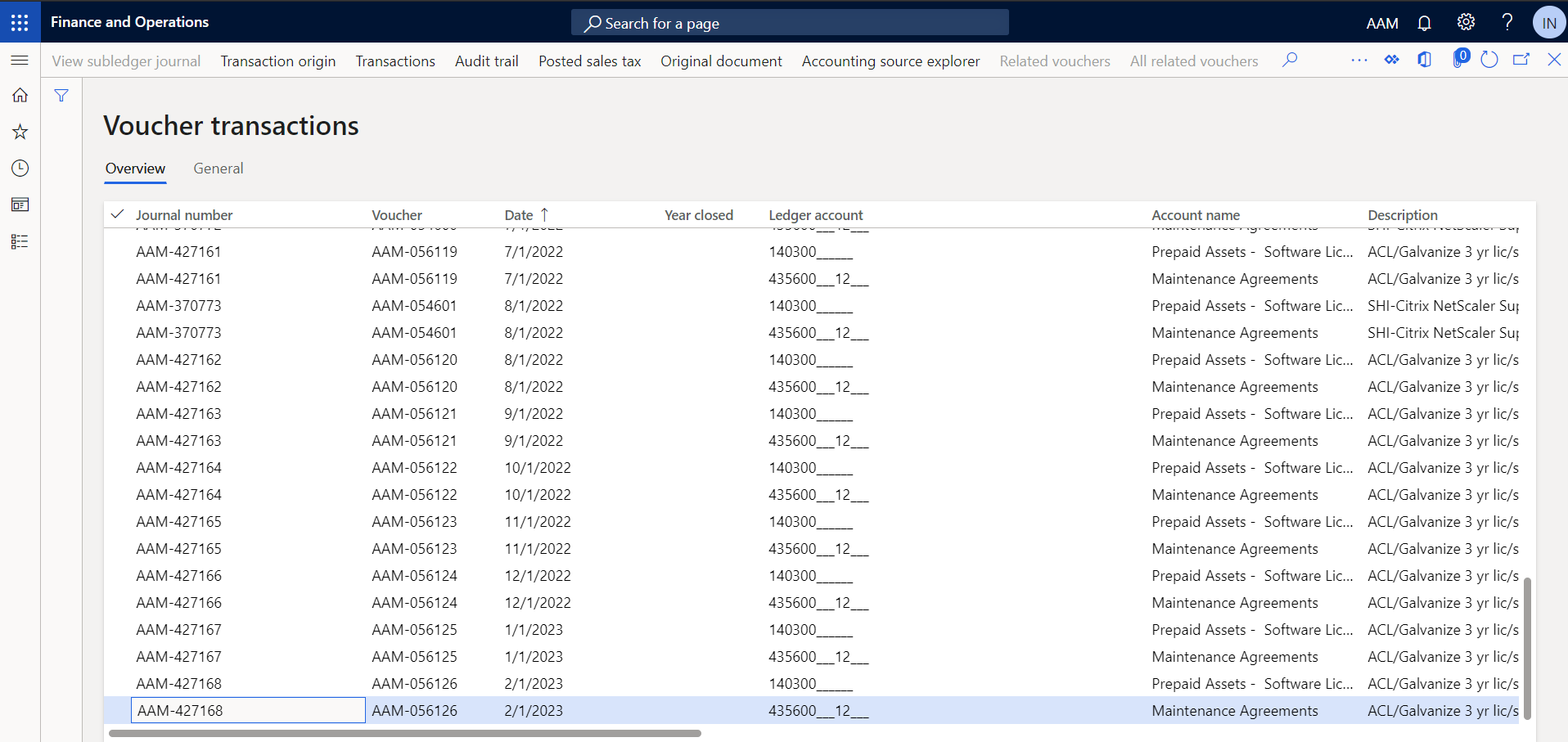
AAMVoucher.png

Now, I want to show some fields of expense reports page to Voucher Transactions page.

How can I achieve this? I could not find direct relations between the tables GeneralJournalEntry and TrvExpTrans.

Please suggest some solution.

Also instead of just displaying fields through display method, I want to create view and add it in the LedgerTransVoucher form, so that User can put filter on the newly added fields.

Well I am modifying my question.

If someone could tell me the direct relation between TrvExpTrans and SubledgerJournalEntry, then it would be useful for me.

I tried to debug the process of opening SubLedger Voucher from Expense report details page, but couldn't figure out how the data is getting populated in Temporary data source.

I have the same question (0)
  • Verified answer
    Ludwig Reinhard Profile Picture
    Microsoft Employee on at

    Hi,

    What's the main reason for this request?

    Do you want to check / reconcile your ledger accounts or analyze data or why is it that you expense transactions on the GL voucher?

    One standard feature that you can use for this purpose are the default descriptions. 

    They allow you to include specific expense report elements into the posting text that you can then use to analyze your vouchers. 

    Please see the next screenprint for an example:

    4274.exp.png

    Best regards, 

    Ludwig

  • Rhushikesh R Profile Picture
    758 on at

    Hi Ludwig,

    I am not sure about the exact reason behind this requirement, but my client wants to display the below fields from Expense report in voucher transactions,

    1. Purpose

    2. Merchant Id

    3. Additional information.

    I am really confused, how this should be achieved.

  • Verified answer
    Ludwig Reinhard Profile Picture
    Microsoft Employee on at

    Good morning Rhushikesh, 

    Can you test the default description feature with a setup similar to what is illustrated in the next screenprint?

    defdesc.png

    This should do the job in my opinion. 

    Best regards, 

    Ludwig

  • Rhushikesh R Profile Picture
    758 on at

    Thank you Ludwig. Actually I work as Technical consultant, hence I am not aware of the setup you mentioned earlier. I have configured the setup as mentioned by you. Would you please tell me where I can see the configured fields now?

  • Rhushikesh R Profile Picture
    758 on at

    Okay, the setup we configured gets displayed in Description of voucher transactions.

    But what if there is already one setup done? How can I replace my new setup with the older one? Can you help me on that part Ludwig?

  • Verified answer
    nunomaia Profile Picture
    25 Moderator on at

    If it exists you update the existing setting. I will impact new postings

  • Rhushikesh R Profile Picture
    758 on at

    Thank you Ludwig and Nuno for your valuable feedbacks.

  • Verified answer
    vinitgoyal2005 Profile Picture
    6,332 on at

    Hi Rhushikesh Raut,

    Though this is already shared thought of sharing the blog I wrote for the same thing which will help others:

    Have a look at d365foe.blogspot.com/.../auto-generated-and-short-hand-journal.html

Under review

Thank you for your reply! To ensure a great experience for everyone, your content is awaiting approval by our Community Managers. Please check back later.

Helpful resources

Quick Links

Responsible AI policies

As AI tools become more common, we’re introducing a Responsible AI Use…

Neeraj Kumar – Community Spotlight

We are honored to recognize Neeraj Kumar as our Community Spotlight honoree for…

Leaderboard > Finance | Project Operations, Human Resources, AX, GP, SL

#1
Martin Dráb Profile Picture

Martin Dráb 664 Most Valuable Professional

#2
André Arnaud de Calavon Profile Picture

André Arnaud de Cal... 522 Super User 2025 Season 2

#3
Sohaib Cheema Profile Picture

Sohaib Cheema 303 User Group Leader

Last 30 days Overall leaderboard

Product updates

Dynamics 365 release plans



