web
You’re offline. This is a read only version of the page.
close
Skip to main content

Notifications

Announcements

No record found.

Community site session details

Community site session details

Session Id :
Microsoft Dynamics AX (Archived)

Version Control check out issue.

(0) ShareShare
ReportReport
Posted on by

Hi there,

I would like to check an element out, but that option is disabled.

1, I add an element to the VC by selecting the element in the AOT.

2, By using right clicks, I checked in my element. The text went bold.

I believe that I skip some step, because the option like check in, check out, history, get latest and undo check out is disabled.

Version control parameters;
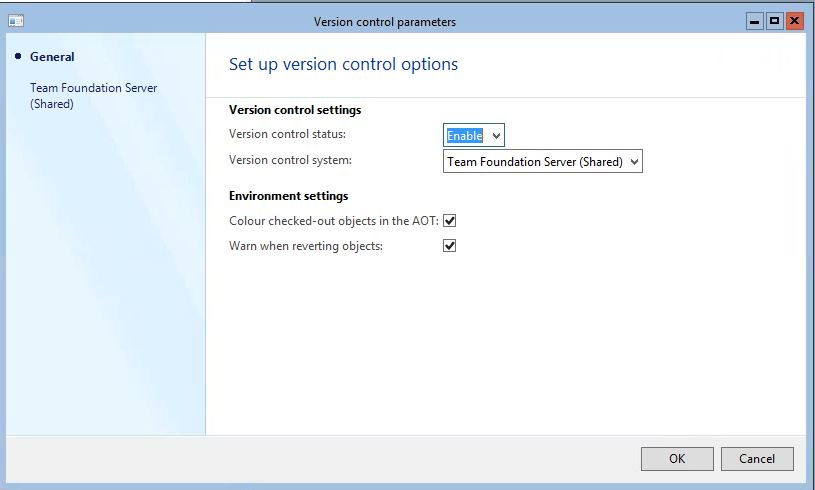
VersionControlParameters.JPG

Could you tell me how to check an element out?

*This post is locked for comments

I have the same question (0)
  • Martin Dráb Profile Picture
    237,817 Most Valuable Professional on at

    I don't follow you. You said that you added an element to version control and checked it in, but at the same time you said that all options such as check in were disabled. So, how did you do it?

    You said that you added an element to version control by selecting it in AOT, but that's now you can add objects to VCS. You have to use the Add operation.

    Bold text isn't related to VCS.

    Also, Team Foundation Server (Shared) doesn't look like the standard VCS - do you have a customization there?

    And the last thing - you tagged your question with the current version (= Dynamics 365 for Operation), but the picture disproves it. Is it AX 2012?

  • Community Member Profile Picture
    on at

    Hi Martin,

    I am sorry for my not clear explanation of what happened.

    After step 2 the option like check in, check out, history, get latest and undo check out is disabled.

    Yes, you're right I made a mistake. It is AX 2012 where I do not make any customization in VCS.

    So what I did wrong that I don't have option there for check out?

  • Martin Dráb Profile Picture
    237,817 Most Valuable Professional on at

    I'm still not sure about the situation. Do you mean that you can check in new objects (and you can see them in TFS), but then you can't work with objects that already exist there?

    I've never seen something called Team Foundation Server (Shared) - Microsoft doesn't support TFS in shared environments, as far as I know.

  • Community Member Profile Picture
    on at

    Hi Martin,

    The company using Citrix Receiver 

    CitrixReceiver.JPG

    Yes, I can check in new objects and I can work with  objects that already exist .  They told me, that after I check in the object I should check out the object so nobody else can change the object except me, but after I checked in the object I do not have the option for check out the object.

    I am new in AX so it is  possible that I did something wrong or miss something.

  • Martin Dráb Profile Picture
    237,817 Most Valuable Professional on at

    I'm sorry, but I don't think I can help you without more information.

  • Felipe Queija Profile Picture
    110 on at

    When you using Check-In, you will lock the object to you so nobody can change at the same time, and will record a new "version" of that object with your changes.

    Check-out is to release the object and let it able to be changed again.

    I am not following what is your problem to use this function ... If you can maybe post some screenshots about the whole process that you are using, will be easy to determinate what are you doing.

  • Martin Dráb Profile Picture
    237,817 Most Valuable Professional on at

    Actually it's the opposite - you check out a file, modify it and check it in.

    He means a situation where multiple checkouts are disabled, therefore checking out an object set an exclusive lock in TFS, and others are using server workspaces, which respect locks. Note that if these conditions are not met, checking out the files won't fulfil the goal.

  • Felipe Queija Profile Picture
    110 on at

    You are saying for an object that already been modified, but for an object that never been modified is not like i said or am i confused in the logic ?

  • Martin Dráb Profile Picture
    237,817 Most Valuable Professional on at

    The operations for new objects are Add and CheckIn. Check out makes no sense for files that aren't in the version control yet.

  • Community Member Profile Picture
    on at

    I try to be more specific.

    Some elements I add to the VC by selecting the element in the AOT, but never check in.
    Some elements I add to the VC by selecting the element in the AOT and check in.

    Some elements I don't add to the VC.

    Is that can be the reason why I can't check out an elements that I previously check in?

Under review

Thank you for your reply! To ensure a great experience for everyone, your content is awaiting approval by our Community Managers. Please check back later.

Helpful resources

Quick Links

Responsible AI policies

As AI tools become more common, we’re introducing a Responsible AI Use…

Neeraj Kumar – Community Spotlight

We are honored to recognize Neeraj Kumar as our Community Spotlight honoree for…

Leaderboard > 🔒一 Microsoft Dynamics AX (Archived)

#1
Priya_K Profile Picture

Priya_K 4

#1
Martin Dráb Profile Picture

Martin Dráb 4 Most Valuable Professional

#3
Scott_itD Profile Picture

Scott_itD 2 Community Manager

Last 30 days Overall leaderboard

Featured topics

Product updates

Dynamics 365 release plans



