web
You’re offline. This is a read only version of the page.
close
Skip to main content

Notifications

Announcements

No record found.

Community site session details

Community site session details

Session Id :
Customer experience | Sales, Customer Insights,...
Answered

How to run workflow with modern advanced find

(0) ShareShare
ReportReport
Posted on by 10

Hi All,

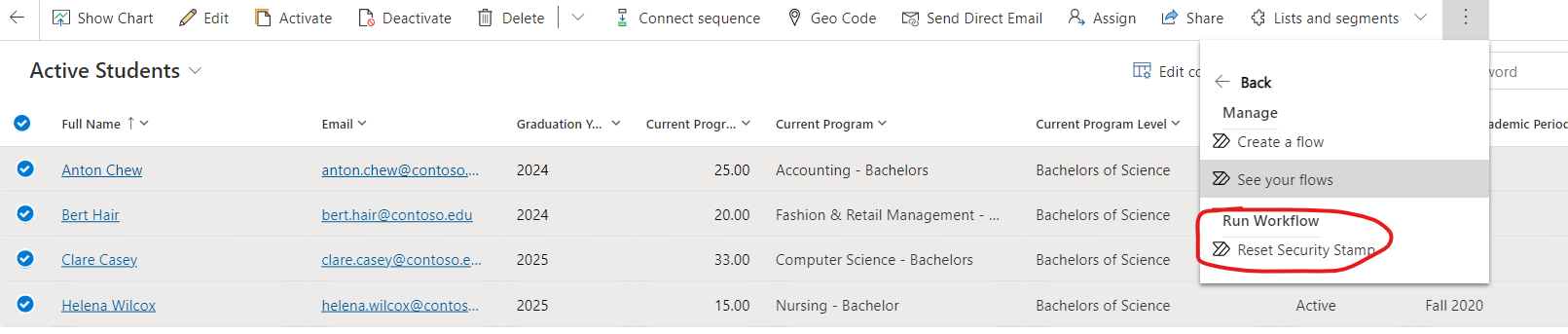
With the classic modern advanced find you had the option to execute workflows on selected records.
How can I do this with the modern advanced find?

Thanks in advance.

I have the same question (0)
  • Suggested answer
    Abdul Wahab Profile Picture
    12,119 Moderator on at

    Hi yabuniez

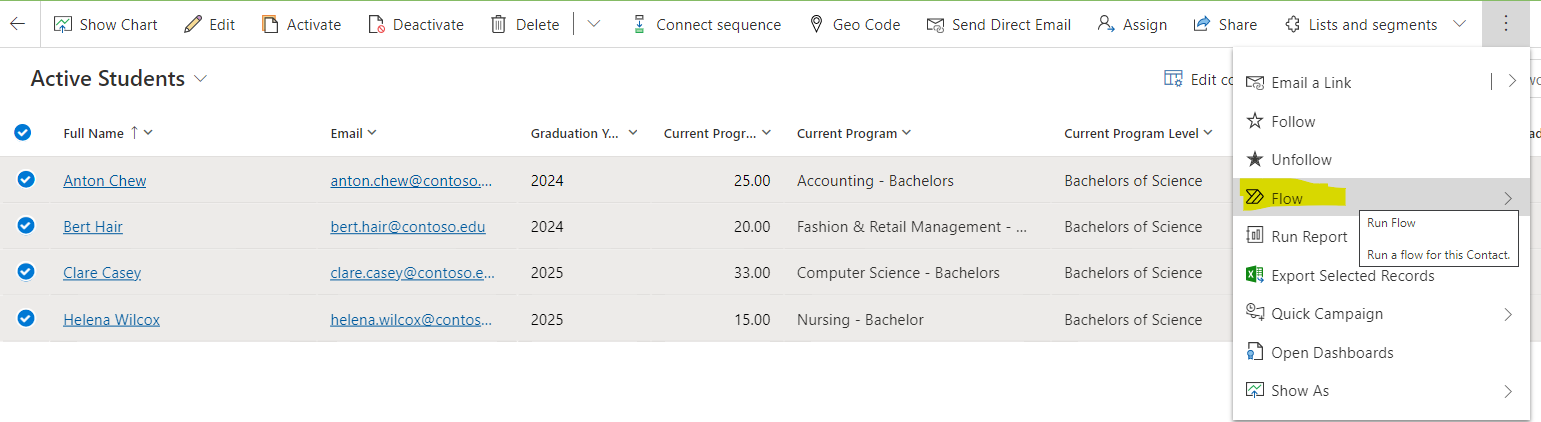
    You can find it in the flow button.

    Let me know if I can provide you with more details.

    Thanks
    Regards,

    Abdul Wahab
    Power Platform/Customer Engagement Developer/Lead/Solution Architecture/Project Manager
    Direct/WhatsApp:+923323281237
    E-mail: abdulwahabubit@outlook.com
    Skype: abdul.wahabubit
    Linkedin: www.linkedin.com/.../

  • Suggested answer
    KK-365 Profile Picture
    1,010 on at

    In the new modern unified interface, you can use the flow button as shown below.

    pastedimage1661846068400v1.png

  • yabuniez Profile Picture
    10 on at

    Is it the same as the above in the legacy interface?

    werkstroom.png

  • yabuniez Profile Picture
    10 on at

    The flow button isn't shown and I do have permissions for it.

  • Suggested answer
    Abdul Wahab Profile Picture
    12,119 Moderator on at

    Hi yabuniez,

    You can find that button in the elipse.

    Let me know if I can provide you with more details.

    Thanks
    Regards,

    Abdul Wahab
    Power Platform/Customer Engagement Developer/Lead/Solution Architecture/Project Manager
    Direct/WhatsApp:+923323281237
    E-mail: abdulwahabubit@outlook.com
    Skype: abdul.wahabubit
    Linkedin: www.linkedin.com/.../

  • Suggested answer
    Abdul Wahab Profile Picture
    12,119 Moderator on at

    Hi

    You need to enable the flow button on your environment first. Here is the link for more details.

    Let me know if I can provide you with more details.

    Thanks
    Regards,

    Abdul Wahab
    Power Platform/Customer Engagement Developer/Lead/Solution Architecture/Project Manager
    Direct/WhatsApp:+923323281237
    E-mail: abdulwahabubit@outlook.com
    Skype: abdul.wahabubit
    Linkedin: www.linkedin.com/.../

  • Verified answer
    Community Member Profile Picture
    on at

    Hi yabuniez,

    Have created on-demand workflows for the entity, then you can view them after expanding flow button:
    pastedimage1661931142994v8.png

    pastedimage1661931106120v7.png

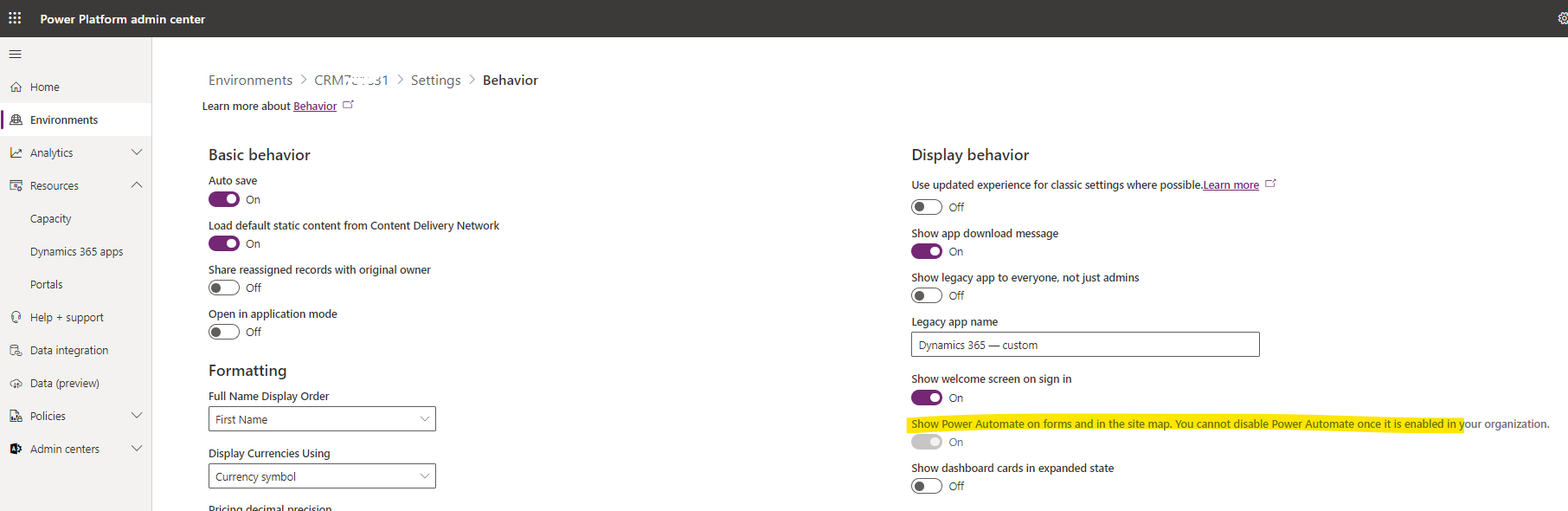
    If you can't find 'Flow' button in the ribbon bar, you can check following settings:

    1)Check security role: the "Run Flows" privilege in the Customizations / Miscellaneous Privileges

    pastedimage1661930410288v4.jpeg

    2)Navigate to Settings>System Settings>Customizations. Next, click on "Yes" under "Enable Microsoft Flow".

    pastedimage1661930468452v5.jpeg

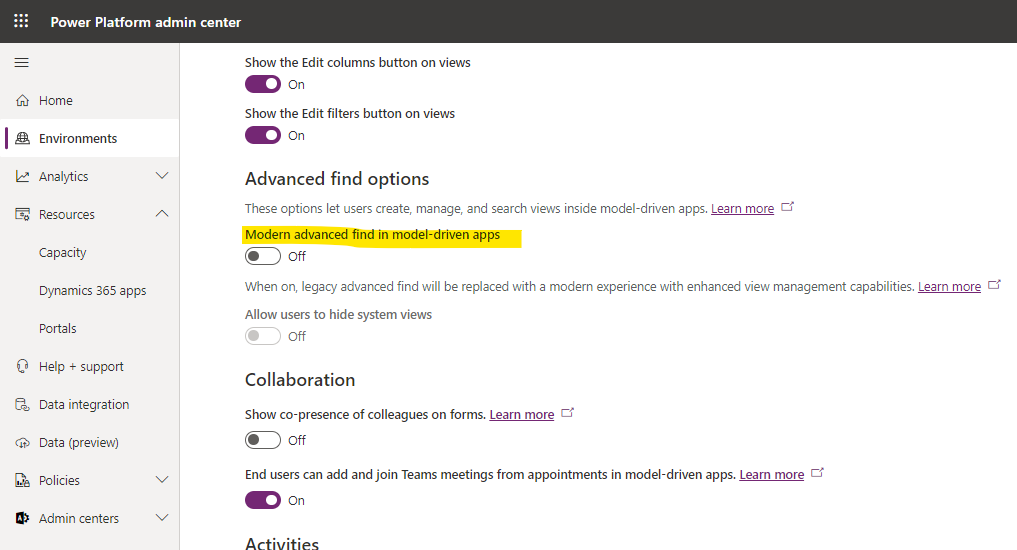
    3)Go to PPAC Environments, select one environment > settings > Behavior:
    pastedimage1661930832553v6.png

    Finally, If you don't want to use modern advanced find, maybe you can disable it and go back to classic modern advanced find:

    -Go to PPAC Environments, select one environment > settings > Features 

    pastedimage1661930358713v3.png

    pastedimage1661930228758v1.png

Under review

Thank you for your reply! To ensure a great experience for everyone, your content is awaiting approval by our Community Managers. Please check back later.

Helpful resources

Quick Links

Responsible AI policies

As AI tools become more common, we’re introducing a Responsible AI Use…

Neeraj Kumar – Community Spotlight

We are honored to recognize Neeraj Kumar as our Community Spotlight honoree for…

Leaderboard > Customer experience | Sales, Customer Insights, CRM

#1
Tom_Gioielli Profile Picture

Tom_Gioielli 73 Super User 2025 Season 2

#2
Gerardo Rentería García Profile Picture

Gerardo Rentería Ga... 43 Most Valuable Professional

#3
Daniyal Khaleel Profile Picture

Daniyal Khaleel 32 Most Valuable Professional

Last 30 days Overall leaderboard

Product updates

Dynamics 365 release plans