web
You’re offline. This is a read only version of the page.
close
Skip to main content

Notifications

Announcements

No record found.

Community site session details

Community site session details

Session Id :
Finance | Project Operations, Human Resources, ...
Answered

Add table to DP extension

(0) ShareShare
ReportReport
Posted on by 98

Good afternoon,

I am trying to add a new data source to the SalesInvoice report by extending the DP. When I go to add it as a data source in the SSRS report definition, it doesn't list my new table, only the standard tables in the DP itself. Here is what I have done so far:

  1. Created new temp table "bbsSalesInvoiceBankAccountTmp", table type set to In Memory. Added appropriate fields. Build and full db sync.
  2. Created an extension of the Data Provider class (code below):
  3. Duplicate SSRS report, add a new data source, set to Data Source Type Report Data Provider
  4. In the query box, set the Data Provider to SalesInvoiceDP. It then brings up the Select Fields screen with the standard 6 tables visible.
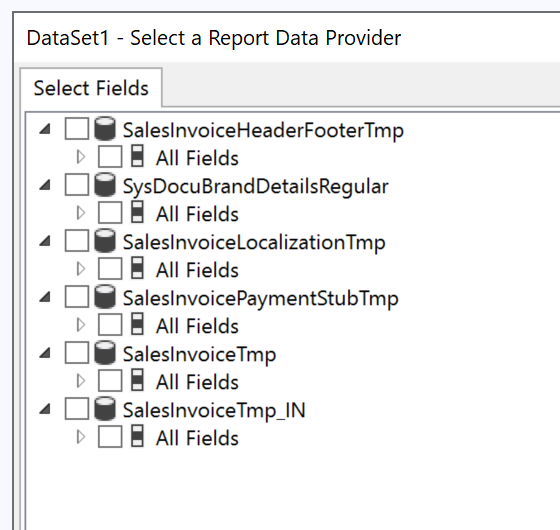
    pastedimage1664210991062v2.png

[ExtensionOf(classstr(SalesInvoiceDP))]
final class SalesInvoiceDP_bbsOutputDocuments_Extension
{
    public bbsSalesInvoiceBankAccountTmp   bbsSalesInvoiceBankAccountTmp;
    
    public void generateInvoiceRelatedInformation(CustInvoiceJour _custInvoiceJour)
    {
        next generateInvoiceRelatedInformation(_custInvoiceJour);
        this.insertIntobbsSalesInvoiceAddressTmp();
    }

    protected void insertIntobbsSalesInvoiceAddressTmp(){

        
    }

}

Is anyone able to assist please. Thanks in advance.

I have the same question (0)
  • Verified answer
    GirishS Profile Picture
    27,827 Moderator on at

    Hi Phil Matthews,

    You didn't create a get method for your custom table in the dp class extension. So first you need to add the get method for your custom table - Build and synch the project - Then add a dataset to the duplicated report.

    Thanks,

    Girish S.

  • Phil Matthews Profile Picture
    98 on at

    Thank you for responding Girish,

    You are of course correct with your response, but it still does not show the new table when I add the new data source to the report. I have added code as follows to my DP.

        [SRSReportDataSetAttribute(tableStr(bbsSalesInvoiceBankAccountTmp))]
        public bbsSalesInvoiceBankAccountTmp getbbsSalesInvoiceBankAccountTmp()
        {
            select bbsSalesInvoiceBankAccountTmp;
            return bbsSalesInvoiceBankAccountTmp;
        }

  • GirishS Profile Picture
    27,827 Moderator on at

    Have you done build and synch of your project after adding the above code?

    Thanks,

    Girish S.

  • Phil Matthews Profile Picture
    98 on at

    I have, yes.

  • GirishS Profile Picture
    27,827 Moderator on at

    Try the below code.

    [SRSReportDataSetAttribute(tableStr('bbsSalesInvoiceBankAccountTmp'))]
        public bbsSalesInvoiceBankAccountTmp getbbsSalesInvoiceBankAccountTmp()
        {
            select bbsSalesInvoiceBankAccountTmp;
            return bbsSalesInvoiceBankAccountTmp;
        }

    Thanks,

    Girish S.

  • Phil Matthews Profile Picture
    98 on at

    I think I have resolved by typing the DP extension name into the Query field manually:

    select * from SalesInvoiceDP_bbsOutputDocuments_Extension.bbsSalesInvoiceBankAccountTmp

    I am just testing and will update shortly.

  • GirishS Profile Picture
    27,827 Moderator on at

    Hi Phil Matthews,

    Is the error got resolved?

    Thanks,

    Girish S.

  • Phil Matthews Profile Picture
    98 on at

    Yes, this specific issue is now resolved by putting the name of the DP Extension in the Query instead of the DP itself.

    Thank you for your assistance.

  • GirishS Profile Picture
    27,827 Moderator on at

    Hi Phil Matthews,

    Please mark the useful answers as verified if its solved your issue.

    Thanks,

    Girish S.

Under review

Thank you for your reply! To ensure a great experience for everyone, your content is awaiting approval by our Community Managers. Please check back later.

Helpful resources

Quick Links

Responsible AI policies

As AI tools become more common, we’re introducing a Responsible AI Use…

Neeraj Kumar – Community Spotlight

We are honored to recognize Neeraj Kumar as our Community Spotlight honoree for…

Leaderboard > Finance | Project Operations, Human Resources, AX, GP, SL

#1
Martin Dráb Profile Picture

Martin Dráb 544 Most Valuable Professional

#2
André Arnaud de Calavon Profile Picture

André Arnaud de Cal... 450 Super User 2025 Season 2

#3
Sohaib Cheema Profile Picture

Sohaib Cheema 250 User Group Leader

Last 30 days Overall leaderboard

Product updates

Dynamics 365 release plans



