web
You’re offline. This is a read only version of the page.
close
Skip to main content

Notifications

Announcements

No record found.

Community site session details

Community site session details

Session Id :
Finance | Project Operations, Human Resources, ...
Answered

taRMDistribution - Account does not exist for Account Index (DSTINDX)

(0) ShareShare
ReportReport
Posted on by 5

I'm working with eConnect and trying to send over a transaction.  If I send just the transaction then it shows up in Dynamics GP as I would expect and creates the transaction with a default sales distribution.
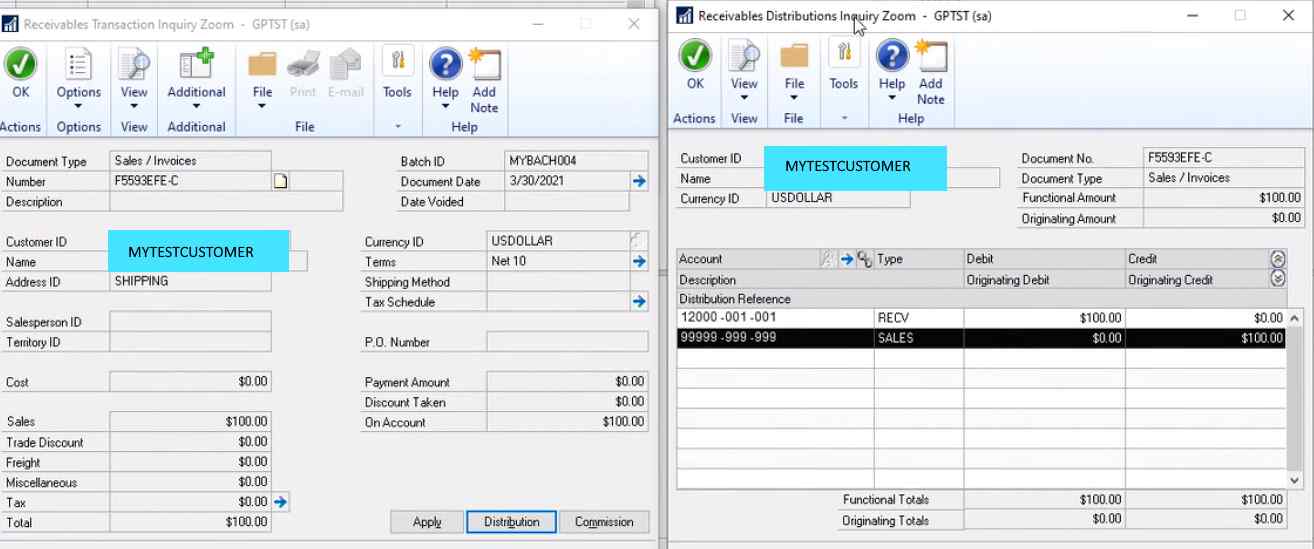
working-transaction.png

If I try and add distributions I get the error:

Error Number = 1341 Stored Procedure= taRMDistribution Error Description = Account does not exist for Account Index (DSTINDX)
Node Identifier Parameters: taRMDistribution

Here is a sample of my xml:


        1
        b5fad6df-2
        MYTESTCUSTOMER
        9
        60100-002-010
        100
      
      
        1
        b5fad6df-2
        MYTESTCUSTOMER
        9
        60100-002-010
        472


      1
      b5fad6df-2
      4/8/2021
      b5fad6df-2
      MYTESTCUSTOMER
      572
      572


I'm not quite sure what I haven't done.  The error indicates that I need to supply a DSTINDX but I don't know where to find this.  Everything I searched seems to indicate that if I add distribution items I need to supply an account number but I'm not sure where to find this.

I was able to use eConnectOut and find the customer info but there doesn't seem to be any account info in the results.  At this point I'm a bit stumped.

Thanks,

Brian

Categories:
I have the same question (0)
  • Verified answer
    Derek Albaugh Profile Picture
    on at

    Looking at the taRMDistribution procedure for eConnect, this is the syntax making up error 1341 (with error 1340 right before it... )

    if (@I_vACTNUMST <> '')

    begin

    select @I_vDSTINDX = 0

    select @I_vDSTINDX = ACTINDX from GL00105 (nolock) where ACTNUMST = @I_vACTNUMST

    if (@I_vDSTINDX = 0)

    begin

    select @O_iErrorState = 1340  

    exec @iStatus = taUpdateString

    @O_iErrorState,

    @oErrString,

    @oErrString output,

    @O_oErrorState output

    return (@O_iErrorState)

    end

    end

    else

    begin

    if not exists( select 1 from GL00105 (nolock) where ACTINDX = @I_vDSTINDX )

    begin

    select @O_iErrorState = 1341  

    exec @iStatus = taUpdateString

    @O_iErrorState,

    @oErrString,

    @oErrString output,

    @O_oErrorState output

    return (@O_iErrorState)

    end

    end

    It begins with looking at the @I_vACTNUMST value being passed and if it is blank, then it assigns I_vDSTINDX the ACTINDX value from GL00105 where the ACTNUMST = I_vACTNUMST value. If that ends up with I_vDSTINDX = 0, then it would throw error 1340.

    It then looks at GL00105 where ACTINDX = I_vDSTINDX and if that doesn't exist, then it throws error 1341, which is the error you're seeing.

    It basically is saying that the account does not exist for the account index (DSTINDX).

    Hopefully this will help point you in the right direction with this error.

    Thanks

  • brian.mullen Profile Picture
    5 on at

    Thank you for the help.  I added the required account indexes (RMARACC, RMSLSACC) to eConnect_Out_Setup and regened the customer sproc.  Now I can just query for the customer and get the info I needed.

Under review

Thank you for your reply! To ensure a great experience for everyone, your content is awaiting approval by our Community Managers. Please check back later.

Helpful resources

Quick Links

Responsible AI policies

As AI tools become more common, we’re introducing a Responsible AI Use…

Neeraj Kumar – Community Spotlight

We are honored to recognize Neeraj Kumar as our Community Spotlight honoree for…

Leaderboard > Finance | Project Operations, Human Resources, AX, GP, SL

#1
Martin Dráb Profile Picture

Martin Dráb 664 Most Valuable Professional

#2
André Arnaud de Calavon Profile Picture

André Arnaud de Cal... 522 Super User 2025 Season 2

#3
Sohaib Cheema Profile Picture

Sohaib Cheema 303 User Group Leader

Last 30 days Overall leaderboard

Product updates

Dynamics 365 release plans



