web
You’re offline. This is a read only version of the page.
close
Skip to main content

Notifications

Announcements

No record found.

Community site session details

Community site session details

Session Id :
Customer experience | Sales, Customer Insights,...
Answered

Apply filter to view added on dashboard

(0) ShareShare
ReportReport
Posted on by 50

Hi.

We have an issue, or lack of functionality from MS, regarding view filters.

When on a standard view we can (Sort A to Z, Sort Z to A, Filter By):
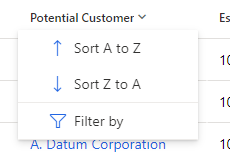
2022_2D00_10_2D00_18-10_5F00_54_5F00_34_2D00_Window.png

But when adding that same view to a standard dashboard tile, we lack the function "Filter by" - or it is greyed out:
2022_2D00_10_2D00_18-10_5F00_55_5F00_56_2D00_Window.png

It is a standard dashboard - i.e. not an interactive dashboard.
We have looking into interactive dashboard, but it doesn't meet some of our other requirements. 

So my question is:
Is there any 'fix' for this, where we can dynamically filter the view on specific columns, while staying on the dashboard? - i.e. not navigating away from the dashboard

I have the same question (0)
  • m.jeppesen Profile Picture
    50 on at

    -

  • Verified answer
    Leah Ju Profile Picture
    Microsoft Employee on at

    Hi m.jeppesen,

    This is by-design.

    Generally, You need click 'See al records' to navigate to main view, then you can filter each columns.

    pastedimage1666148463666v1.png

    But it will be away from the dashboard, which is not you want.

    So you can change the control on the dashboard from Read-only Grid (default) to other grid controls(Editable Grid,Power Apps Read-OnlyGrid,(Preview)Power Apps grid control), then you can filter columns directly in dashboards.  

    pastedimage1666148574010v2.png

    Result:

    pastedimage1666149536863v3.png

  • m.jeppesen Profile Picture
    50 on at

    Leah, thank you so so much!

    That really really saved me

Under review

Thank you for your reply! To ensure a great experience for everyone, your content is awaiting approval by our Community Managers. Please check back later.

Helpful resources

Quick Links

Responsible AI policies

As AI tools become more common, we’re introducing a Responsible AI Use…

Neeraj Kumar – Community Spotlight

We are honored to recognize Neeraj Kumar as our Community Spotlight honoree for…

Leaderboard > Customer experience | Sales, Customer Insights, CRM

#1
Tom_Gioielli Profile Picture

Tom_Gioielli 170 Super User 2025 Season 2

#2
#ManoVerse Profile Picture

#ManoVerse 61

#3
Gerardo Rentería García Profile Picture

Gerardo Rentería Ga... 52 Most Valuable Professional

Last 30 days Overall leaderboard

Product updates

Dynamics 365 release plans



