web
You’re offline. This is a read only version of the page.
close
Skip to main content

Notifications

Announcements

No record found.

Community site session details

Community site session details

Session Id :
Service | Customer Service, Contact Center, Fie...
Answered

Cannot add a New Contact in the Contact lookup in a Case.

(0) ShareShare
ReportReport
Posted on by 125

When adding a contact via the lookup field to an Account or Opportunity, you have the option to add a new contact if the person you want is not yet listed in Dynamics 365.

However on a Case you cannot do this, which is frustrating for the Service team as they need to navigate away from the case to add in the contact, then come back.

Specifically, this is what we see for an opporunity:
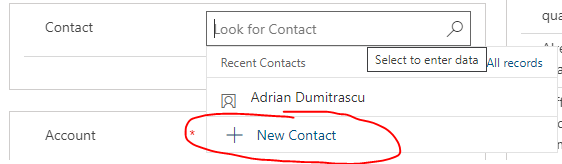
pastedimage1595387105498v1.png

When it comes to a Case, I see the following:

pastedimage1595387164471v2.png

Is there a setting to allow this?

Note: I can see that in the old web interface you bring up "more records" and can add a new contact.

I have the same question (0)
  • Verified answer
    Anthony Dong Profile Picture
    on at

    Hi, 

    Thanks for reporting this issue. Yes, we can replicate it in local environment. In UCI, there is no option to add new Contact in the Lookup field of Case entity 

    pastedimage1595394048183v1.png

    In Classic (old) web, there will be "New" button under "More records"
    pastedimage1595394090873v2.png

    This should be a product bug, 

    we suggest you to contact Microsoft Support team to confirm it. 

  • Verified answer
    Pankaj Gogoi Profile Picture
    3,177 on at

    Hi Scott,

    Please check this links, it seems to be issue with case entity.

    community.dynamics.com/.../new-button-is-missing-on-contact-lookup

    support.microsoft.com/.../service-update-78-for-microsoft-dynamics-365-9-1-0

    Best Regards

    PG

  • Community Member Profile Picture
    on at

    Good morning,

    I have this issue in current version on case form where new contact is missing

    2021 wave release 1

    9.2.2.1041.00172

    this is on the case main form using UCI

  • Suggested answer
    ScottColbourne Profile Picture
    125 on at

    I got this fixed using Microsoft Support.

    From memory the fix is simply to remove the contact lookup field from the form and then re add it.

    It then goes onto the form with the background functionality to add a new contact

  • Community Member Profile Picture
    on at

    Thanks Scott,

    this worked a treat

    Una

Under review

Thank you for your reply! To ensure a great experience for everyone, your content is awaiting approval by our Community Managers. Please check back later.

Helpful resources

Quick Links

Responsible AI policies

As AI tools become more common, we’re introducing a Responsible AI Use…

Neeraj Kumar – Community Spotlight

We are honored to recognize Neeraj Kumar as our Community Spotlight honoree for…

Leaderboard > Service | Customer Service, Contact Center, Field Service, Guides

#1
Tom_Gioielli Profile Picture

Tom_Gioielli 61 Super User 2025 Season 2

#2
Siv Sagar Profile Picture

Siv Sagar 52 Super User 2025 Season 2

#3
Daniyal Khaleel Profile Picture

Daniyal Khaleel 42 Most Valuable Professional

Last 30 days Overall leaderboard

Featured topics

Product updates

Dynamics 365 release plans



