web
You’re offline. This is a read only version of the page.
close
Skip to main content

Notifications

Announcements

No record found.

Community site session details

Community site session details

Session Id :
Finance | Project Operations, Human Resources, ...
Answered

Database table is not updated after altering table's structure

(0) ShareShare
ReportReport
Posted on by 5

I have altered our database in our source code. (Change column from A -> B)

However, after applying the new source code.

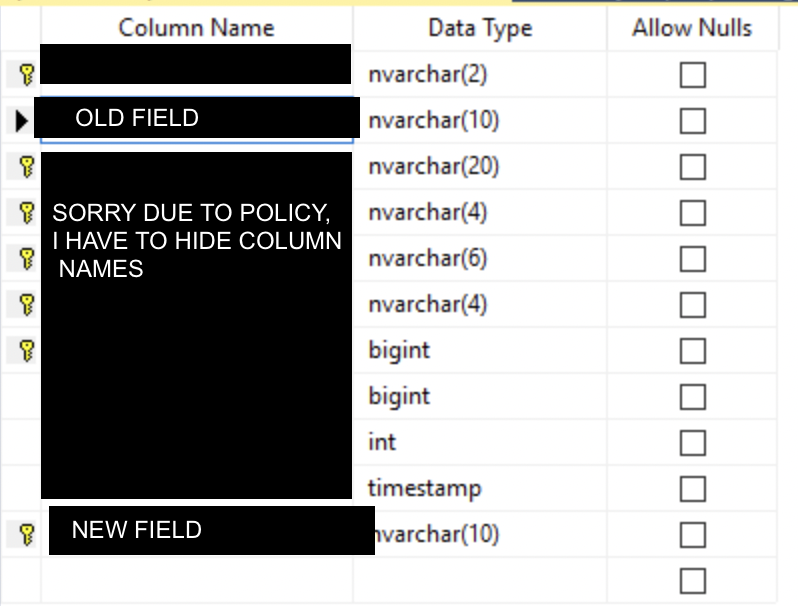
SQL Server table is not updated correctly, the old field A is not deleted, and the new field B exists alongside.

I think it is likely caused by a cache or index constraint, but I do not understand where to start investigating. Do you guys have any ideas?

 6305.pastedimage1666668560585v2.png

After applying the new source:

0474.pastedimage1666668829193v4.png

I have the same question (0)
  • Martin Dráb Profile Picture
    237,807 Most Valuable Professional on at

    You should tell us more about you applied the changes, because that's the step that failed.

    If you're talking about a development environment, you need compile the code and the run database synchronization. Verify that both completed without errors.

    By the way, what is the file that you're showing at the first screenshot? To me, it looks like a table definition in F&O, but you've created a thread about AX 2012.

  • kopitop Profile Picture
    5 on at

    Thank you,

    In the development environment, we have done database synchronization without any problems.

    It happened when we applied the same package to the sandbox environment.

    I want to post a log of the latest deployment, but there was no error.

    Are there any possible reasons?

    Yes, It is a table definition in F&O; I mistakenly posted it in AX 2012. Sorry.

  • Verified answer
    Martin Dráb Profile Picture
    237,807 Most Valuable Professional on at

    Moved to Dynamics 365 Finance Forum.

    As I said, I would like to hear more about how you applied the changed. How did you create the deployble package and how did you install it to the sandbox environment?

  • kopitop Profile Picture
    5 on at

    Thank you,

    This is our process:

    Use source code from the development branch to build a model & synchronize the database.

    Then, create a deployable package and upload it to LCS

    Finally, apply the package.

    If you need more info, please tell me.

  • Martin Dráb Profile Picture
    237,807 Most Valuable Professional on at

    How do you create the deplyable package? By a build pipeline? Manually in Visual Studio? Does it include the model? Does it take the right version of code?

  • kopitop Profile Picture
    5 on at

    Thanks,

    I confirmed that

    → Created the deployable package by Visual Studio 2017 manually

    → Model is included

    → Code version of the machine we used to create the deployable package is the same as in the Sandbox machine.

  • Martin Dráb Profile Picture
    237,807 Most Valuable Professional on at

    How do you know that the code is the same?

    If code was deployed and DB sync didn't do its job, you should be now getting runtime exceptions when code refers to the non-existing field. Is it the case?

    Why do you suspect that the problem is related to an index constraint? Are you already aware of a problem with the design of your change? If DB sync failed, you show see an error.

  • Verified answer
    Martin Dráb Profile Picture
    237,807 Most Valuable Professional on at

    By the way, you should avoid creating deployments from DEV machines, because it doesn't guarantee that what you're delivering is what yo have in source control. It also requires a manual selection of models, which increases the risk of mistakes. And it also blocks the environment.

  • kopitop Profile Picture
    5 on at

    ? In my understanding, DB sync did its job. there are no error logs.

    This is the query that was run during DB sync. I assume the SQL server would have written some errors if something was wrong.

    pastedimage1666689774783v1.png

    ? When I access the table from F&O's table browser, it shows the latest table's layout correctly (without the old field)

    But, the actual table is incorrect (with the old field remaining).  (I saw it in the SQL server)

    So, I guess there might be a cache that retains the index constraint of the old field somewhere that caused the issue.  ( no more than a speculation, and it might be an irrational guess)

Under review

Thank you for your reply! To ensure a great experience for everyone, your content is awaiting approval by our Community Managers. Please check back later.

Helpful resources

Quick Links

Responsible AI policies

As AI tools become more common, we’re introducing a Responsible AI Use…

Neeraj Kumar – Community Spotlight

We are honored to recognize Neeraj Kumar as our Community Spotlight honoree for…

Leaderboard > Finance | Project Operations, Human Resources, AX, GP, SL

#1
Martin Dráb Profile Picture

Martin Dráb 664 Most Valuable Professional

#2
André Arnaud de Calavon Profile Picture

André Arnaud de Cal... 522 Super User 2025 Season 2

#3
Sohaib Cheema Profile Picture

Sohaib Cheema 303 User Group Leader

Last 30 days Overall leaderboard

Product updates

Dynamics 365 release plans