Hi,
This is my first time posting on this forum so I am not sure exactly what the correct steps are.
Goal: Create a new table to hold a different type of address for Sales Orders that the customer can use on the Sales Order Form (UI). This is a customer requirement.
Backstory: I created a custom address table called install locations which was based off of the existing delivery address table (logisticsPostalAddress). This functions the exact same way as the delivery addresses on a sales order form but this is an custom data piece that our client requires. I have everything working from the table, to classes and models, data entities and extensions. There are dozens of files that I needed to either duplicate or extend in order to get the functionality working the same way as addresses is not a simple table. Everything works correctly if I use the data entity, I am only running into the below issue when I am trying to add an address using the UI flow on the Sales Order Form. This leads me to believe that the issue is with either my form extension of Sales Table or the custom data entity that is assigned to the Sales Table Form extension.
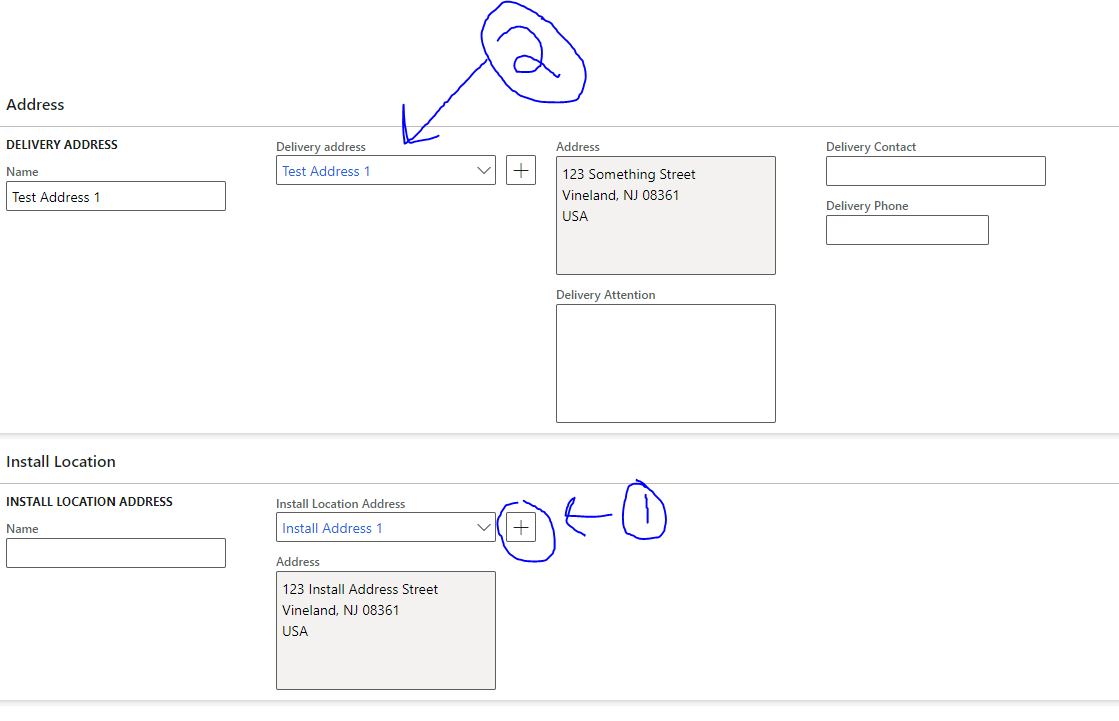
Problem: When using the Sales Order Form (UI), when I add a new address to Install Locations table, it then updates the Delivery Address to a value that is not valid for the selected customer. I checked everywhere in the code but was not able to find any reference or correlation between Delivery Address and the custom Install Location address I created.
See the example below.
What is happening is that I am creating a brand new address in the Install Location section but as well as I add it, the address on the Delivery Address changes to something else entirely.
Example Picture:
If any one has any suggestions on where I can look to solve this or if there is another way for me to disable that change from occurring that would be great!
Hopefully this was clear enough, if not ask me any questions and I will try to answer them to the best of my ability.







