web
You’re offline. This is a read only version of the page.
close
Skip to main content

Announcements

News and Announcements icon
Community site session details

Community site session details

Session Id :
Small and medium business | Business Central, N...
Answered

AL Language latest version not available?

(6) ShareShare
ReportReport
Posted on by 112
I'm getting this error, and there are solutions online, but none of them work for me.

This AL extension version for Visual Studio Code cannot be used with the specified server.
Please update the AL extension from the Visual Studio Code marketplace.
Additional information:
Server details
- Runtime: 16.0
- Web API: 6.0
- Debugger: 6.0
 
AL extension details
- Supported runtimes: 1.0, 2.0, 2.1, 2.2, 2.3, 2.4, 3.0, 3.1, 3.2, 4.0, 4.1, 4.2, 4.3, 4.4, 4.5, 5.0, 5.1, 5.2, 5.3, 5.4, 5.5, 6.0, 6.1, 6.2, 6.3, 6.4, 6.5, 6.6, 7.0, 7.1, 7.2, 8.0, 8.1, 9.0, 9.1, 9.2, 10.0, 10.1, 10.2, 11.0, 11.1, 12.0, 12.1, 12.2
- Supported Web API: 1.0, 2.0, 3.0, 4.0, 5.0, 6.0
- Supported debuggers: 1.0, 2.0, 3.0, 4.0, 5.0, 6.0

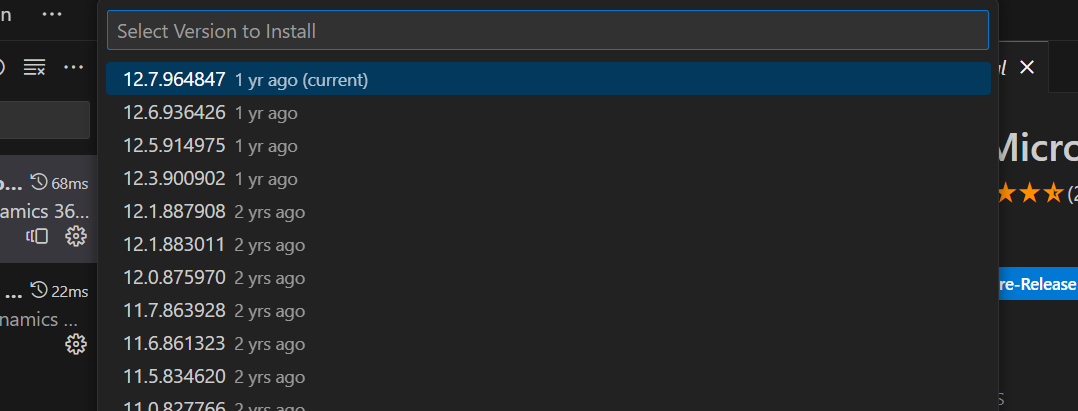
when i check for the versions of AL Language extension, this is the latest version i can find: 12.7.964847

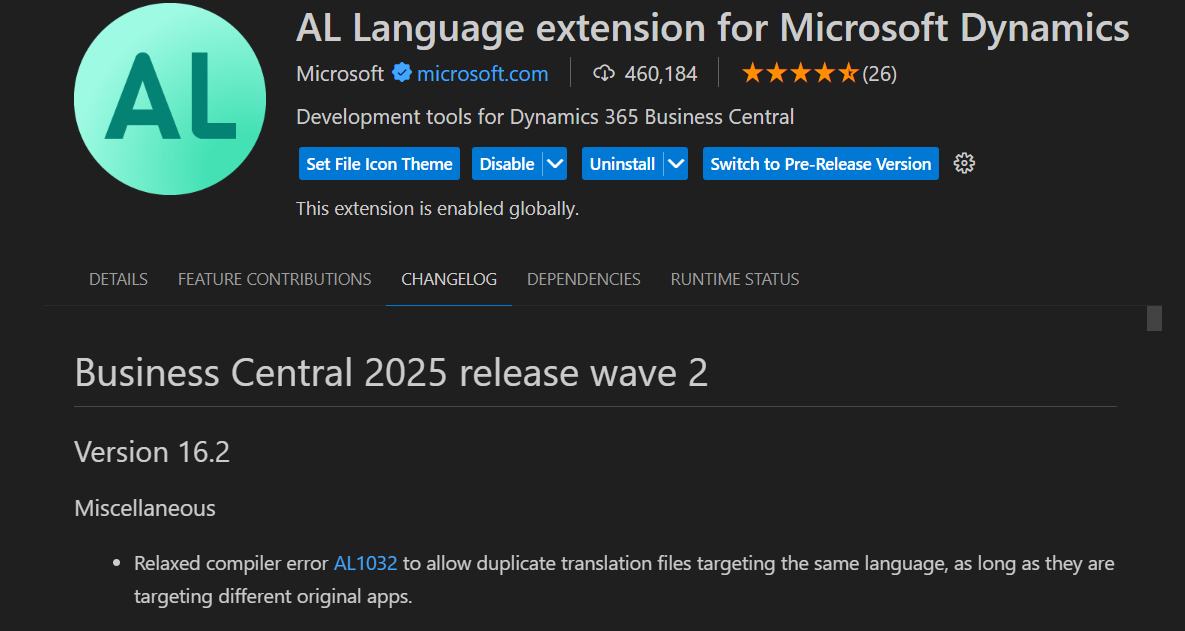
while the change log clearly states version 16:


is there anything i can do?, i've installed vs code from company portal (because of company policies)
I have the same question (0)
  • Suggested answer
    OussamaSabbouh Profile Picture
    17,577 Super User 2026 Season 1 on at
    Hello,

    Your AL extension (v12.x) only supports runtimes up to 12.2, but your server uses runtime 16.0.
    You need AL Language v16.x or newer.
    Switch to the Pre-Release channel in VS Code or install the latest .vsix manually.
    If blocked, IT must update or allow access to the public Marketplace.
    Then set "runtime": "16.0" (or lower) in your app.json.

    Regards,
    Oussama
  • Verified answer
    Pallavi Phade Profile Picture
    5,742 Super User 2026 Season 1 on at
    Namaste @Jinesh K
     
    You’re seeing the classic “AL extension too old / server too new” mismatch. The server (BC runtime 16.0) requires an AL Language that supports runtime 16, but your VS Code has an AL extension that doesn’t advertise runtime 16 support
     
    Search in Marketplace and install . Else consult IT admin and get it installed . Else check VS Code version .
     
     
    Regards
    Pallavi Phade
  • Suggested answer
    YUN ZHU Profile Picture
    101,995 Super User 2026 Season 1 on at
    Hi, You can try the Pre-release version below.
    Business Central 2023 wave 1 (BC22): Pre-release version of AL Language extension
     
    Thanks
    ZHU
  • Verified answer
    Jinesh K Profile Picture
    112 on at
    Thankyou for the suggestions, the core issue was that the vs code availabke in he company portal was outdated, and hence i did not have access to the latest "AL language extension".

    once the VS code was updated, AL Language ext also got updated and i could access the latest runtime version.
  • Suggested answer
    Khushbu Rajvi. Profile Picture
    22,792 Super User 2026 Season 1 on at
    Uninstalled extension and then installed it again and check.  Check with your IT / Endpoint admin. Because you mentioned VS Code is installed via company portal, your organization might restrict marketplace access.
     

Under review

Thank you for your reply! To ensure a great experience for everyone, your content is awaiting approval by our Community Managers. Please check back later.

Helpful resources

Quick Links

Season of Sharing Community Challenge Launch!

Jump in, show your community spirit, and win prizes!

Women in Power Builds Momentum

Expanding mentorship, skilling, and AI innovation

Congratulations to the May Top 10 Community Leaders

These are the community rock stars!

Leaderboard > Small and medium business | Business Central, NAV, RMS

#1
OussamaSabbouh Profile Picture

OussamaSabbouh 2,344 Super User 2026 Season 1

#2
YUN ZHU Profile Picture

YUN ZHU 1,742 Super User 2026 Season 1

#3
AndrewThomas81 Profile Picture

AndrewThomas81 1,231

Last 30 days Overall leaderboard

Featured topics

Microsoft Training Manuals

Product updates

Dynamics 365 release plans



