web
You’re offline. This is a read only version of the page.
close
Skip to main content

Notifications

Announcements

No record found.

Community site session details

Community site session details

Session Id :
Service | Customer Service, Contact Center, Fie...
Answered

Duplicate booking records when booking from schedule board

(0) ShareShare
ReportReport
Posted on by 196

Hello experts,

We are facing an issue in our Production environment where for a specific user-type resource, when we try to book a work order, sometimes it is creating 3 booking records with different durations, example 8, 6 and 4 hours on the same day.  This issue does not occur all the time, but we have noticed it only a few times.

I tried to check various configuration related to the Resource including Work Hours, the Resource Requirements etc.  but I am unable to find the cause of this. Only this user resource is having this issue and regardless of which dispatcher creates a booking, this issue seems to occur for this resource.  

Any help on this issue is much appreciated.  Thanks in advance.


pastedimage1628318416278v2.png

pastedimage1628318508431v3.png

Regards,

Palani

I have the same question (0)
  • Thomas David Dayman Profile Picture
    11,323 on at

    Just double check you dont have any custom code, workflows or flows that could be doing this?

  • Palani Profile Picture
    196 on at

    Hi Thomas,

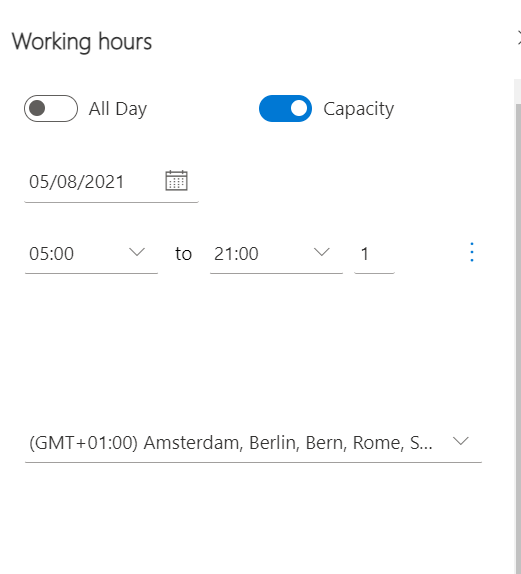
    Thanks for your response.  I did check that there is no custom code that is doing this.  I noticed one behavior where if I turn off the Capacity toggle on the work hours (bookable resource) for a particular day and try to create a booking for that day, it is creating just one booking record which is the expected result.  For days where this Capacity is not turned off, it is creating more than 1 record.

    This Capacity field is turned on for all other users as well, but they are not facing the issue.

    pastedimage1628480089578v1.png

    Regards,

    Palani K.B.

  • Ali Khan Profile Picture
    1,380 on at

    Hey Palani, just to rehash my understanding: this issue is happening with only 1 resource, disappears with Capacity is turned off. Rest of the resources are working regardless capacity is on or off?

    That one resource's type is user or crew?

  • Palani Profile Picture
    196 on at

    Hi Ali,

    The resource type is User.  Your understanding is correct for the remaining.

    Regards,

    Palani K.B.

  • Ali Khan Profile Picture
    1,380 on at

    It is very strange if this issue is happening with only one record, which is no different to others that are working fine. I would suggest comparing all the fields of this problematic resource record with the one working fine, checking any background process and if all else fails, opening a ticket with support.

    Cheers

  • Verified answer
    Palani Profile Picture
    196 on at

    Hi Ali,

    Thanks for your response.  We were able to figure out the issue.

    The Work Hours configuration for this particular resource had more than one recurring work hours set up which was causing duplicate booking records to be created.  Since the start time of the recurring work hours were same, they were on top of each other and could not be easily identified visually.

    After deleting all recurring work hour configuration and add a new one, the issue of duplicate booking records got resolved.

    Regards,

    Palani K.B.    

  • Ali Khan Profile Picture
    1,380 on at

    Interesting. Glad you figured it out.

    Cheers

  • VinayN Profile Picture
    on at

    Yes, when multiple overlapping recurring working hours are defined one on top of other, you would run in to these scenarios, you can always  try to delete all existing work hours and then create work hours , will fix this type of issues in future.

Under review

Thank you for your reply! To ensure a great experience for everyone, your content is awaiting approval by our Community Managers. Please check back later.

Helpful resources

Quick Links

Responsible AI policies

As AI tools become more common, we’re introducing a Responsible AI Use…

Neeraj Kumar – Community Spotlight

We are honored to recognize Neeraj Kumar as our Community Spotlight honoree for…

Leaderboard > Service | Customer Service, Contact Center, Field Service, Guides

#1
Tom_Gioielli Profile Picture

Tom_Gioielli 49 Super User 2025 Season 2

#2
Daniyal Khaleel Profile Picture

Daniyal Khaleel 27 Most Valuable Professional

#3
Soundari Profile Picture

Soundari 15

Last 30 days Overall leaderboard

Featured topics

Product updates

Dynamics 365 release plans