web
You’re offline. This is a read only version of the page.
close
Skip to main content

Notifications

Announcements

No record found.

Community site session details

Community site session details

Session Id :
Customer experience | Sales, Customer Insights,...
Answered

Overview: Which Security Role is used by Which Team?

(0) ShareShare
ReportReport
Posted on by 104

Hi guys,

today I stumbled over a problem regarding the usage of security roles in Dynamics CE, when these roles are used by teams.

In our company, we need to know which security role is used by which team. I was therefore looking for a kind of an overview-funktion, where I can see security roles - say - on the left side, and the users / teams that use that role, on the right side. In Dynamics 365 F&O, this is a standard function, I copied a screenshot out of it. Now, I need something similar for Dynamics CE.

I've already checked the XRM Toolbox. All I found were overviews and reports where you select a user, and then, you can see the corresponding roles. Unfortunately, I need this funktion the other way round, where I can select the security roles in order to see the corresponding team / users.

Do you have any suggestions?

BR

Flo
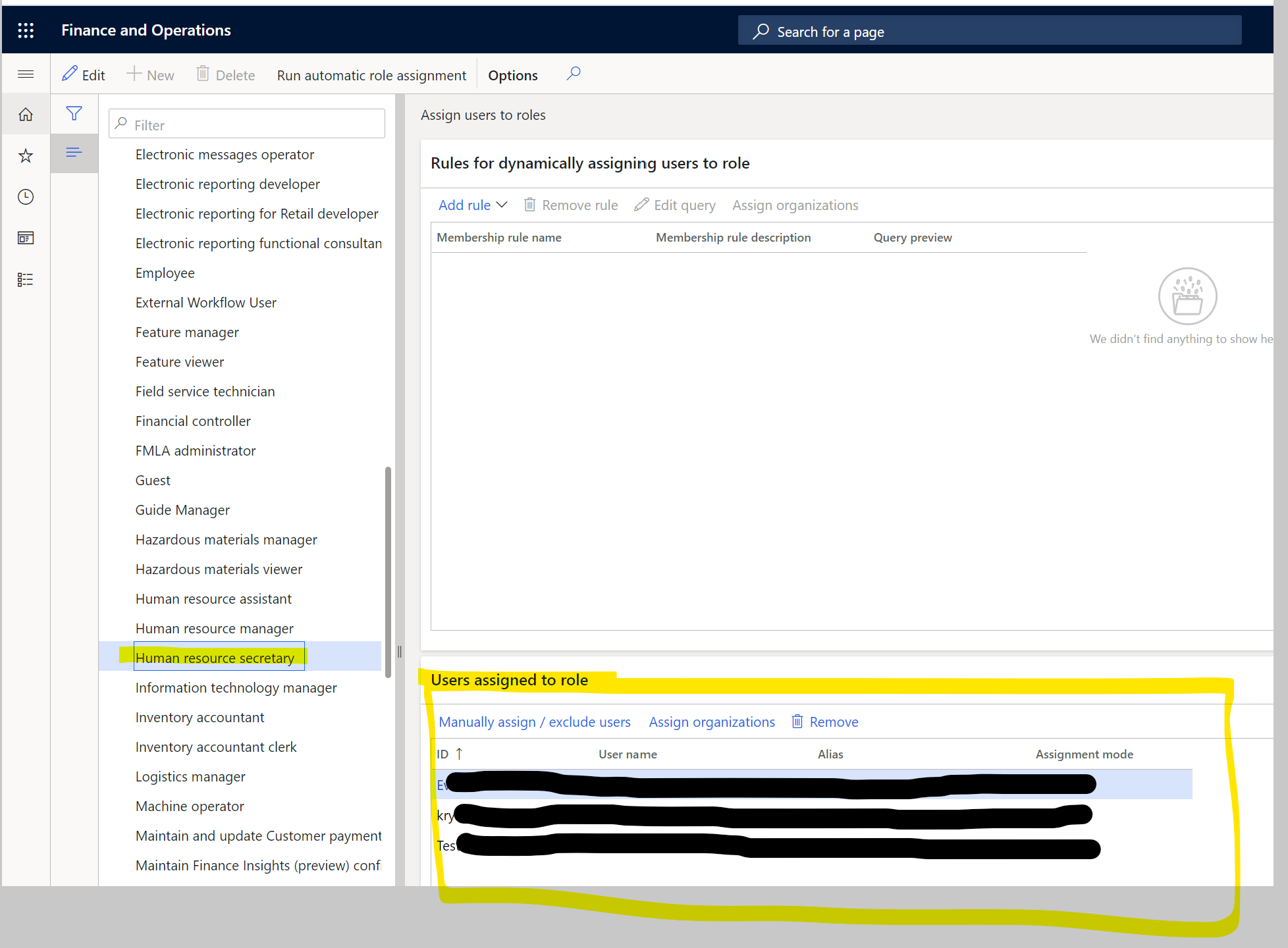
pastedimage1600790549588v1.png

I have the same question (0)
  • Verified answer
    LuHao Profile Picture
    40,892 on at

    Hi Florian,

    We have to use the "Users, Team and Security Role Report" tool of XRM Toolbox to achieve it.

    Open the XRM Toolbox, install "Users, Team and Security Role Report" tool and open it.

    Connect to your D365 organization.

    Load Data and Generate Report.

    pastedimage1600829517201v1.png

    It will download two files, one is csv, another is xlsx.

    Open xlsx file, go to Data tab and click Form Text/CSV.

    pastedimage1600829715696v2.png

    Select the csv file, select Based on entire dataset, click Load.

    pastedimage1600830803364v5.png

    It will insert a worksheet as the first one.

    In the first worksheet, copy the data starting from the third row and paste it into the second worksheet, then click Data > Refresh All.

    pastedimage1600840834613v1.png

    Then is the "Security Role" worksheet, you can see the security roles and its users.

    pastedimage1600830921663v7.png

  • Florian S. Profile Picture
    104 on at

    Hello Hao,

    thanks, this helped. :-)

  • DeanDelfin Profile Picture
    5 on at

    Hello Florian! There are many security roles, so it would be good to know which roles and for which tasks you want to use them. It is best to use different programs to define security roles, these programs are great for both desktops and laptops. The best way to test security roles is penetration testing melbourne, but not everyone does it. This should be done before installing any role. You can also find a complete list of security roles online, and then use software to determine which role is appropriate for your task. If you want to know what software you should use to determine security roles, the best thing to do is to look at this information on YouTube.

  • Suggested answer
    Abdul Wahab Profile Picture
    12,119 Moderator on at

    Hi DeanDelfin,

    Create a new thread, please. The current one is already cloed.

    If I answer your question then please mark it as verified.

    Let me know if I can provide you with more details.

    Thanks
    Regards,

    Abdul Wahab
    Power Platform/Customer Engagement Developer/Lead/Solution Architecture/Project Manager
    Direct/WhatsApp:+923323281237
    E-mail: abdulwahabubit@outlook.com
    Skype: abdul.wahabubit
    Linkedin: www.linkedin.com/.../

Under review

Thank you for your reply! To ensure a great experience for everyone, your content is awaiting approval by our Community Managers. Please check back later.

Helpful resources

Quick Links

Responsible AI policies

As AI tools become more common, we’re introducing a Responsible AI Use…

Neeraj Kumar – Community Spotlight

We are honored to recognize Neeraj Kumar as our Community Spotlight honoree for…

Leaderboard > Customer experience | Sales, Customer Insights, CRM

#1
Tom_Gioielli Profile Picture

Tom_Gioielli 170 Super User 2025 Season 2

#2
#ManoVerse Profile Picture

#ManoVerse 61

#3
Gerardo Rentería García Profile Picture

Gerardo Rentería Ga... 52 Most Valuable Professional

Last 30 days Overall leaderboard

Product updates

Dynamics 365 release plans



