web
You’re offline. This is a read only version of the page.
close
Skip to main content

Announcements

News and Announcements icon
Community site session details

Community site session details

Session Id :
Small and medium business | Business Central, N...
Answered

PATCH Request Automation API : Resource not found for the segment 'extensionUpload'

(1) ShareShare
ReportReport
Posted on by 2,384 Moderator

Greetings Community - Having used the BC API Automation before, this is the first time I am facing a weird situation.

My goal is to publish a simple extension through automation API, following the 3 steps listed by MS here in this link. https://learn.microsoft.com/en-us/dynamics365/business-central/dev-itpro/administration/itpro-introduction-to-automation-apis#upload-and-install-a-per-tenant-extension

The first part has been successful, which talks about POST : Insert Extension Upload

I am stuck in the part where through a PATCH request, the binary file is to be uploaded. I want to publish this extension to CRONUS (OOTB Company)

This gitHub discussion says that instead of {appID}, the correct parameter to pass in the URL is {packageID} from an extension metadata

My extension has not been published yet, how can I get a PackageID of an extension when it's not yet been published and moreover pass it in the PATCH request? Is there a way through powershell or something else to obtain an extensions PackageID? I see PackageID as a response when I use GET Extensions from the same BC Environment, but these are extensions already published in the environment

My request header is IF-MATCH: *

My request body is the .app file which I want to publish
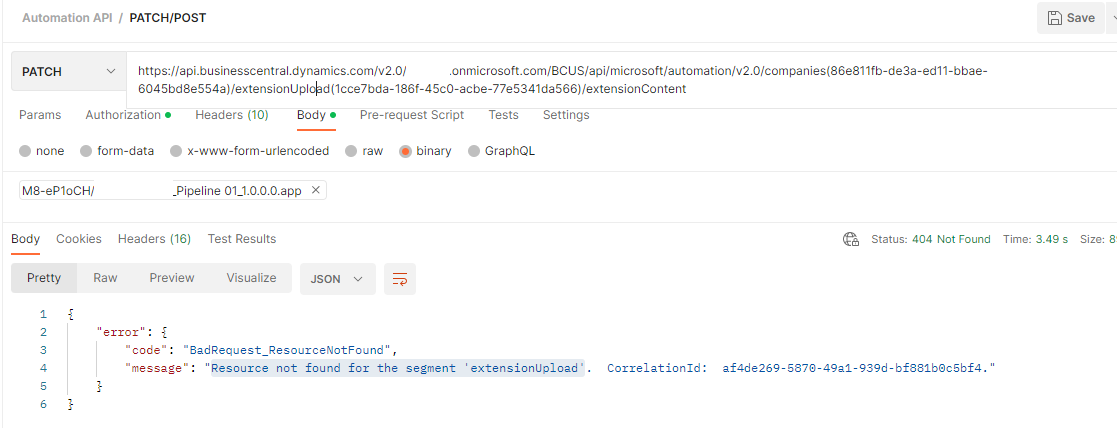
pastedimage1675440186045v1.png

FYI: Using a trial version of BC, probably has expired but not sure if it will fit this context

I have the same question (0)
  • Suggested answer
    Marco Mels Profile Picture
    Microsoft Employee on at

    Hello,

    Feel free to raise this to Microsoft via your partner or CSP.

    Thank you.

  • Verified answer
    NAV_with_Narang Profile Picture
    2,384 Moderator on at

    An Update for everyone reading this thread:

    I was successfully able to decode the answer to my question above, after some deep research. Here are some pointers for you:

    1. Microsoft has specified that you need 3 requests sent to the automation API for your extension to successfully load into Business Central (POST, PATCH, POST). The english names of these 3 requests is "Insert Extension Upload", "Upload Extension File" & "Install Extension"

    Of which the first request is to send a POST, which will intimate table 5447, that a new extension is now getting uploaded. From my experience, this table will have only one record at a time and the record in this table will be deleted/archived/won't bother you once you are done with all 3 steps to publish an extension via API

    The response of the first POST Request, is very important. The response contains a value named "System ID", which is nothing but your "PackageID"

    2. Use this System ID/Package ID in your upcoming/next PATCH request, in the parameter named "extensionUploadId" in 
    PATCH api.businesscentral.dynamics.com/v2.0/{environment name}/api/microsoft/automation/v2.0/companies({companyId})/extensionUpload({extensionUploadId})/extensionContent

    Now you're good to go. You now have the PackageID of the extension, even before it is published.

Under review

Thank you for your reply! To ensure a great experience for everyone, your content is awaiting approval by our Community Managers. Please check back later.

Helpful resources

Quick Links

Season of Sharing Community Challenge Launch!

Jump in, show your community spirit, and win prizes!

Women in Power Builds Momentum

Expanding mentorship, skilling, and AI innovation

Congratulations to the May Top 10 Community Leaders

These are the community rock stars!

Leaderboard > Small and medium business | Business Central, NAV, RMS

#1
OussamaSabbouh Profile Picture

OussamaSabbouh 2,222 Super User 2026 Season 1

#2
YUN ZHU Profile Picture

YUN ZHU 1,603 Super User 2026 Season 1

#3
Grigorios Mavrogeorgis Profile Picture

Grigorios Mavrogeorgis 1,186 Super User 2026 Season 1

Last 30 days Overall leaderboard

Featured topics

Microsoft Training Manuals

Product updates

Dynamics 365 release plans



