web
You’re offline. This is a read only version of the page.
close
Skip to main content

Announcements

No record found.

News and Announcements icon
Community site session details

Community site session details

Session Id :
Microsoft Dynamics 365 | Integration, Dataverse...
Answered

What's the meaning of this asterisk?

(1) ShareShare
ReportReport
Posted on by 30

We're using D365 Sales Pro, but I suspect this is a more general inquiry that applies to any D365 app. We're trying to create a set of public Views for our users, and establish a default.

When choosing "My Work-->Activities" - I believe the default View is displayed, in our case, "My Activities". However, it always displays the View name with an asterisk which implies (to me at least) that it's either not the default, or somehow in an unsaved state, or something otherwise is not nominal about it:
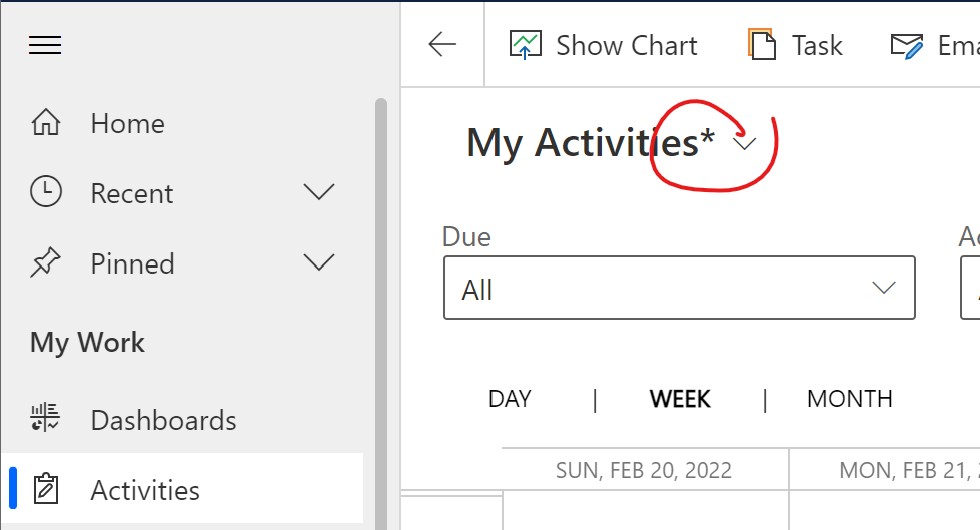
Screenshot-2022_2D00_02_2D00_22-121904.jpg

If I change the setting to show it as a "Read only Grid" - which we prefer as our default:
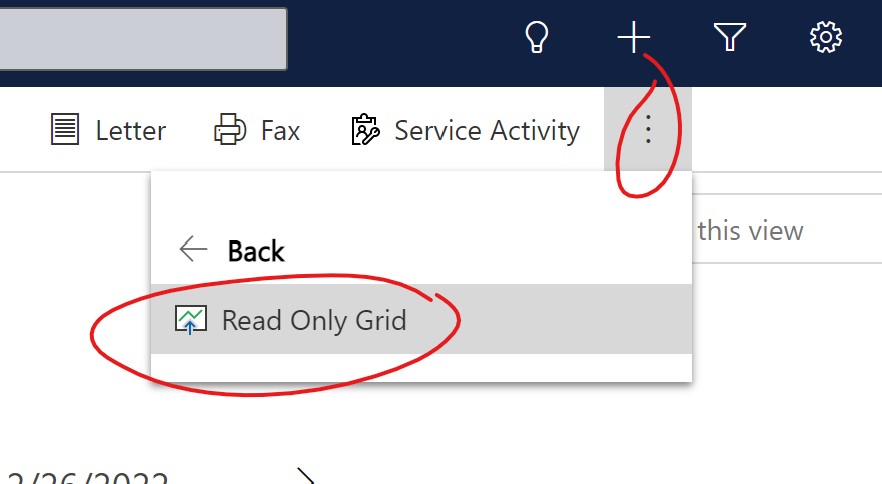
Screenshot-2022_2D00_02_2D00_22-122109.jpg

The asterisk then goes away:

Screenshot-2022_2D00_02_2D00_22-122508.jpg

Can someone explain what's going on here or what this means? I'm struggling to wrap my head around view creation and customization. 

Thanks,

Bob

I have the same question (0)
  • Verified answer
    Ben T Profile Picture
    803 on at

    Bob,

    That means that you have changed the view (columns or filter criteria), but only for you. For system views, you cannot save the changes from that interface (you can save changes to personal views that way).

    I am not sure why the astrik goes away when you change to read only - I can only assume its bc the previous changes are cleared out, though for me that doesn't happen.

    To edit system (public) views, check out this, docs.microsoft.com/.../create-edit-views-app-designer

    Lmk if any other issues come up

  • Suggested answer
    Pradeep87 Profile Picture
    10 on at

    This is new feature in the wave 2 release of 2022 named Modern Advanced find.

    Asterix will appear if there is any filter update using "Edit filter" option.

    Another useful link: www.preact.co.uk/.../how-is-dynamics-365-advanced-find-changing

Under review

Thank you for your reply! To ensure a great experience for everyone, your content is awaiting approval by our Community Managers. Please check back later.

Helpful resources

Quick Links

Introducing the 2026 Season 1 community Super Users

Congratulations to our 2026 Super Stars!

Meet the Microsoft Dynamics 365 Contact Center Champions

We are thrilled to have these Champions in our Community!

Congratulations to the March Top 10 Community Leaders

These are the community rock stars!

Leaderboard > Microsoft Dynamics 365 | Integration, Dataverse, and general topics

#1
11manish Profile Picture

11manish 176

#2
ManoVerse Profile Picture

ManoVerse 56 Super User 2026 Season 1

#3
Niki Patel Profile Picture

Niki Patel 42

Last 30 days Overall leaderboard

Product updates

Dynamics 365 release plans