web
You’re offline. This is a read only version of the page.
close
Skip to main content

Notifications

Announcements

No record found.

Community site session details

Community site session details

Session Id :
Finance | Project Operations, Human Resources, ...
Answered

Vendor payment automation / Records to include Filter not working

(0) ShareShare
ReportReport
Posted on by 97

Dear D365 specialists,

When trying to set up the vendor payment automation process, I am getting the following error message:

"You cannot add new joined tables to process automations. From the query window, please remove any tables that were added manually before proceeding."
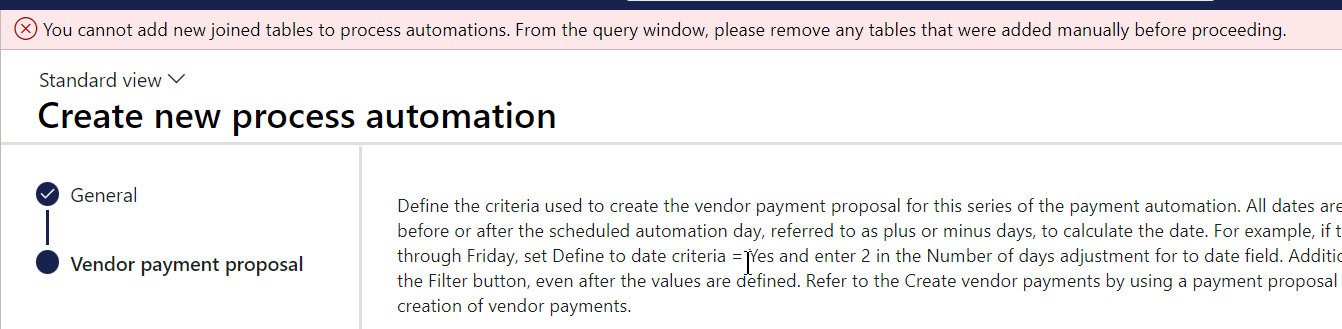
pastedimage1669663030113v1.png

The message appears when on the "Records to include" in the automation process, I set up criteria related to vendor transactions' financial dimensions: 

pastedimage1669663062209v2.png
I'm 100% certain that this process was working fine before (I am running version 10.0.30). I've not added new tables (i.e. the ones that appear cannot be removed). Do you have the same problem? if we can't filter on the financial dimensions, for me this whole automation process becomes useless.
Thanks
Peter   
I have the same question (0)
  • Verified answer
    André Arnaud de Calavon Profile Picture
    301,069 Super User 2025 Season 2 on at

    Hi Peter,

    I can confirm I can reproduce this issue. I would suggest checking LCS issue search for possible known issues. If you can't find a related entry, you can contact Microsoft Support.

  • Verified answer
    PeterKRB Profile Picture
    97 on at

    As it turns out, there's a new "feature" (for a functionality already present in the system?!):

    pastedimage1669715931374v1.png

    When enabled, queries are working as expected.

Under review

Thank you for your reply! To ensure a great experience for everyone, your content is awaiting approval by our Community Managers. Please check back later.

Helpful resources

Quick Links

Responsible AI policies

As AI tools become more common, we’re introducing a Responsible AI Use…

Neeraj Kumar – Community Spotlight

We are honored to recognize Neeraj Kumar as our Community Spotlight honoree for…

Leaderboard > Finance | Project Operations, Human Resources, AX, GP, SL

#1
Martin Dráb Profile Picture

Martin Dráb 559 Most Valuable Professional

#2
André Arnaud de Calavon Profile Picture

André Arnaud de Cal... 464 Super User 2025 Season 2

#3
Sohaib Cheema Profile Picture

Sohaib Cheema 250 User Group Leader

Last 30 days Overall leaderboard

Product updates

Dynamics 365 release plans



