web
You’re offline. This is a read only version of the page.
close
Skip to main content

Notifications

Announcements

No record found.

Community site session details

Community site session details

Session Id :
Customer experience | Sales, Customer Insights,...
Answered

SSRS REPORT RETURNING DUPLICATE VALUES

(0) ShareShare
ReportReport
Posted on by 143

Hi 

I am creating an SSRS report for Dynamics Field service, for the invoice with the Fetch XML query.

The query has multiple linked entities, it is repeating tablix values with the number of products we have in the Invoice.

I am not sure what is wrong in the query, or is there something extra I have to do to stop those redundant values. 

here is my Fetch Xml query

<fetch distinct="false" no-lock="true" mapping="logical">
<entity name="invoice" enableprefiltering="1">
<attribute name="invoiceid" />
<attribute name="shipto_line2" />
<attribute name="shipto_city" />
<attribute name="billto_line2" />
<attribute name="sg_referencenumber" />
<attribute name="shipto_stateorprovince" />
<attribute name="billto_stateorprovince" />
<attribute name="shipto_postalcode" />
<attribute name="billto_city" />
<attribute name="billto_line1" />
<attribute name="billto_line3" />
<attribute name="invoicenumber" />
<attribute name="createdon" />
<attribute name="billto_postalcode" />
<attribute name="shipto_line3" />
<attribute name="shipto_line1" />
<attribute name="msdyn_invoicedate" />
<attribute name="paymenttermscode" />
<attribute name="sg_workorder" />
<attribute name="freightamount" />
<attribute name="totalamount" />
<attribute name="totallineitemamount" />
<attribute name="totaltax" />
<attribute name="sg_salesperson" />
<attribute name="billto_telephone" />
<attribute name="shipto_telephone" />
<link-entity name="invoicedetail" from="invoiceid" to="invoiceid" alias="invoiceproduct">
<attribute name="productname" />
<attribute name="invoiceid" />
<attribute name="baseamount" />
<attribute name="description" />
<attribute name="priceperunit" />
<attribute name="invoicedetailid" />
<attribute name="quantity" />
</link-entity>
<link-entity name="businessunit" from="businessunitid" to="owningbusinessunit" alias="owner">
<attribute name="address1_line3" />
<attribute name="address1_line1" />
<attribute name="address1_city" />
<attribute name="address1_stateorprovince" />
<attribute name="address1_fax" />
<attribute name="address1_postalcode" />
<attribute name="address1_telephone1" />
</link-entity>
</entity>
</fetch>

and here is the report how it looks
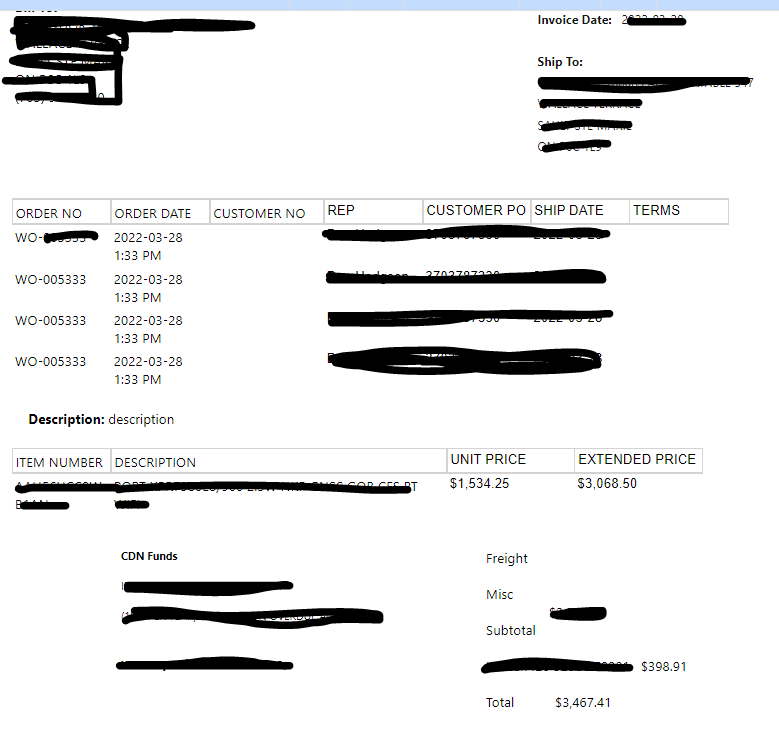
pastedimage1648495135740v1.png

If you can see, the WO table values are repeated, and it is repeating the number of items we have in the Invoice( here only one Item is visible because there is a visibility condition attached to the row to hide rows with $0 price)

Please suggest what can be the fix for the problem

I have the same question (0)
  • Verified answer
    Community Member Profile Picture
    on at

    Hi,

    Please follow the below screenshot.

    While creating the table first you need to remove Data row (associate part) from table and keep header and you can create header as much as you require.

    pastedimage1648520614647v1.png

    Right click on pastedimage1648520911086v3.png three parallels line and delete the row and create the header just right click on the pastedimage1648521178626v4.png and create the header.

    pastedimage1648520794303v2.png

    I think this will remove your repetition problem.

    Thanks,

    Arshad

  • Smehra33 Profile Picture
    143 on at

    Thank you Arshad, it worked.  This is a life saver tip, I was wondering why my reports are having repeated values. Thank you again.

  • Community Member Profile Picture
    on at

    Hi,

    Please follow my blog and You Tube channel.

    www.youtube.com/.../videos

    juniorcrmblog.blogspot.com/

    juniorazurecrm.blogspot.com/

    Thanks,

    Arshad

  • Jeremi Chasseguet Profile Picture
    10 on at

    Hello ! This seems to be very helpful, exactly what I need. But I can manage to figure it out. "Right click on image three parallels line and delete the row and create the header just right click on the image and create the header." --> Here it only offers to delete 'rowS'. Is that correc ? And there is no option to create a header. So I used the already header row present. It does take away the duplicates, but only one record appears, no more lists.

    Could you show us a screenshot ?

    Thank you very much for your help

Under review

Thank you for your reply! To ensure a great experience for everyone, your content is awaiting approval by our Community Managers. Please check back later.

Helpful resources

Quick Links

Responsible AI policies

As AI tools become more common, we’re introducing a Responsible AI Use…

Neeraj Kumar – Community Spotlight

We are honored to recognize Neeraj Kumar as our Community Spotlight honoree for…

Leaderboard > Customer experience | Sales, Customer Insights, CRM

#1
Tom_Gioielli Profile Picture

Tom_Gioielli 171 Super User 2025 Season 2

#2
#ManoVerse Profile Picture

#ManoVerse 83

#3
Jimmy Passeti Profile Picture

Jimmy Passeti 50 Most Valuable Professional

Last 30 days Overall leaderboard

Product updates

Dynamics 365 release plans



