web
You’re offline. This is a read only version of the page.
close
Skip to main content

Notifications

Announcements

No record found.

Community site session details

Community site session details

Session Id :
Finance | Project Operations, Human Resources, ...
Answered

How to include multiple ISV Licenses(.XML and .TXT) together in Build pipeline D365FO

(0) ShareShare
ReportReport
Posted on by 35

Hi All,

I have received multiple ISV licenses from my client and few license files are in .txt and few files are in .xml extension. In my deployment environment, I am able to import .xml files based on the below scripts.

K:\AOSService\PackagesLocalDirectory\Bin\Microsoft.Dynamics.AX.Deployment.Setup.exe --setupmode importlicensefile --metadatadir K:\AOSService\PackagesLocalDirectory --bindir K:\AOSService\PackagesLocalDirectory --sqlserver . --sqldatabase AxDB --sqluser axdbadmin --sqlpwd xx --licensefilename C:\SM\License1.xml

K:\AOSService\PackagesLocalDirectory\Bin\Microsoft.Dynamics.AX.Deployment.Setup.exe --setupmode importlicensefile --metadatadir K:\AOSService\PackagesLocalDirectory --bindir K:\AOSService\PackagesLocalDirectory --sqlserver . --sqldatabase AxDB --sqluser axdbadmin --sqlpwd xx --licensefilename C:\SM\License2.txt

Now I need to add the same all licenses files to my deployable package. So, as per the few blogs, I have created a Licenses folder under my Azure devops Trunk path. Then uploaded the .xml& .txt license files under the same folder. 

pastedimage1612107510243v1.png

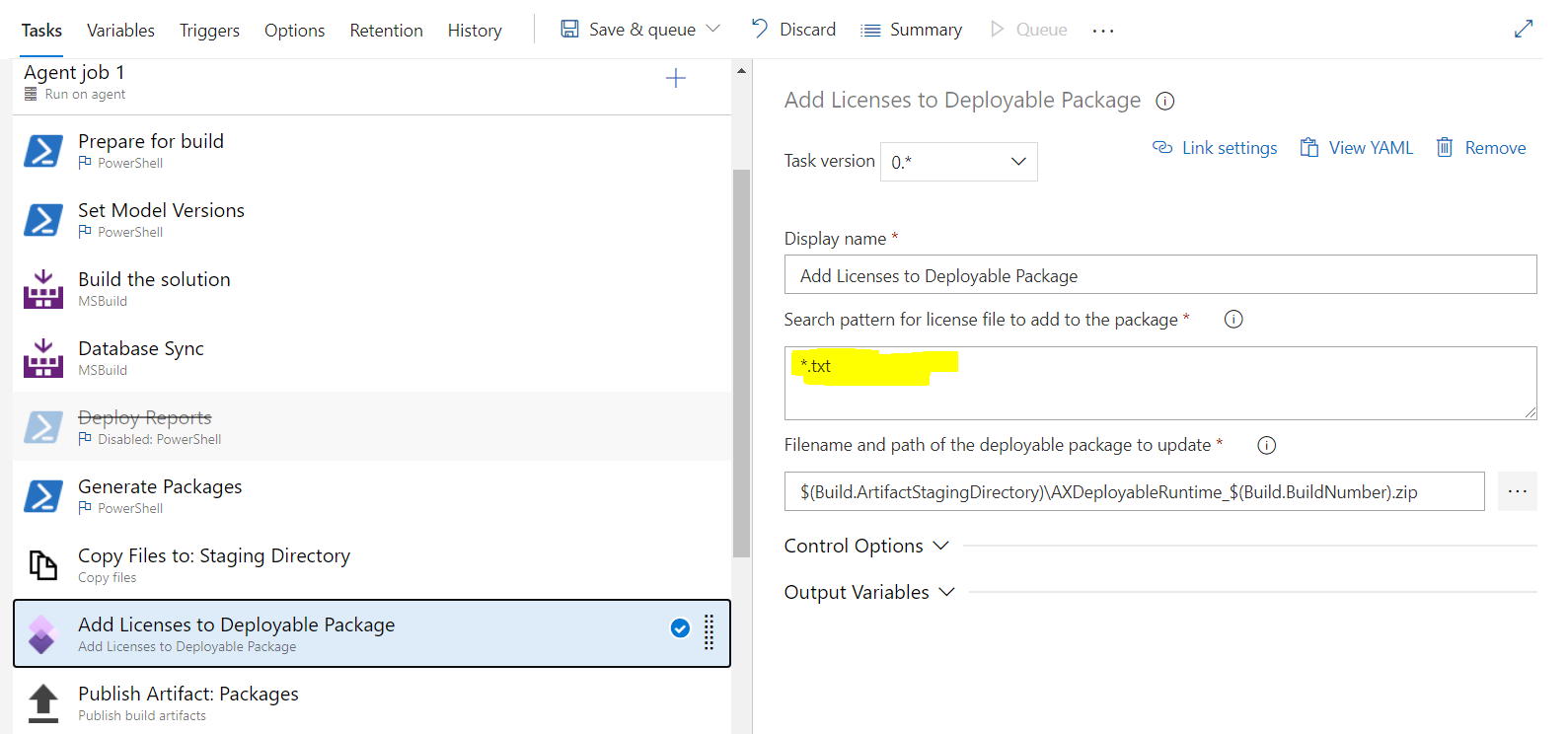
2. I have enabled Add Licenses To deployable package steps under my build pipeline.
pastedimage1612108176326v3.png

Now my question is what should I specify on Search pattern for license file to add to the package portion. I have multiple extensions(.xml and .txt) license files. 

$(build.sourcesDirectory)\Licenses\*          ->will this script work?

Need your expert opinion. 

Thanks in advance. 

I have the same question (0)
  • Suggested answer
    André Arnaud de Calavon Profile Picture
    301,075 Super User 2025 Season 2 on at

    Hi Sabarni,

    You can find a very recent post about ISV licenses in Packages here: www.codecrib.com/.../isv-licenses-in-packages.html

    Probably the blog and referenced video will answer your question.

  • sabarni Profile Picture
    35 on at

    Hi André ,

    Thanks for your response.

    As per this video , I have done all the setup but problem is as this blog only .txt license file I can attached to add deployable package. But my scenario is to add .txt & .xml file extension to the deployment package. Then if I add  $(build.sourcesDirectory)\Licenses\*    path to Search pattern for license file to add to the package--  will this syntax work or not ? Or do I to ask ISV client to provide only .TXT license file ?

  • Verified answer
    Joris dG Profile Picture
    17,775 on at

    You can add multiple lines. So you can add one line for *.txt and one for *.xml. Your * may work as well, or maybe *.*. Should be easy enough to try! At the end of the video I explain how you can check the package to see if the licenses are actually in there.

  • sabarni Profile Picture
    35 on at

    Yes Joris. It worked using $(build.sourcesDirectory)\Licenses\*  this script. Thanks for your suggestion.

Under review

Thank you for your reply! To ensure a great experience for everyone, your content is awaiting approval by our Community Managers. Please check back later.

Helpful resources

Quick Links

Responsible AI policies

As AI tools become more common, we’re introducing a Responsible AI Use…

Neeraj Kumar – Community Spotlight

We are honored to recognize Neeraj Kumar as our Community Spotlight honoree for…

Leaderboard > Finance | Project Operations, Human Resources, AX, GP, SL

#1
Martin Dráb Profile Picture

Martin Dráb 551 Most Valuable Professional

#2
André Arnaud de Calavon Profile Picture

André Arnaud de Cal... 450 Super User 2025 Season 2

#3
BillurSamdancioglu Profile Picture

BillurSamdancioglu 278 Most Valuable Professional

Last 30 days Overall leaderboard

Product updates

Dynamics 365 release plans



