web
You’re offline. This is a read only version of the page.
close
Skip to main content

Notifications

Announcements

No record found.

Community site session details

Community site session details

Session Id :
Customer experience | Sales, Customer Insights,...
Answered

Logic App that pulls data from CosmosDB and pushes it into CRM while performing an update

(0) ShareShare
ReportReport
Posted on by 45

Hello I am trying to create a workflow that first:

1. Extracts data from CosmosDB, using a query 

2. Looping over the results

3. Pushing the results data into CRM

                                          Once this data is created in CRM, CRM automatically generates an ID for each record. How can I then:

4. Return the newly generated ID back to the original CosmosDB container in  which it was pulled from?

I have started on this and these are my questions:

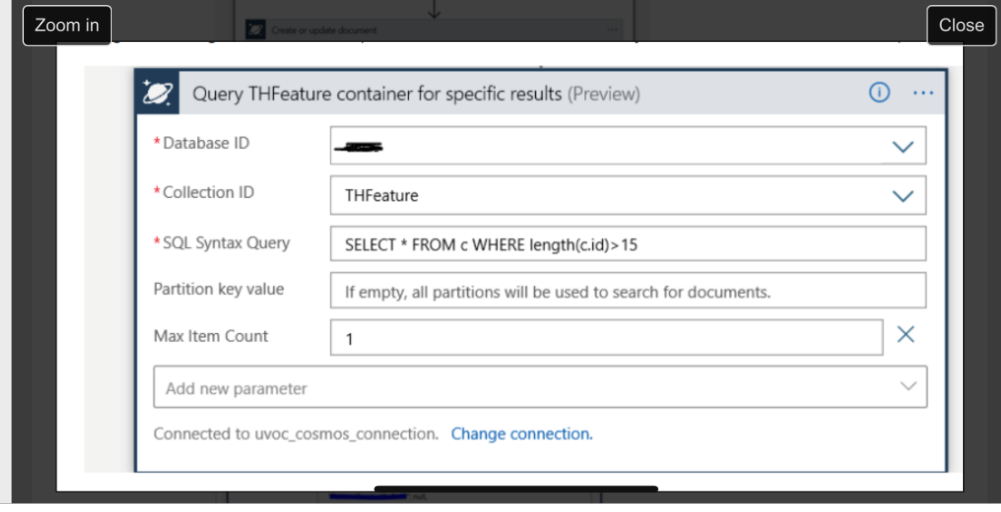
Does this first part look correct in what I am doing? I must use this SQL query for this:

   a. I am simply telling the Logic App to extract data from a particular container inside CosmosDB
pastedimage1595795704679v1.png

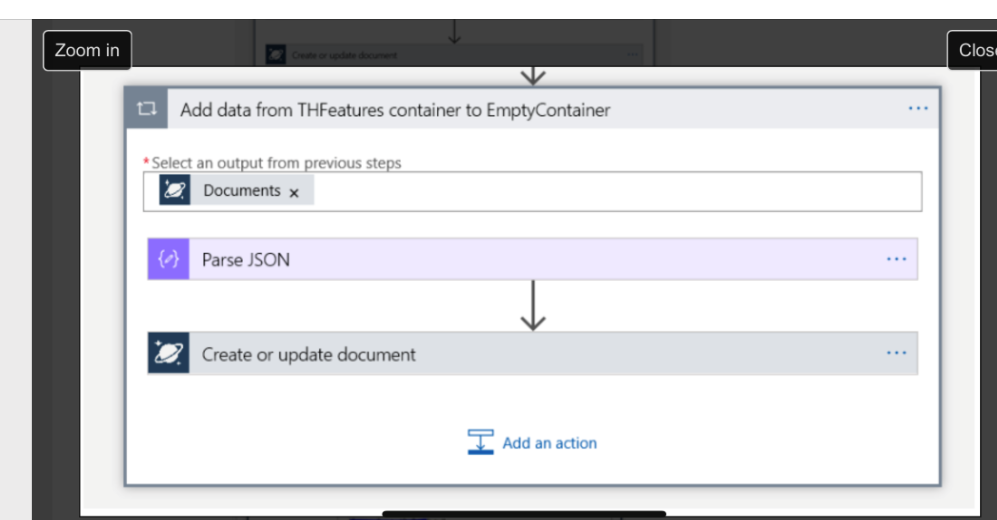
b. Then I would like to loop over the results I just obtained, and push this to CRM
pastedimage1595795816543v2.png

c. My dilemma is: Once data is pushed to CRM, CRM then automatically generates an ID for each record that is uploaded. How would I then return the updated ID to cosmos? I am not sure how to construct this in LogicApps and have been researching examples of this.

Any help is greatly appreciated.

Thanks

I have the same question (0)
  • Verified answer
    Filipe Relvas Profile Picture
    on at

    Hello Lynette,

    Regarding the Record Creation in Dynamics CRM and take the ID from it you can use the CDS Create Record action.

    This action after creating a Record returns the ID from it through 3 differentes means:

    - ItemInternalId: "<guid>";

    - @odata.id : "https://<orgname>.crm<region>.dynamics.com/api/data/v9.1/<entity>(<guid>);

    - Entity Primary Key (e.g. for Account it would be AccountId)

    You can then extract one of these values, ideally the first option, through Dynamic Content and insert it in Cosmos.

    As an example I've created an Account and extracted the ItemInternalId through the expression body('<actionname>')['iteminternalid']:

    pastedimage1595848234355v1.png

    In this case I'm using compose but you could directly use the expression in the Cosmos DB action.

    Documentation:

    https://docs.microsoft.com/en-us/azure/connectors/connect-common-data-service

    Hope this helps!

  • jasmine202020 Profile Picture
    75 on at

    Thank you Felipe, I am reading the documents that you sent. Very helpful!

Under review

Thank you for your reply! To ensure a great experience for everyone, your content is awaiting approval by our Community Managers. Please check back later.

Helpful resources

Quick Links

Responsible AI policies

As AI tools become more common, we’re introducing a Responsible AI Use…

Neeraj Kumar – Community Spotlight

We are honored to recognize Neeraj Kumar as our Community Spotlight honoree for…

Leaderboard > Customer experience | Sales, Customer Insights, CRM

#1
Tom_Gioielli Profile Picture

Tom_Gioielli 170 Super User 2025 Season 2

#2
#ManoVerse Profile Picture

#ManoVerse 70

#3
Jimmy Passeti Profile Picture

Jimmy Passeti 50 Most Valuable Professional

Last 30 days Overall leaderboard

Product updates

Dynamics 365 release plans



