web
You’re offline. This is a read only version of the page.
close
Skip to main content

Notifications

Announcements

No record found.

Community site session details

Community site session details

Session Id :
Customer experience | Sales, Customer Insights,...
Answered

Bulk-Create custom activity entity records based on marketing list members

(0) ShareShare
ReportReport
Posted on by

Hello, 

I want to bulk-create records for my custom activity entity based on all members in a marketing list. I have tried to archive this by building a workflow but I can not find out how it should be done. The members is always only Accounts.

Your help is very much apprechiated!

BR, 

Emma

I have the same question (0)
  • Suggested answer
    Malini Johari Profile Picture
    160 on at

    Hi,

    Please refer below link for your help:

    https://www.inogic.com/blog/2020/02/new-way-for-creating-and-updating-records-in-dynamics-365-crm/

    Thanks

  • Suggested answer
    LuHao Profile Picture
    40,892 on at

    Hi partner,

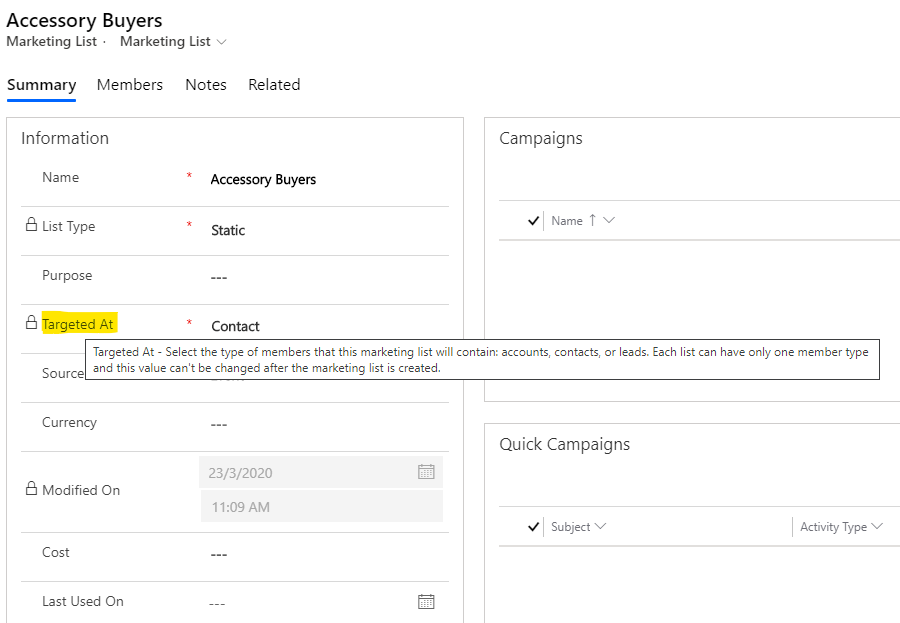
    Marketing List has an field "Targeted At" (Marketing List Member Type) that define its member entity.

    pastedimage1586918095795v1.png    pastedimage1586918140287v2.png

    The members of a Marketing List can only be one entity, such as Account.

    This is why the members is always Accounts when you are building a workflow.

    In addition, the marketing list members are actually the customer type entities, such as Account, Contact, so we need to select Account or Contact or other entity when new workflow.

    We need to create a workflows for each Member Type. For example, if you have three Marketing List, one whose members are accounts, one whose members are contacts, one whose members are leads, then we need to create three workflows, one entity is account, one entity is contact. one entity is lead.

    Here is a on-demand workflow for Account. The To field is filled with the dynamic value of Account.

    pastedimage1586920954693v1.png    pastedimage1586920984711v2.png

    Activate this workflow.

    Open Advanced Find, search for Accounts, select filter to (Related) Marketing Lists Contains Data, then select the Marketing List you want to bulk-create records.

    pastedimage1586920604227v6.png    pastedimage1586920710581v7.png

    Click Result, then select all records and click Run Workflow. Select the workflow you created.

    pastedimage1586920768965v8.png    pastedimage1586921078533v3.png

    If Marketing List Member is another entity, then create a workflow for this entity and then search for the record of this entity in Advanced Find, and finally run the on-demand workflow.

  • EmmaCRMadmin Profile Picture
    on at

    Hello, 

    Thank you for your detailed explanation!

    Is there a way to run the workflow from my open marketinglist for the specific marketinglist members? I want to let the users do it easily and it feels like a "long way" for them to go in to advamced find to do it every time.

    Thanks

    /Emma

  • Suggested answer
    meelamri Profile Picture
    13,216 User Group Leader on at

    Hi,

    You can use Flow for this scenario. Let me know if you need more guidance to implement it.

  • Verified answer
    LuHao Profile Picture
    40,892 on at

    Hi Emma,

    Then you have to use Power AutoMate.

    Due to the N: N relationship between the Marketing List entity and the customer type entity, we need to perform two traversal records, the first to traverse relationship entity records, and the second to traverse Contact records.

    Please refer to this blog to understand it: https://community.dynamics.com/365/sales/b/crminogic/posts/retrieve-many-to-many-n-n-related-records-in-dynamics-365-using-microsoft-flow

    The following are the steps of Flow, I have tested it, it can successfully create the custom activity records.

    pastedimage1586936568609v1.png

    pastedimage1586936582979v2.png

    pastedimage1586936600102v3.png

    pastedimage1586936621068v4.png

    pastedimage1586936642195v5.png    pastedimage1586936930598v6.png

  • EmmaCRMadmin Profile Picture
    on at

    Wow thank you so much! And if it is only for Accounts i guess I just change the regarding field to Account.

    Thanks again!

    BR,

    Emma

  • EmmaCRMadmin Profile Picture
    on at

    Hello, I just created this flow to create Opportunities only for Accounts. But when I run it I get this error:

    pastedimage1588596991742v1.png

    Any clue?

    BR, 

    Emma

  • Verified answer
    LuHao Profile Picture
    40,892 on at

    Hi Emma,

    Did you create this flow by clicking "Create a flow" from the D365 Marketing List form?

    In addition, please refer to this thread: powerusers.microsoft.com/.../548796

  • EmmaCRMadmin Profile Picture
    on at

    Hello, 

    I created it in the solution. But i tried to create a new one from the marketinglist form, I could start the flow but it gets stuck like this:

    pastedimage1588655647615v1.png

    And also I realised when I should run my flow I get this window:

    Does it men that I need to select which ones I want to run the flow for? I need to be able to run for all since it could be quite a lot of Accounts in the members list.

    pastedimage1588655742174v3.png

    My flow looks like this:

    pastedimage1588655962792v4.png

    pastedimage1588655975166v5.png

    BR, 

    Emma

  • EmmaCRMadmin Profile Picture
    on at

    Hello, 

    I left the flow running and it has been completed after almost 15 minutes... 

    created a lot of empty opportunities. it is strange since I only have 3 Accounts in my Member list on my marketing list so something must be wrong in my flow... 

    In the apply to each step there are 189, but i only have 3 in my marketinglist...

    pastedimage1588661328044v1.png

    Note: we will only use this flow when the member type is Account.

    Any clue?

    Would really apprechiate your help!

    BR, 

    Emma

Under review

Thank you for your reply! To ensure a great experience for everyone, your content is awaiting approval by our Community Managers. Please check back later.

Helpful resources

Quick Links

Responsible AI policies

As AI tools become more common, we’re introducing a Responsible AI Use…

Neeraj Kumar – Community Spotlight

We are honored to recognize Neeraj Kumar as our Community Spotlight honoree for…

Leaderboard > Customer experience | Sales, Customer Insights, CRM

#1
Tom_Gioielli Profile Picture

Tom_Gioielli 170 Super User 2025 Season 2

#2
#ManoVerse Profile Picture

#ManoVerse 61

#3
Gerardo Rentería García Profile Picture

Gerardo Rentería Ga... 52 Most Valuable Professional

Last 30 days Overall leaderboard

Product updates

Dynamics 365 release plans