web
You’re offline. This is a read only version of the page.
close
Skip to main content

Notifications

Announcements

No record found.

Community site session details

Community site session details

Session Id :
Finance | Project Operations, Human Resources, ...
Answered

How do I resolve "More than one model mapping exists. Set one of the configurations as default."

(2) ShareShare
ReportReport
Posted on by 141

I am getting this error upon saving my ER configuration:

"More than one model mapping exists for the 'Invoice (InvoiceProject)' data model in the configurations Invoice model mapping, Project invoice model mapping. Set one of the configurations as default."

I do note that I have both Invoice model mapping and Project invoice model mapping in my ER solutions table. How do I go about setting one of them as the default without simply deleting one of them?

I have the same question (1)
  • Verified answer
    Adria Ariste Profile Picture
    User Group Leader on at

    I think that if you have more than one model enabled you need to select the "Default for model mapping" checkbox for the model you want to use:

    pastedimage1573550623374v1.png

    Adrià Ariste - Senior technical consultant @ Axazure - Read my blog!

  • Lexicon_ Profile Picture
    141 on at

    Thank you! :D

  • Lexicon_ Profile Picture
    141 on at

    Hi, I'm still having a problem with this.

    If I set the default to Yes on Invoice model mapping (which I've derived and made modifications to the "Project Invoice" model mapping), and set it to No on Project invoice model mapping (which is just stock from Microsoft), I get the error again in my format mapping.

    pastedimage1573697824493v4.png

    pastedimage1573697250349v2.png

    pastedimage1573697293428v3.png

    If I switch the defaults around (invoice model mapping = NO and project invoice model mapping = YES), then it doesn't give me that error.

    If I set BOTH to default = Yes, it also doesn't give me that error. (I didn't think two defaults should even be allowed)

    If I want to use the invoice MM and not the project invoice MM, I have to delete the project invoice MM configuration.

    Why doesn't the check box work when it's one particular way, when it works the other way?

    Also, is there a way to "move" model mappings between the two configurations? The invoice MM has 4 model mappings under its configuration components fasttab. If I've made a change to one of the mappings there, but I also want to use the project invoice MM configuration, how can bring my modified model mapping from invoice MM over to project invoice MM? Do I have to add a new model mapping to the project invoice MM configuration and set everything up again from scratch?

    And last but not least, I've found that a format mapping configuration can also contain a model mapping component. If I add a model mapping on the same definition InvoiceProject to a format config, then there will be 3 model mappings available on the same definition InvoiceProject. How does that work now? Also, can model mappings be merged?

    Please and thank you so much.

  • Lexicon_ Profile Picture
    141 on at

    I've played around a bit more and now I've got the opposite problem.

    I derived Project invoice model mapping, made some changes and set that to default. I also turned off the default switch on invoice model mapping. And now I'm getting the error message.

    It seems like being a derived model mapping causes this issue. Why can't I have a format configuration that uses *my* derived model mapping? -__-

  • Adria Ariste Profile Picture
    User Group Leader on at

    When you created the new format did you choose your derived model mapping for it? There's an option in the formats called "Rebase", that allows you to change the base component, but I think this won't let you change the model mapping for a format and you'll need to create the format again and use your model mapping.

    Adrià Ariste - Senior technical consultant @ Axazure - Read my blog!

  • Suggested answer
    MhaU Profile Picture
    on at

    Hi Lexicon,

    If you wish to create a model mapping and a format that uses your mapping, then you must create your own model derived from the Microsoft one and then when creating the model mapping and export format, choose target model your own model. In this way having the same root, derived model mapping and derived export format, your own derived format will use your own derived model mapping. Model mapping and export format are not directly connected, you do not "tell" the export format which mapping to use, rather having the same root/model indicates the export format which mapping to use.

    Hope this makes sense.

    Let us know if you need any other information and we will be more than happy to assist further.

    Thank you!

  • Lexicon_ Profile Picture
    141 on at

    Thanks Adrià and Mihaela!

    I suppose I did the sequence the wrong way around. I created the new format mapping before I derived the model mapping and modified it.

    I tried rebasing my format mapping but it never lets me change the model, only the version number.

    I am still very confused. Let me see if I am getting the process sequence right:

    1. Are you saying I should have clicked on Invoice model, the root config in bold, and created a new model mapping, like so?
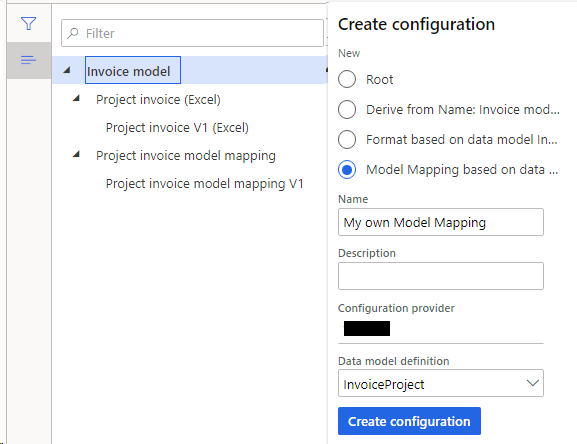
    pastedimage1573780373550v2.png

    BUT #1: how do I know that the InvoiceProject model that gets created this way will have all the datasource mappings that I want so I don't have to recreate them from scratch?

    Previously, I had both Invoice model mapping and Project invoice model mapping that both had the InvoiceProject component, but the one in Invoice MM wasn't as comprehensively mapped as the one in Project invoice MM. This was why I previously chose to derive a model mapping from Project invoice MM (and suffixed it with V1) as you can see in the screenshot above.

    Also, I noted that Invoice MM was based off the latest version of the root Invoice model, and Project invoice MM was based off an older version. Keep in mind that Invoice MM isn't the mapping that I want. Now, if I create a new model mapping from scratch as depicted in the screenshot, it will be based off the latest version of the root Invoice model, just like the Invoice MM, which isn't what I want. So this means I won't be starting off with the model mapping that I need. I will need to recreate so many datasource bindings.

    Anyway, moving on:

    2. So after I've created a new model mapping on the InvoiceProject definition, I should do my modifications here. Which is recreating multiple datasource bindings to get it on par with what is in Project invoice MM, and then a few more which is my own modification/extension.

    3. Then I should click on the root Invoice model, and create a new format mapping, like so:
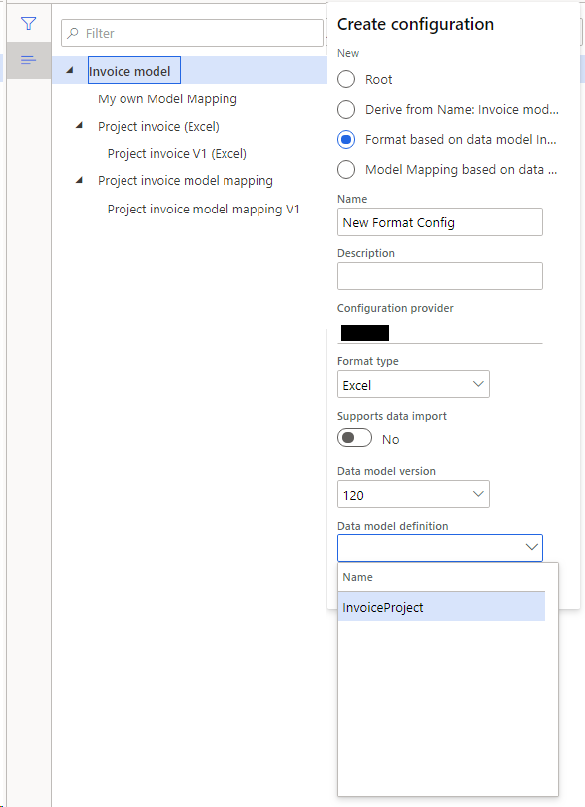
    pastedimage1573780816964v5.png

    BUT #2: In that last data model definition dropdown, how do I know which InvoiceProject is getting picked up? There is an InvoiceProject mapping in Project invoice MM, Project invoice MM V1, and My own Model Mapping. There are three of them! (If I try to click Create Configuration with My own Model Mapping highlighted (instead of the root Invoice model), I don't get the option to create a format config.)

    BUT #3: Again, doing it this way means there's a lot of stuff I need to recreate in my format mapping. The stock format mapping "Project invoice (Excel)" has these mapping roots already established:
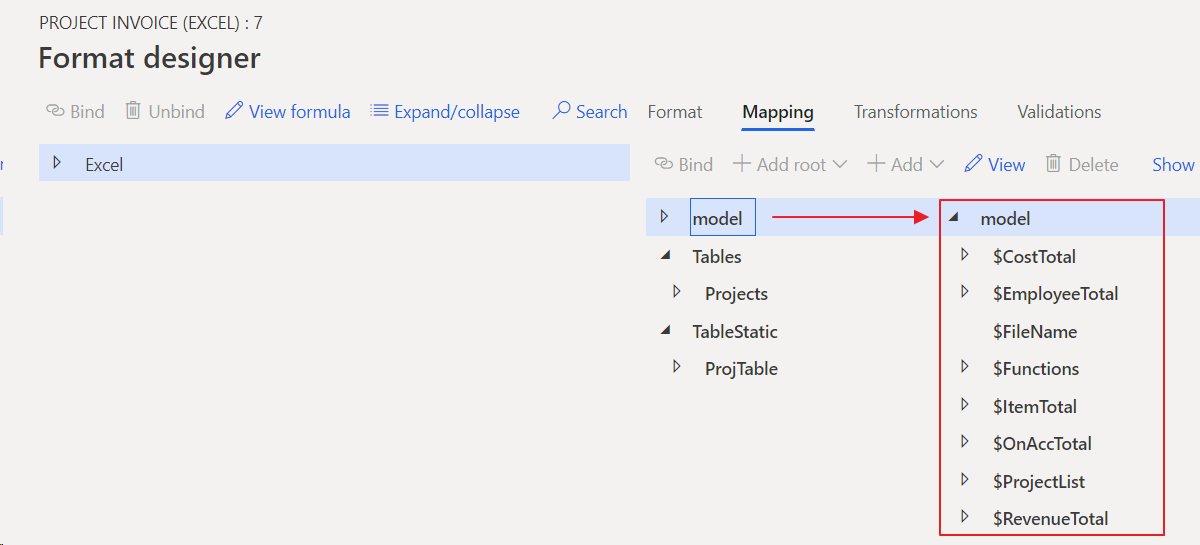
    pastedimage1573781128392v6.png

    There's a bunch of calculated fields under model, and there's Tables and TableStatic. All these are not in the model mapping, they are in the format mapping. That's why previously I chose to derive from Project invoice (Excel) (and suffixed it with V1) as you can see in the screenshot. Now, if I create a new format mapping from scratch, it won't have all of these and I will need to recreate them.

    4. Is this how it's supposed to look in the end?
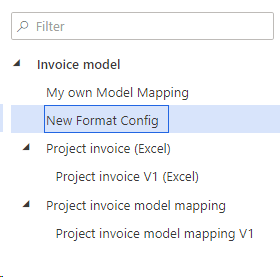
    pastedimage1573781544457v7.png

    ------------

    I'm really sorry this is so long but I'm really confused and frustrated. Why does it seem impossible to just get the mapping/format that is closest to what I need and then work off them incrementally to get to what I want, instead of having to start from scratch and rebuild what's already been built? 

    And the thing is, I wouldn't even encounter this if I didn't need to modify the model mapping because of a particular error:

    Path 'model/InvoiceBase/CompanyInfo/BankAccount/xxx' has no binding to any datasource in using model's mapping

    That's why I needed to have my own model mapping because I needed to add a couple more datasource bindings.

    I would really appreciate some guidance on this please!! Thank you so much in advance.

  • Suggested answer
    MhaU Profile Picture
    on at

    Hi Lexicon,

    First do this setup in reporting configurations form. Click on top on the Configurations | Advances settings | User parameters and flag Run settings to Yes. This will allow you to choose to run draft version and will be helpful when you start working on the derived configurations so you do not need to Complete each time you have a change and want to test it.

    I would advise use this approach, perhaps I can make it clear now.

    Stand on Invoice model and create configuration and derive from the Invoice model. Call it NewInvoiceModel. For now do not make any changes, just change status to Complete.

    Then stand on NewInvoiceModel, click Create configuration and choose create model mapping as this is what you wish, Name=NewModelMapping and choose Data model definition=InvoiceProject. You will see now the NewModelMapping as a child of your new model.

    Alternatively if you wish to use some of the mappings already and add new data sources/bindings, you can stand on Project invoice model mapping, click Create configuration, select derive and choose Target model=NewInvoiceModel. This way the newly derived model mapping will have parent NewInvoiceModel mentioned in brackets. The same for export formats, if you wish to reuse what it is created already, just derive the MS configuration and choose Target model=NewInvoiceModel. Something like this you can have:

    pastedimage1573818208216v1.png

    In the screen shots above I do not see if you have created your own model or not by deriving the Invoice model from Microsoft.

    Let me know if you need any other information.

  • Lexicon_ Profile Picture
    141 on at

    Thank you!! Thank you so much, this is brilliant help and everything I needed for things to fall into place.

    > Stand on Invoice model and create configuration and derive from the Invoice model. Call it NewInvoiceModel

    I did not do this step previously. A major missing puzzle in my understanding! I have now been able to move on and complete my task.

    Thank you again very much! :D

  • Martin Gumbs Profile Picture
    10 on at

    Hi Is it possible to change the data model version on existing format. I have created a new Invoice format, but now we got new requirement to add few more fields in Data model . Do i need to create new format or is there any way i change the version of data model in existing format or please suggest some workaround. I have already heavily modified  the format and don't want to repeat effort again,  

Under review

Thank you for your reply! To ensure a great experience for everyone, your content is awaiting approval by our Community Managers. Please check back later.

Helpful resources

Quick Links

Responsible AI policies

As AI tools become more common, we’re introducing a Responsible AI Use…

Neeraj Kumar – Community Spotlight

We are honored to recognize Neeraj Kumar as our Community Spotlight honoree for…

Leaderboard > Finance | Project Operations, Human Resources, AX, GP, SL

#1
Martin Dráb Profile Picture

Martin Dráb 664 Most Valuable Professional

#2
André Arnaud de Calavon Profile Picture

André Arnaud de Cal... 522 Super User 2025 Season 2

#3
Sohaib Cheema Profile Picture

Sohaib Cheema 303 User Group Leader

Last 30 days Overall leaderboard

Product updates

Dynamics 365 release plans



