web
You’re offline. This is a read only version of the page.
close
Skip to main content

Notifications

Announcements

No record found.

Community site session details

Community site session details

Session Id :
Microsoft Dynamics AX (Archived)
Answered

Arabic Font Printing via OPOS Printer (EPSON TM-T88V)

(1) ShareShare
ReportReport
Posted on by

Dear Experts,

I was using Microsoft Dynamics AX 2012 R3 for Retail. When printing payment slip from POS the OPOS printer prints Arabic fonts in reverse direction.
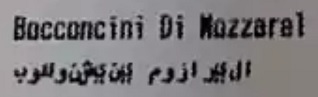

POS-ARABIC.jpg

With the help from a friend who had the modified files from EPSON. Following were replaced with originals on all consoles and problem was resolved.

PrintUnicodeAdapter.dll

PtrCore130.dll

NOTE: These files are workable only with the ADK270ER5 driver version.

*This post is locked for comments

I have the same question (1)
  • Verified answer
    Shafeeque P. Profile Picture
    6,533 Moderator on at

    It doesn't work with the default opos driver from . PM me your email address, i will share the driver with arabic support.

    Fast forward to Marc 2023: The issue is resolved in the latest version of the OPOS driver from Epson. If you are seeing question marks even after using the latest driver, check for the correct code page which is mentioned in the thread by a different user.

  • Waqar Ahmed Manzoor Profile Picture
    on at

    Thank you Shafeeque, your immediate help saved my day.

  • Mohd irfan mehdi Profile Picture
    956 on at

    Hi shafeeque,

    i am also facing same problem, can you share me driver with arabic support

  • Krishna Kodidala Profile Picture
    465 on at

    Dear Shafeeque,

    I am having Printer TM-88V and System arabic enabled.  when I print Receipts it is giving junk. Will you send me Arabic support Driver Please.

    I am using NAV 5 LS retail

    My email : kneni (AT) hotmail (DOT) com  

    Warm regards

    Kris

  • Krishna Kodidala Profile Picture
    465 on at

    Hi Shafeeque,

    do we need any specific Printer model.? 

    I am using Epson TM-88V  Model M129H,

    I have installed Opos driver and copied those DLL to C:\Program Files (x86)\OPOS\Epson2.

    In OPOS setup tool I have changed code page 1256 in Printing property page.

    In NAV hardware profile I set code page 1256 too

    Please help 

    Warm regards

    Krishna Murthy 

  • Krishna Kodidala Profile Picture
    465 on at

    IMG_2D00_20171009_2D00_WA0003_2D00_1.png.1. Arabic Supported Printer

    2. Update OPOS drivers 2.7 Version or higher version for the printer

    3. Codepage value(character set) should be 1256 on printer and hardware profile

    4. BIN Conversion should be false on Hardware profile.

    5. System need Arabic enabled.

    Still unable to print receipts. It gives right alignment of whole Product line including Unit price.

    Warm regards

    Kris

  • Community Member Profile Picture
    on at

    Dear Friend,

    I am having trouble printing arabic (its printing in reverse direction). Epson TM-T88VU is the printer and using OPOS driver. Please help.

    Regards,

    Avanish.

  • Waqar Ahmed Manzoor Profile Picture
    on at

    Share your email address, and I will forward you the files that are needed to fix.

  • Community Member Profile Picture
    on at

    Hello Waqar,

    I have the same issue. Can I have the patch please. nitinrastogi_kw (AT) hotmail (DOT) com

    Regards

    Nitin

  • DhavalD Profile Picture
    35 on at

    Hello Mr. Waqar

    Can you please help me with the same because I am getting reverse printing in arabic please help.

    Regards,

    Dhaval Damania

    KSA 00966595624507

Under review

Thank you for your reply! To ensure a great experience for everyone, your content is awaiting approval by our Community Managers. Please check back later.

Helpful resources

Quick Links

Responsible AI policies

As AI tools become more common, we’re introducing a Responsible AI Use…

Neeraj Kumar – Community Spotlight

We are honored to recognize Neeraj Kumar as our Community Spotlight honoree for…

Leaderboard > 🔒一 Microsoft Dynamics AX (Archived)

#1
Martin Dráb Profile Picture

Martin Dráb 4 Most Valuable Professional

#1
Priya_K Profile Picture

Priya_K 4

#3
MyDynamicsNAV Profile Picture

MyDynamicsNAV 2

Last 30 days Overall leaderboard

Featured topics

Product updates

Dynamics 365 release plans



