web
You’re offline. This is a read only version of the page.
close
Skip to main content

Notifications

Announcements

No record found.

Community site session details

Community site session details

Session Id :
Customer experience | Sales, Customer Insights,...
Answered

Lead scoring: Give points for a specific page visit

(0) ShareShare
ReportReport
Posted on by

Hi

We are building a complex lead scoring model with many parameters but we are struggling to do something quite simple:

- Give few points to a lead visiting a specific page.

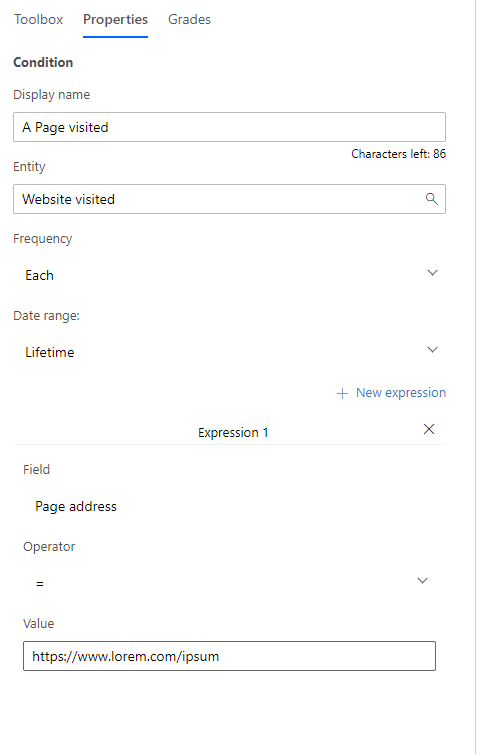
We configure the condition as follow:
pastedimage1615802937800v1.png

We want to give point when a lead visits the page https://www.lorem.com/ipsum - let's say 5 points.

When we go live, basically, all leads are getting points... where as the page is brand new and not visited yet at all by anybody.

Did we miss something?

Thanks

P

I have the same question (0)
  • Suggested answer
    Nya Profile Picture
    29,060 on at

    Hi,

    In your case, the Page address means the address of a Marketing Page.

     pastedimage1615881297078v1.png

    If you’d like to track an outside URL, you’d better create a Redirect URL.

     pastedimage1615881306864v2.png

    And set it into the Lead Scoring Model.

     pastedimage1615881316624v3.png

    The visits can be found in the insights of the Redirect URL.

     pastedimage1615881325327v4.png

    These contacts who have accessed this link also serve as Leads' Existing Contact.

    Then these associated Leads can get the scores.

     pastedimage1615881336771v5.png

    If this helped you, I'd appreciate it if you'd mark this as a Verified Answer, which may in turn help others as well.

    Best Regards,

    Nya

  • Community Member Profile Picture
    on at

    Hi,

    Thank you.

    Mmm, well, we cannot create a redirect link in between all our website pages.

    But i'm surprised by the fact that only redirect links and marketing pages can be used for lead scoring. When you look at a lead insights, in the visited pages, you can see all the pages the lead has visited.

    pastedimage1615882998171v1.png

    So, by using the URL, it should work as it's a data in D365.

    Looking at the lead scoring model, i can select "Website visits", then "Page Address".

    pastedimage1615883109812v2.png

    For the redirect link, there is a dedicated option instead of "Website visits". So if there is a dedicated option for "Redirect link", then what "Website visits" stands for?

    Thanks for your help.

    P

  • Suggested answer
    Nya Profile Picture
    29,060 on at

    Hi,

    The "Website visits" stands for the visits of a certain Marketing Website.

     pastedimage1615943522927v1.png

    If you enter a link directly into the model without any processing in Marketing, it will not get the corresponding tracking results.


    If this helped you, I'd appreciate it if you'd mark this as a Verified Answer, which may in turn help others as well.

    Best Regards,

    Nya

  • Community Member Profile Picture
    on at

    Hi Nya

    Thanks.

    In my case, i've several Marketing Websites.

    pastedimage1615969718165v2.png

    In this case, as you can see, we know who has visited our website. I would like to assign point to these persons when they visit specific pages... For ex the second line. How to achieve that?

    I dont understand why we could not do this as it's tracked and in the database.

    Thanks

  • Verified answer
    Nya Profile Picture
    29,060 on at

    Hi,

    In your case, the page addresses here are the URLs of the Marketing Pages that the websites are embedded into.


    If you’d like to score the leads with the visits of the Website from different page addresses, the Expression should be set as

    1. Website ID = the websites you’d like to track.
    2. Page address = the URL of the Marketing Page.


    For example, here’s a visit of the Website, called Capture.

     pastedimage1616061342588v1.png

    The Contact who made the visit is the Existing Contact of a Lead.

     pastedimage1616061348287v2.png

    Set the Lead Scoring Model as the following image.

     pastedimage1616061368493v4.png

    The scores of the Lead will be updated after going live the model.

     pastedimage1616061376488v5.png

    If this helped you, I'd appreciate it if you'd mark this as a Verified Answer, which may in turn help others as well.

    Best Regards,

    Nya

  • Community Member Profile Picture
    on at

    Hi Nya

    It looks like this is what i'm looking for :-) Let me test it and come back to you here.

    Thanks a lot

    P

  • Community Member Profile Picture
    on at

    Thank you Nya, it worked :-)

    I was sure that it was doable and you helped me. Thanks for your help

Under review

Thank you for your reply! To ensure a great experience for everyone, your content is awaiting approval by our Community Managers. Please check back later.

Helpful resources

Quick Links

Responsible AI policies

As AI tools become more common, we’re introducing a Responsible AI Use…

Neeraj Kumar – Community Spotlight

We are honored to recognize Neeraj Kumar as our Community Spotlight honoree for…

Leaderboard > Customer experience | Sales, Customer Insights, CRM

#1
Tom_Gioielli Profile Picture

Tom_Gioielli 170 Super User 2025 Season 2

#2
#ManoVerse Profile Picture

#ManoVerse 70

#3
Jimmy Passeti Profile Picture

Jimmy Passeti 50 Most Valuable Professional

Last 30 days Overall leaderboard

Product updates

Dynamics 365 release plans



