web
You’re offline. This is a read only version of the page.
close
Skip to main content

Notifications

Announcements

Community site session details

Community site session details

Session Id :
Microsoft Dynamics AX (Archived)

Fixed Asset depreciation

(0) ShareShare
ReportReport
Posted on by 452

Hi

I am using a FA Straight Line Service Life method

eg 1/1/16  acquistion 1,200

service life = 12

monthly depreciation = 100/month

1/4/16 acquisition adjustion = 1200

depreciation for april onward = 200/month

I do want to to have adjustment happen on the last period.

How do i make the depreciation to run for 200/month until the FA is fully depreciated?
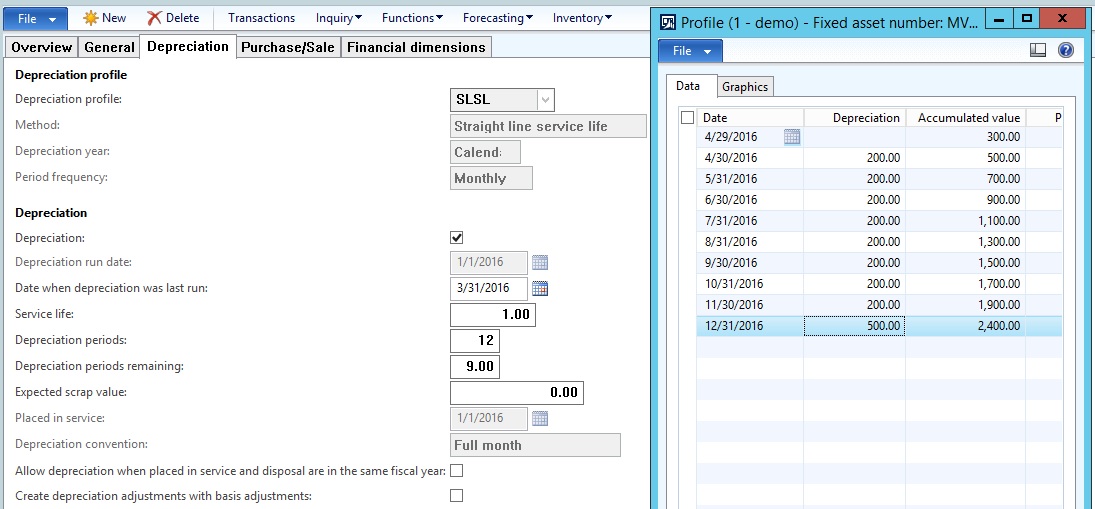
5047.FA.jpg

I tried in Ax2012 R2 should be able to do so

Refer to below
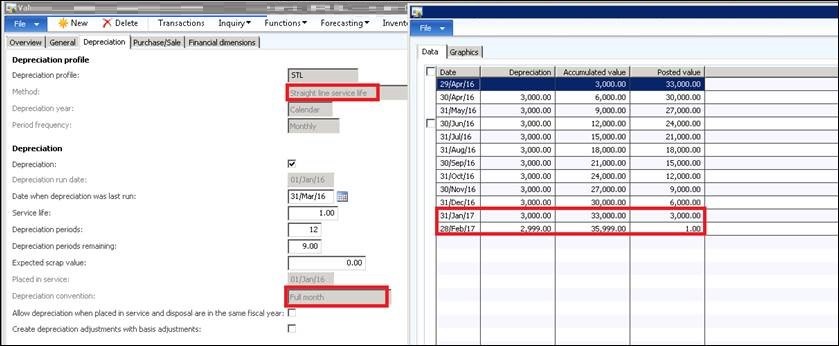
AX2012-R2.jpg

*This post is locked for comments

I have the same question (0)
  • Ludwig Reinhard Profile Picture
    Microsoft Employee on at

    Hi Dexin,

    If nothing remains open and if your issue is fixed would you be so kind and verify the feedback that helped you getting this fixed? Many thanks,

    Ludwig

  • Dexin Profile Picture
    452 on at

    Hi Serene,

    Yes, it works.

    Thank you very much.

  • Verified answer
    Community Member Profile Picture
    on at

    Hi Dexin,

    I've tested the case in 2012R3CU9, and changing the Remaining period does work for Straight line service line method:

    2768.2.png

    2768.2.png

    Perhaps you can give it another try.

    S.

  • Dexin Profile Picture
    452 on at

    Changing remaining period only works for Stailght line life remaining method.

    Thank you so much anywhere....got no choice but to change the depreciation method to Straight line life remaining

  • Dexin Profile Picture
    452 on at

    Yes, i did checked and compared all the parameters in R2 and R3. but they result differently

  • Suggested answer
    André Arnaud de Calavon Profile Picture
    301,908 Super User 2025 Season 2 on at

    Hi Dexin,

    You can try to change the remaining periods to 10.5. Then it should use 2100 / 10.5 as calculation.

  • Ludwig Reinhard Profile Picture
    Microsoft Employee on at

    Hi Dexin,

    Have you checked and compared all your fixed asset parameter settings? If it worked in R2 then it should work the same in R3.

    Has your fixed asset setup been made for a specific country or with some customizations?

    Best regards

    Ludwig

  • Dexin Profile Picture
    452 on at

    Straight Line Life remaining will base on my remaining to do the calculation

    eg

    1200 acquired on 1/1/16

    Jan'16 depreciation - 100

    Feb'16 depreciation - 100

    March'16 - 100

    NBV as at March'16 = 900

    Remaining life - 9

    if april'16 acq ajustment + 1200

    Calculation will be NBV / remaining life

    =  2100 / 9

    = 233.33

    But i would like April'16 onward depreciate 200/month until it fully depreciated.

    Base on my attachment on top, it's able to do so in R2.

  • Suggested answer
    André Arnaud de Calavon Profile Picture
    301,908 Super User 2025 Season 2 on at

    Hi Dexin,

    The Straight Line Service Life method is not the correct setting for your requirement. You need to use the Straight Line Life Remaining for this purpose. Have a look at the next help document: technet.microsoft.com/.../aa498361.aspx

Under review

Thank you for your reply! To ensure a great experience for everyone, your content is awaiting approval by our Community Managers. Please check back later.

Helpful resources

News and Announcements

Season of Giving Solutions is Here!

Quick Links

Responsible AI policies

As AI tools become more common, we’re introducing a Responsible AI Use…

Neeraj Kumar – Community Spotlight

We are honored to recognize Neeraj Kumar as our Community Spotlight honoree for…

Leaderboard > 🔒一 Microsoft Dynamics AX (Archived)

#1
TAHER Mehdi Profile Picture

TAHER Mehdi 3

#2
Martin Dráb Profile Picture

Martin Dráb 2 Most Valuable Professional

#2
Volodya Profile Picture

Volodya 2

Last 30 days Overall leaderboard

Featured topics

Product updates

Dynamics 365 release plans



