web
You’re offline. This is a read only version of the page.
close
Skip to main content

Notifications

Announcements

No record found.

Community site session details

Community site session details

Session Id :
Microsoft Dynamics AX (Archived)

DataMart/Management Reporter Data Sync Issue

(0) ShareShare
ReportReport
Posted on by 45

Hello,

My issue today stems from data synchronization between the datamart and management reporter.  The data itself tends to not synchronize from our production environment unless the application and process services are restarted.  Per several other items found on the site, we first attempted to reset the AX-MR credentials to no avail (I've attached a screenshot showing our MR Config Console).  We also have a few SQL errors/timeouts in the log around the last time we experienced problems, but I'm not entirely convinced they're related.
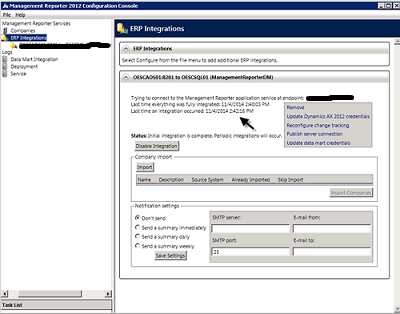
Any idea as to how we can sync this data without restarting the services each time or is this a necessary evil from here on out?

Thanks!

- Andrew

*This post is locked for comments

I have the same question (0)
  • Andrew Holman Profile Picture
    45 on at

    It seems this isn't an uncommon thing, but I'm not very familiar with Management Reporter, so was hoping to defer to someone with more experience.  Again, thanks for any information.

  • Community Member Profile Picture
    on at

    Andrew,

    We are experiencing the same issue and the only resolutions I have seen are refresh the connection or recreate the data mart. Have you gotten any other leads?

    Thanks!

  • Andrew Holman Profile Picture
    45 on at

    Ben,

    We actually two customers going through this now and both seem to be experiencing time outs with the data synchronization process.  What has worked for both customers (one of them only temporarily) was to reset the default process refresh time to 45 seconds in the Management Reporter SQL database.

    You can see the processes and relative times using the queries found in this post:

    community.dynamics.com/.../138888.aspx

    I would also recommend checking the Scheduling.Message table for any message with a Severity != '8' - that is the standard level, so it will filter out the syncs that went through correctly.  All of the '2' severity messages deal with timeouts and sync failures.  If you arrange by date DESC you should be able to get a general idea of how everything is running.

    The other alternative mentioned in that post by Redbeard at the bottom is writing a batch file and then using Task Scheduler to restart your MR data services each night (or whenever your business/users are least active on Management Reporter).

    Hope this helps some.  We still have a user that is experiencing this problem but the refresh time defaults helped the other, so it might be worth exploring.

    - Andrew

Under review

Thank you for your reply! To ensure a great experience for everyone, your content is awaiting approval by our Community Managers. Please check back later.

Helpful resources

Quick Links

Responsible AI policies

As AI tools become more common, we’re introducing a Responsible AI Use…

Neeraj Kumar – Community Spotlight

We are honored to recognize Neeraj Kumar as our Community Spotlight honoree for…

Leaderboard > 🔒一 Microsoft Dynamics AX (Archived)

#1
Martin Dráb Profile Picture

Martin Dráb 4 Most Valuable Professional

#1
Priya_K Profile Picture

Priya_K 4

#3
MyDynamicsNAV Profile Picture

MyDynamicsNAV 2

Last 30 days Overall leaderboard

Featured topics

Product updates

Dynamics 365 release plans
