web
You’re offline. This is a read only version of the page.
close
Skip to main content

Notifications

Announcements

No record found.

Community site session details

Community site session details

Session Id :
Finance | Project Operations, Human Resources, ...
Suggested Answer

Only 1 of 2 keys provided for lookup, provide keys for dataAreaId,VendorAccountNumber. clientRequestId: 5395adea-0ccf-476f-a4ee-0348c80f36ef

(0) ShareShare
ReportReport
Posted on by

Hi,

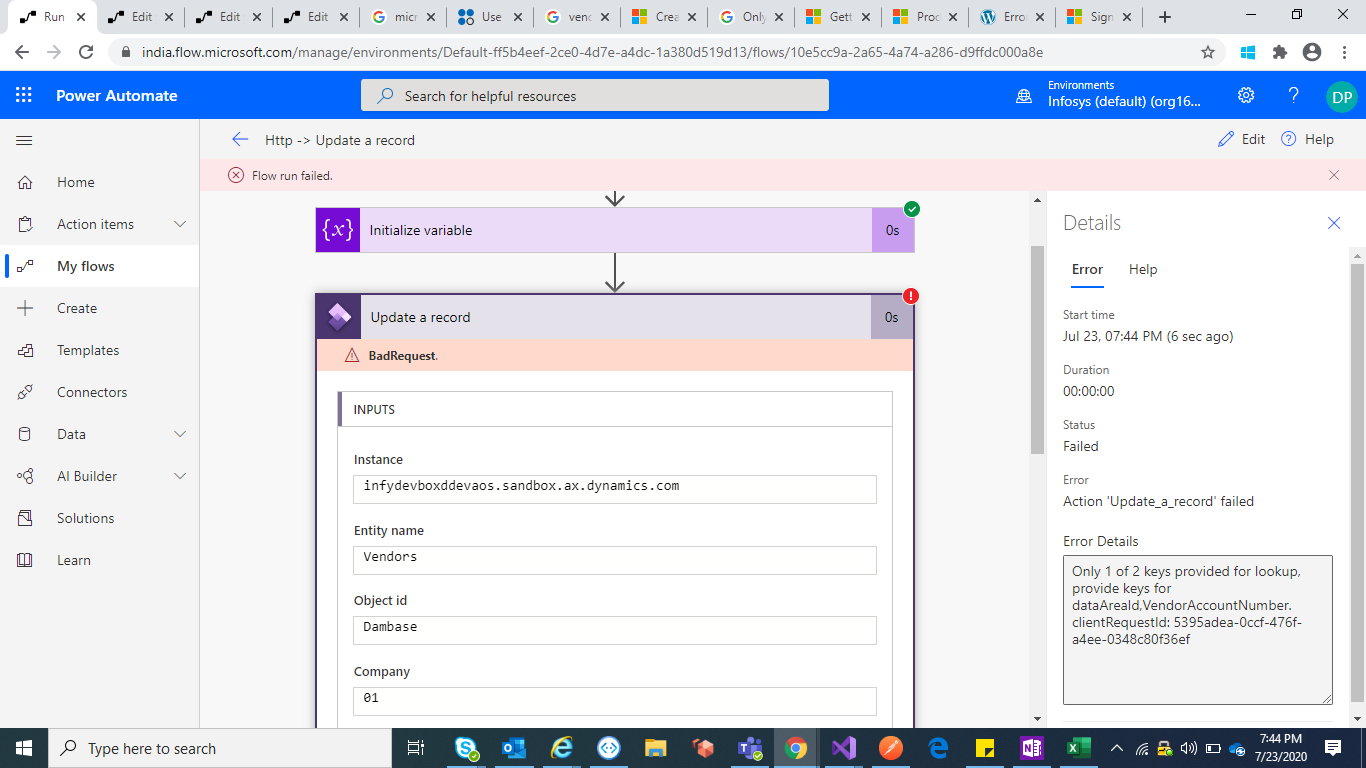
I am using power automate inorder to connect to D365 ERP. I need to update the fax and email details of the particular vendor by giving the Vendor Account Number.I have written the flow in power automate but I am getting the below error.

"Only 1 of 2 keys provided for lookup, provide keys for dataAreaId,VendorAccountNumber.
clientRequestId: 5395adea-0ccf-476f-a4ee-0348c80f36ef"

Although I gave the mentioned values I am getting similar error.In power autmate there is something field called object ID what should I give in that object ID.Pls mention.
Screenshot-_2800_73_2900_.png

I tried to test it in Postman I am getting the below error.

{
    "error": {
        "code""NoResponse",
        "message""The server did not received a response from an upstream server. Request tracking id '08586060932277506532340268439CU25'."
    }
}
Thank you in Advance.
I have the same question (0)
  • nmaenpaa Profile Picture
    101,162 Moderator on at

    Did you provide Vendor account number? I can't see it in the screenshot.

  • PranaviD Profile Picture
    30 on at

    Yes,I have given. It is Dambase which I gave the input from postman as it is failed we are able to see it in power automate

    Screenshot-_2800_75_2900_.png

  • PranaviD Profile Picture
    30 on at
    [deleted]
  • Suggested answer
    nmaenpaa Profile Picture
    101,162 Moderator on at

    Have you tried with VendorsV2 entity?

    Vendors is marked as obsolete so you should not use it.

    Your Postman issue seems unrelated since you get a completely different error.

  • PranaviD Profile Picture
    30 on at

    Yes, I have tried with VendorsV2 entity but the same error again.

  • Suggested answer
    André Arnaud de Calavon Profile Picture
    301,148 Super User 2025 Season 2 on at

    Hi Pranavi,

    You have to use the dataarea ID and the entity key sparated with a comma as the object key.

    So e.g.  01,Dambase

    You can read about this on my blog: dynamicspedia.com/.../

  • PranaviD Profile Picture
    30 on at

    Hi Andre,

    It's working.Thank you so much.

Under review

Thank you for your reply! To ensure a great experience for everyone, your content is awaiting approval by our Community Managers. Please check back later.

Helpful resources

Quick Links

Responsible AI policies

As AI tools become more common, we’re introducing a Responsible AI Use…

Neeraj Kumar – Community Spotlight

We are honored to recognize Neeraj Kumar as our Community Spotlight honoree for…

Leaderboard > Finance | Project Operations, Human Resources, AX, GP, SL

#1
André Arnaud de Calavon Profile Picture

André Arnaud de Cal... 449 Super User 2025 Season 2

#2
Martin Dráb Profile Picture

Martin Dráb 422 Most Valuable Professional

#3
BillurSamdancioglu Profile Picture

BillurSamdancioglu 239 Most Valuable Professional

Last 30 days Overall leaderboard

Product updates

Dynamics 365 release plans



