web
You’re offline. This is a read only version of the page.
close
Skip to main content

Notifications

Announcements

No record found.

Community site session details

Community site session details

Session Id :
Customer experience | Sales, Customer Insights,...
Suggested Answer

Form Definition - Edit/Insert Portals

(0) ShareShare
ReportReport
Posted on by 3,710

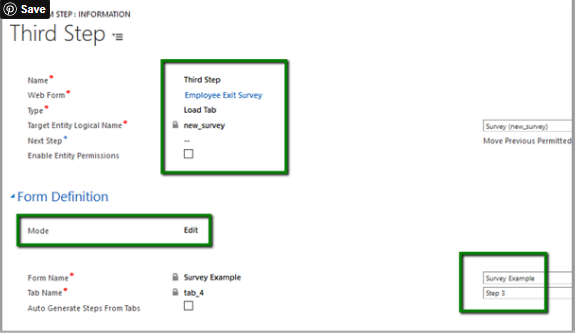
Hello Team, Can you please clarify the difference between the Edit/Insert Mode in the Form Definition? Thank you! 

We are updating some data in the particular entity in the insert mode from the Portals, the data is updated in the CRM. When we view the same data in another from with the Edit Mode, the data is not showing  the current value, instead its showing the old value.
pastedimage1594341762021v2.png

I have the same question (0)
  • Suggested answer
    Bipin D365 Profile Picture
    28,983 Moderator on at

    Hi,

    Edit mode used if you want to edit existing record.

    Insert mode used when you want the user to create new record.

    If found helpful, Please mark my answer verified.

  • Kishor Kumar Profile Picture
    3,710 on at

    Thanks Bipin! We had made some changes to a record in the Insert Mode and the data is updated in the CRM, but when we the same record in the Edit mode, its showing the old record values not the updated one. Any pointers on this. Thank you!

  • Alejandro Serdan Profile Picture
    on at

    Hi !

    Showing the old record values is in some scenarios expected due to cache latency. Cache latency SLA is 15 minutes.

    Regards.

  • Suggested answer
    oliver.rodrigues Profile Picture
    4,052 on at

    that's a weird behavior in my opinion

    the insert mode should always create a new record

    the edit mode expects the record GUID in the query string parameter, that's how it identities it and updates the existing record

    you shouldn't have any caching issues if you are performing the transactions within the Portals, for example if you update a record in via Portals you should see the data straight away.. if you update back in your Model-Driven App (D365) then it might take a while for the data to be refreshed in the Portals

    ------------

    If you like this post, give a Thumbs up. Where it solved your request, Mark it as a Solution to enable other users find it.

    We highly recommend users to migrate to PowerUsers community for new Portal questions:

    powerusers.microsoft.com/.../PowerAppsPortals

Under review

Thank you for your reply! To ensure a great experience for everyone, your content is awaiting approval by our Community Managers. Please check back later.

Helpful resources

Quick Links

Responsible AI policies

As AI tools become more common, we’re introducing a Responsible AI Use…

Neeraj Kumar – Community Spotlight

We are honored to recognize Neeraj Kumar as our Community Spotlight honoree for…

Leaderboard > Customer experience | Sales, Customer Insights, CRM

#1
Tom_Gioielli Profile Picture

Tom_Gioielli 83 Super User 2025 Season 2

#2
Gerardo Rentería García Profile Picture

Gerardo Rentería Ga... 49 Most Valuable Professional

#3
#ManoVerse Profile Picture

#ManoVerse 40

Last 30 days Overall leaderboard

Product updates

Dynamics 365 release plans



