web
You’re offline. This is a read only version of the page.
close
Skip to main content

Notifications

Announcements

No record found.

Community site session details

Community site session details

Session Id :
Finance | Project Operations, Human Resources, ...
Suggested Answer

Uploading attachment to current record in Dynamics F&O with the use of ODataUltility library c#

(0) ShareShare
ReportReport
Posted on by 130

Previously I have asked this question here - community.dynamics.com/.../984690,  but

I have some misunderstanding. I was advised to use this sample of code for import from here - github.com/.../DataPackageHandler

1004.Captu64re.PNG

To make it work with Dynamics I must configure azure storage for dynamics in this way - github.com/.../wiki

Is that all that I have to do to make imports to dynamics, so that documents will appear in attachments ?

0456.Capture4.PNG

I have the same question (0)
  • Martin Dráb Profile Picture
    237,990 Most Valuable Professional on at

    Your question can't be answered at the moment, because it depends on what you mean by "to make imports". For example, if there is no data entity for what you want to import, you must develop it before you can use it.

  • Dynamics Questions Profile Picture
    130 on at

    I mean that I always have data entity, case, that you have described will never be used. "to make imports" - I wanted to describe, that I have already some prepared entity for import, (sales order) and some documents. So, I want these documents being appeared in attachment tab at dynamics with in same item, where I send data for sales order entity

  • Suggested answer
    Martin Dráb Profile Picture
    237,990 Most Valuable Professional on at

    If you "send data for sales order entity", it'll create or update sales orders, but not attachments. The entity doesn't accept any files.

    To create document attachments, you'll have to create a new entity that can do that. Look EcoResDocumentAttachmentEntity or LedgerJournalAttachmentsEntity, for instance.

  • Dynamics Questions Profile Picture
    130 on at

    Is there any code sample where import of document with the use of LedgerJournalAttachmentsEntity to dynamics is shown ?

    The only thing I found is this - community.dynamics.com/.../import-document-handling-attachment-files-msdyn365fo

    But I still have questions :

    1) In LedgerAttachment I have CreateLedgerAttachment method with parameters dataAreaId, documentid and ledgerJournalHeaderEntityAttachment. What is dataAreaId parameter ?

    2) What fields are obligatory for successful import

    3)When LedgerJournalAttachmentsEntity is used, all fields are initialized, with the help of what this entity must be sent to dynamics ?

  • Martin Dráb Profile Picture
    237,990 Most Valuable Professional on at
    1. DataAreaId is the ID of an company (legal entity) in F&O. Nevertheless I don't know what method you're talking about and you shouldn't to call any such a method by yourself, as far as I know. It's already handled by DocuRefEntity.insertEntityDataSource().
    2. It depends on the entity you'll create/use. What you'll need at the minimum are mandatory fields of DocuRef table, primary key of the record you're attaching to and the file content.
    3. Unfortunately I don't understand this question. Please try to rephrase it.
  • Suggested answer
    Sergei Minozhenko Profile Picture
    23,093 on at

    Hi Dynamics Questions,

    I recommend to create a new entity for your needs (as described in the article) at first (or use existing) and create an example in D365. Then you can export it from D365 and you will get an almost workable package for import. From this package, you will get an idea of what fields and how to fill them.

    Important fields:

    DocumentId - should be unique

    FileContentsFileName - should match filename from Resource folder.

    You can import this package via data package API or recurring API.

    BR, Sergei

  • Dynamics Questions Profile Picture
    130 on at

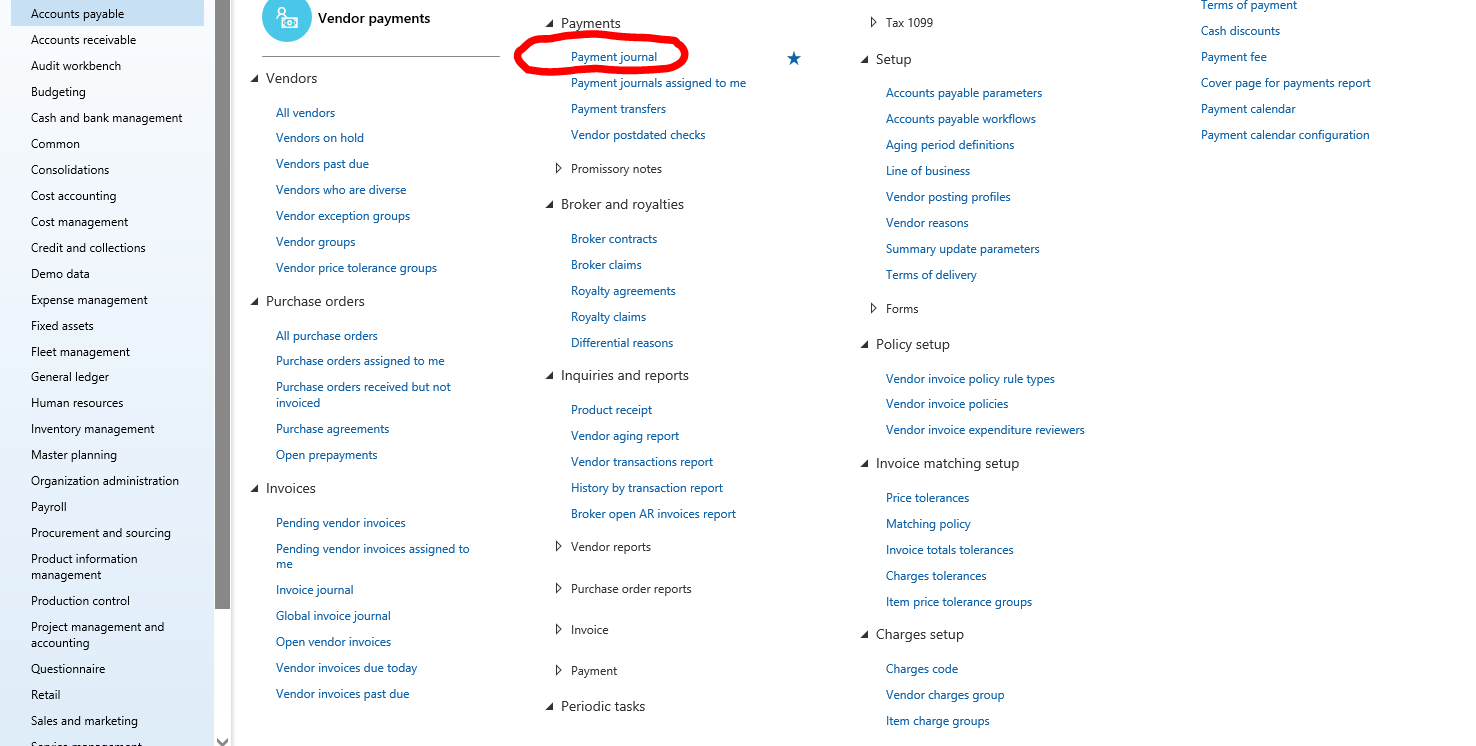
    I use VendorPaymentJournalFee type of export, 
     4670.Capture1.PNG

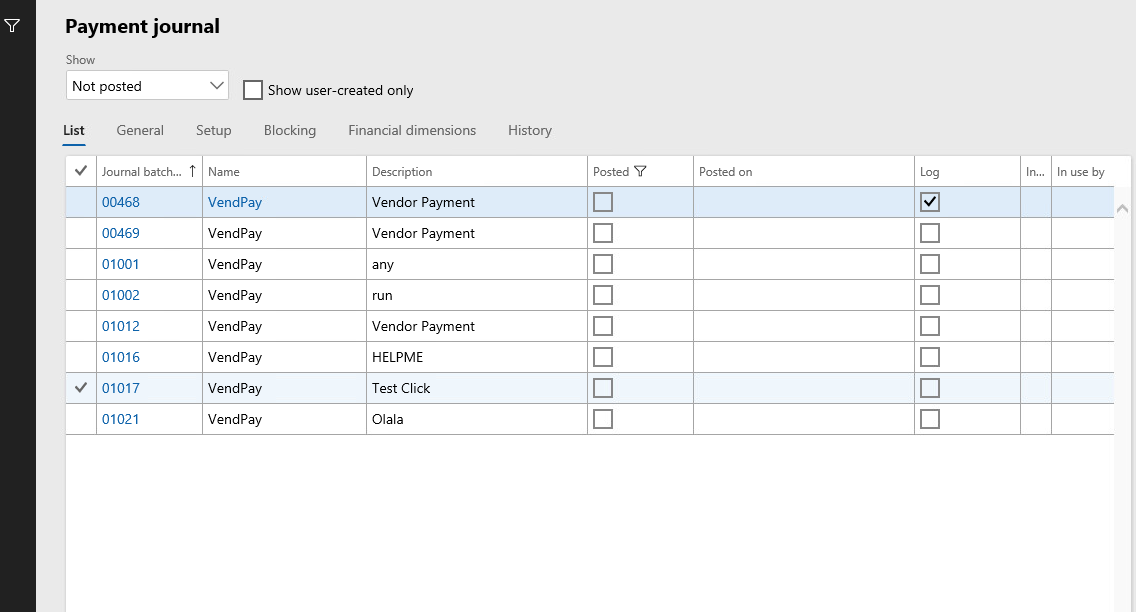
    so all fields with tables appear here after I export them from my environment to Dynamics
    2844.Capture2.PNG

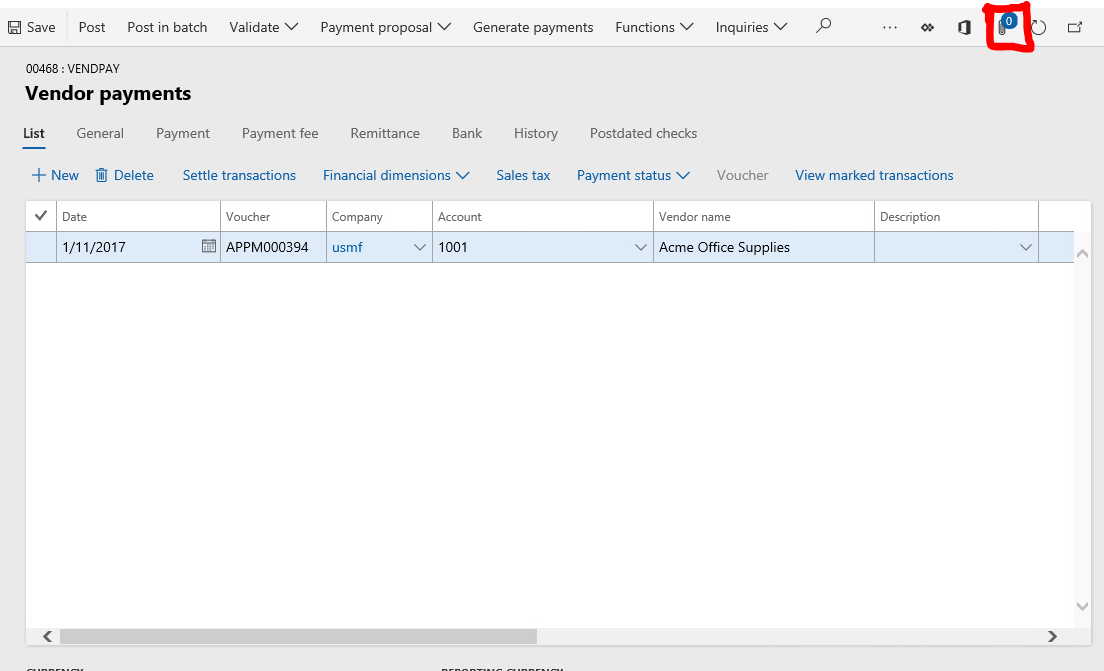
    I need to transfer attachments together with all data (fields, tables) in such a way that, attachments will appear in a new Journal Item, that I exported to Dynamics. I mean here 
    8463.PNG

    For export of my Journal items to dynamics from my environment I use VendorPaymentJournalFee class. Make instance of it, filling and sending to dynamics.

    How I must combine it together with LedgerAttachment instance ( I read that this instance is used for exporting attachments to dynamics). For example : 

    I have filled Journal entity  and I need to make attachment for it, how I can Implement this ?

  • Dynamics Questions Profile Picture
    130 on at

    I tried to make export with the use of all fields that are mentioned above, but I get this error 

    0407.PNG

    This value is already defined in Vendor Journal, so what should I do 

    7840.Capture2.PNG

  • Martin Dráb Profile Picture
    237,990 Most Valuable Professional on at

    Don't you confuse works "export" and "import"?

    You said that you wanted data to appear in an AX form after you export them from an environment, but that would require an import.

    Also, the error you get suggests that you're actually importing (conflicting) data, despite that you said you're making export.

    Why exactly do you want to use some classes instead of data entities, as we suggested? I even didn't see LedgerAttachment class in my application - what it is?

  • Dynamics Questions Profile Picture
    130 on at

    I want to import data do dynamics, by exporting data from my environment.
    I need to send files to dynamics

    This is the class, which I mentioned 

    ld.PNG

Under review

Thank you for your reply! To ensure a great experience for everyone, your content is awaiting approval by our Community Managers. Please check back later.

Helpful resources

Quick Links

Responsible AI policies

As AI tools become more common, we’re introducing a Responsible AI Use…

Neeraj Kumar – Community Spotlight

We are honored to recognize Neeraj Kumar as our Community Spotlight honoree for…

Leaderboard > Finance | Project Operations, Human Resources, AX, GP, SL

#1
André Arnaud de Calavon Profile Picture

André Arnaud de Cal... 490 Super User 2025 Season 2

#2
Martin Dráb Profile Picture

Martin Dráb 429 Most Valuable Professional

#3
BillurSamdancioglu Profile Picture

BillurSamdancioglu 241 Most Valuable Professional

Last 30 days Overall leaderboard

Product updates

Dynamics 365 release plans
