web
You’re offline. This is a read only version of the page.
close
Skip to main content

Notifications

Announcements

No record found.

Community site session details

Community site session details

Session Id :
Customer experience | Sales, Customer Insights,...
Answered

Create a relationship with a custom entity in Microsoft Flow

(0) ShareShare
ReportReport
Posted on by 35

Hi,

I am new to Dynamics 365 but have to create some Flows in Microsoft Flow.

Right now I am trying to create a flow for a custom entity. When the flow is triggered, Dynamics 365 should create a new invoice, relate this invoice to a customer and create a invoice product on this invoice.

I set everything up except one thing:

The invoice product is related to a custom entity. When I try to create this relationship I always receive an error:

{
  "error": {
    "code": "0x0",
    "message": "Resource not found for the segment 'cr077_Lizenzen'."
  }
}

This is the relevant part of the flow:
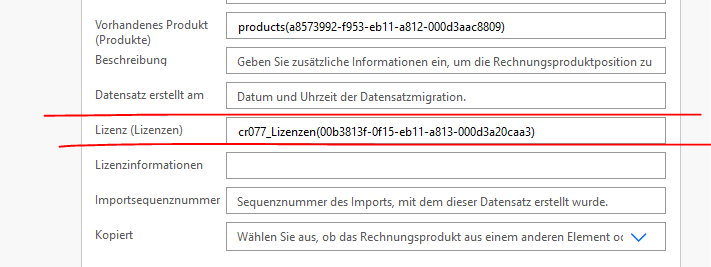
pastedimage1610523763931v1.png

I already know that I have to use the plural form of the entity identifier. This should be "cr077_Lizenzen" because the singular is "cr077_Lizenz". I also tried ""cr077_Lizenzs" but none of them worked.

I have created many relationships with default entities and these are working, only this custom one does not work.

Could anyone give me a hint how to solve this? I could not find anything via web research or in the documentation. Besides that, does anyone know a good book to get a better understanding of Dynamics 365?

Thank you for any help!

I have the same question (0)
  • LoisBarbassat@Ekkiden Profile Picture
    20 on at

    Hi !

    I might be wrong, but the table name needs to be written in plural, like "cr077_Lizenzens" or "cr077_Lizenzenes"

    Power Automate is a bit limited on that and don't always reconize plural words in languages different than english, so you might have to add "s" or even "es" at the end to make it looks like plural.

    Tell me if it's work !

    Kind Regards,

    Loïs

  • sits-ww Profile Picture
    35 on at

    Hi Loïs,

    unfortunately this has not worked. Usually "Lizenzen" should be the plural, because singular is "Lizenz". I have already looked in the entity settings and there is written that "Lizenzen" is the plural.

    I have already tried

    cr077_Lizenz

    cr077_Lizenzen

    cr077_Lizenzs

    cr077_Lizenzens

    cr077_Lizenzes

    cr077_Lizenzenes

    None of them worked.

    I think I have now tried every possibility to get the correct plural. Has Flow a special syntax if the entity is custom? I have researched it but all information I got were for the old data connectors, even in the official documentation.

  • LoisBarbassat@Ekkiden Profile Picture
    20 on at

    I have managed to use flows with custom table using this syntax bellow and it works perfectly, it's in production for several client :

    I just add the "/" symbol, like bellow :

    /prefix_customentityname(GUID)

    I have also noticed that the last ")" tend to disapear when I save my flow, without exactly knowing why.

    Maybe adding "/" at the beggining and double checking for the ")" might help?

  • Suggested answer
    LuHao Profile Picture
    40,892 on at

    Hi partner,

    When you update a lookup field in flow, its format should be the entity's plural name / GUID.

    pastedimage1610530019404v1.png

    We can check the plural name of the entity in https://make.powerapps.com/.

    pastedimage1610530157266v2.png

    pastedimage1610530181839v3.png

    pastedimage1610530199072v4.png

  • sits-ww Profile Picture
    35 on at

    Hi Lu,

    unfortunately this has not solved the issue.

    I have double checked the plural name in the entity settings. This plural name can be changed, so it is possible that the name has changed over time, is there a way to see which is the "real" plural name for the entity?

    Besides that:

    Is there a reason why the syntax is "entity's plural name / GUID" now? Last time I asked I was told to use "entity's plural name(GUID)". Is there any difference? Where can I lookup such information in future? In the Microsoft documentation everything was related to the old data connector..

  • Verified answer
    LuHao Profile Picture
    40,892 on at

    Hi partner,

    We can query its plural name via web api.

    Enter the url https://yourOrg.crm.dynamics.com/api/data/v9.1/EntityDefinitions(LogicalName=%27entityname%27), it will show all metadata.

    Then search "EntitySetName", its value is the entity's plural name.

    pastedimage1610617410748v3.png

  • Verified answer
    LuHao Profile Picture
    40,892 on at

    Hi partner,

    I just tested it, the effect of

    • entity's plural name/GUID
    • /entity's plural name(GUID)
    • entity's plural name(GUID)

    are exactly the same, there is no difference, you can choose any format.

  • sits-ww Profile Picture
    35 on at

    Hi Hao,

    thank you. I could use your information to get the right plural name. After that I was able to run my workflow without any error!

    So much appreciation!

    Have a nice day.

    kind regards from Vienna

Under review

Thank you for your reply! To ensure a great experience for everyone, your content is awaiting approval by our Community Managers. Please check back later.

Helpful resources

Quick Links

Responsible AI policies

As AI tools become more common, we’re introducing a Responsible AI Use…

Neeraj Kumar – Community Spotlight

We are honored to recognize Neeraj Kumar as our Community Spotlight honoree for…

Leaderboard > Customer experience | Sales, Customer Insights, CRM

#1
Tom_Gioielli Profile Picture

Tom_Gioielli 70 Super User 2025 Season 2

#2
Gerardo Rentería García Profile Picture

Gerardo Rentería Ga... 43 Most Valuable Professional

#3
Daniyal Khaleel Profile Picture

Daniyal Khaleel 32 Most Valuable Professional

Last 30 days Overall leaderboard

Product updates

Dynamics 365 release plans



