web
You’re offline. This is a read only version of the page.
close
Skip to main content

Notifications

Announcements

No record found.

Community site session details

Community site session details

Session Id :
Microsoft Dynamics NAV (Archived)

Facing error at the time of creating warehouse shipment

(0) ShareShare
ReportReport
Posted on by 390

Hi Experts,

I am using NAV 2016. I am trying to use FEFO Functionality and I am unable to create warehouse shipment but warehouse receipt and put away posted successfully. 

at the time of warehouse shipment system showing error 'ship must be equal to 'yes' in bin type: code = Put away. Current value is 'No'. 
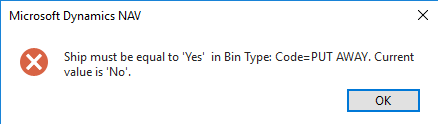
7713.e1.png

But when i m trying to do changes according to error message in bin type then system is not allowing to do changes.
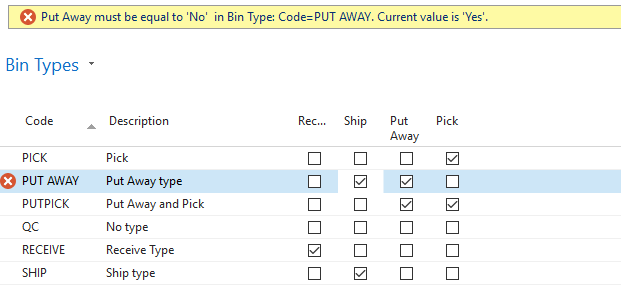
e2.png

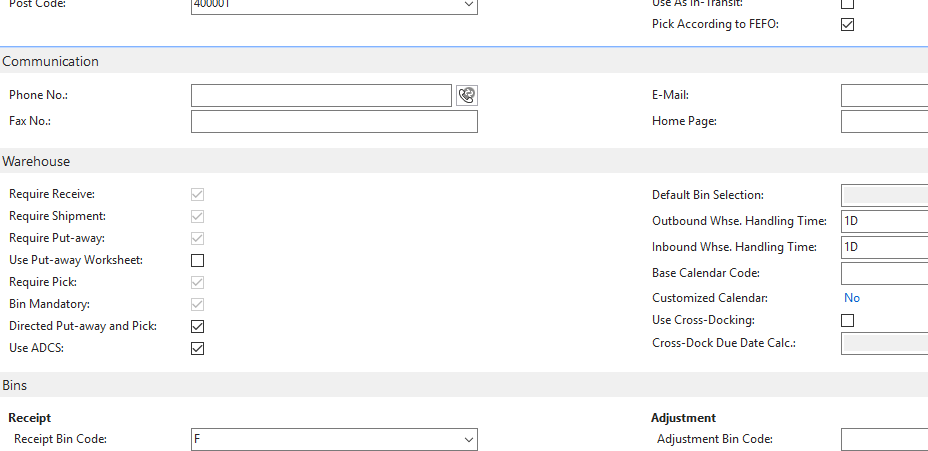
Location card setups: 

e3.png

Please suggest any idea to solve this.

Thanks

*This post is locked for comments

I have the same question (0)
  • Suggested answer
    Mohana Yadav Profile Picture
    61,005 Super User 2025 Season 2 on at

    shouldn't you be using Pick bin type for shipment instead of Put Away?

  • Rajat walia Profile Picture
    390 on at

    Hi Mohana,

    Thanks for your immediate response.

    M sorry for that i accidentally share screen shot for put away instead of pick code.

    But also for pick its showing same error.

  • Verified answer
    Paras mehan Profile Picture
    3,518 on at

    Hi Rajat

    it seems like your bin is empty. Please make sure that in your bin that item is available or not?

    Best Regards,

    Paras Mehan

  • Rajat walia Profile Picture
    390 on at

    Thanks for your response.

    But How to set that it will pick from that bin because there are lots of bins and how to know that in which bin inventory is available.

  • Verified answer
    Paras mehan Profile Picture
    3,518 on at

    Open that item card, Click on Navigate Pane and open the Bin Content in Warehouse Group. Here you can check in which Bin and Zone how much inventory is available.

    Now Go to location card in Bins Fast tab in Shipment Bin code mention that bin.

    Best Regards,

    Paras Mehan

  • Rajat walia Profile Picture
    390 on at

    Thankyou so much. :)

Under review

Thank you for your reply! To ensure a great experience for everyone, your content is awaiting approval by our Community Managers. Please check back later.

Helpful resources

Quick Links

Responsible AI policies

As AI tools become more common, we’re introducing a Responsible AI Use…

Neeraj Kumar – Community Spotlight

We are honored to recognize Neeraj Kumar as our Community Spotlight honoree for…

Leaderboard > 🔒一 Microsoft Dynamics NAV (Archived)

#1
HoangNam Profile Picture

HoangNam 7

Last 30 days Overall leaderboard

Featured topics

Product updates

Dynamics 365 release plans