web
You’re offline. This is a read only version of the page.
close
Skip to main content

Notifications

Announcements

No record found.

Community site session details

Community site session details

Session Id :
Customer experience | Sales, Customer Insights,...
Answered

Customize close as won/close as lost buttons, JavaScript

(0) ShareShare
ReportReport
Posted on by 25

I'm trying to customize the close as won close as lost buttons and I'm having no luck. I tried business rules, but unless you change status reason manual after it loads it wont work. I also tried running some JavaScript  Xrm.Page.getAttribute("opportunitystatuscode").getSelectedOption(); I have it run on load and have it alert the value and it returns Null. Yet if I run it in the console after the quick create form loads it works, it returns Won.

clickButton.PNGHideFields.PNGChangeBackToLost.PNGClickStatusReason.PNG

Here is my Javascript as well as the console log.

Javascript.PNGLog-Message-_2600_-Running-the-comand-after-the-fact.PNGAlert-Message.PNG 

I have the same question (0)
  • Verified answer
    cloflyMao Profile Picture
    25,210 on at

    Hi T-con,

    As per my understanding from your description and screenshot, would you like to hide specific fields based on Status reason on the quick create form?

    It seems that you could customize quick create form of opportunity close, so I assume that you had been working in online environment with wave 2 release.

    If you would like to work with javascript, then create a timer to get field value and insert the web resource to Opportunity Close form under Opportunity Close entity.

    function test() {
    
      setTimeout(() => {
          alert(Xrm.Page.getAttribute("opportunitystatuscode").getSelectedOption().text);
      }, 2000);
    
    }

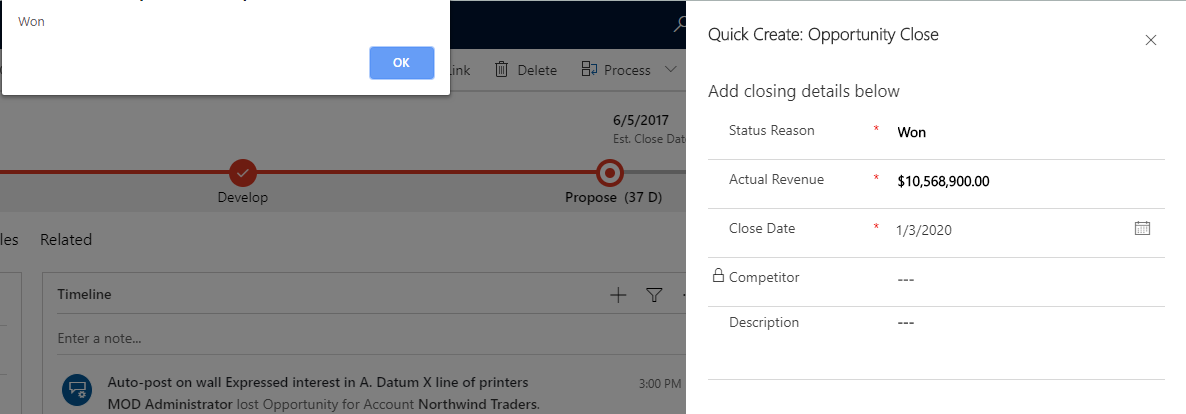
    I could get value both for Close as Won and Close an Lost from my test.
    pastedimage1578035263183v1.png

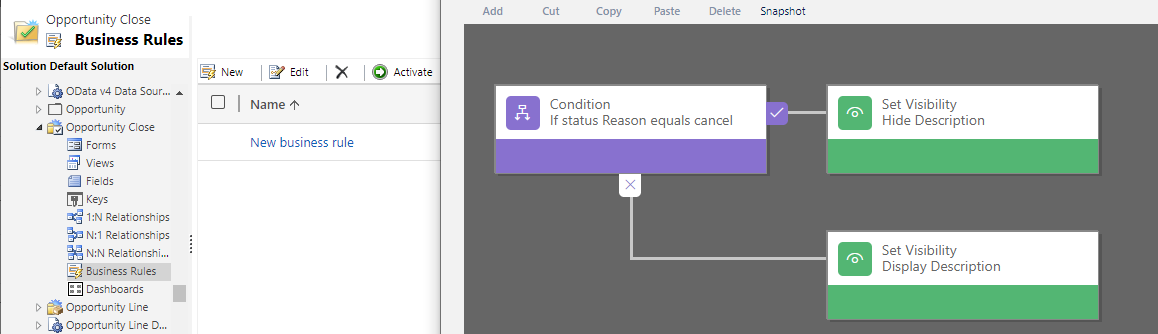
    In business rule style, I created a rule for Opportunity Close samely.

    (Scope: All Forms)
    pastedimage1578035762222v4.png

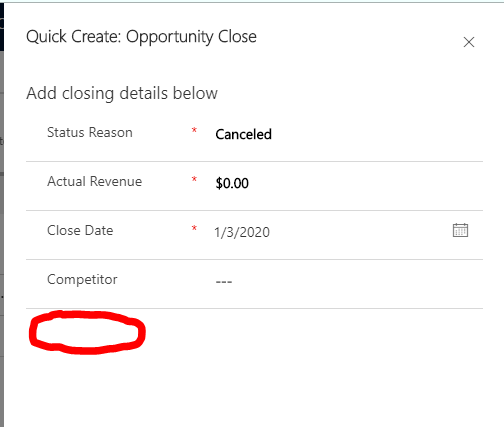
    In Close as Lost test,

    By default the Status reason equals Canceled, after I switched it to Out-Sold and set it to Canceled again, 

    then Description field would be hidden.
    pastedimage1578035532563v3.png

    It seems that business rule wouldn't take effect for default value,

    In conclusion:

    always hide field -> javascript on form onload(timeout)

    hide field on condition -> business rule or javascript on field onchange

    Regards,

    Clofly

  • T-con Profile Picture
    25 on at

    Thanks you managed to save me. I would have never guess to have JavaScript wait.

    Here is the code I used just in case anyone in the future wants to copy paste.

    function HideFields(){
    
    setTimeout(() => {
          var WonOrLost = Xrm.Page.getAttribute("opportunitystatuscode").getSelectedOption().text;
    	  //alert(WonOrLost);
    	  if(WonOrLost == "Won"){
    		//alert("you picked Won");
    		Xrm.Page.getControl("ss_lostreason").setVisible(false);
    	  } else if (WonOrLost == "Lost"){
    		//alert("you picked Lost");
    		Xrm.Page.getControl("ss_stsnumber").setVisible(false);
    	  }	  
      }, 200);
    
    //alert(WonOrLost);
    
    }

    I have one more question. I made an custom "STS number" field on my opportunity close form/entity. Now, how do I get the information from that to the opportunity entity?

    Entering_2600_SavingData.PNGDataMissing.PNG

Under review

Thank you for your reply! To ensure a great experience for everyone, your content is awaiting approval by our Community Managers. Please check back later.

Helpful resources

Quick Links

Responsible AI policies

As AI tools become more common, we’re introducing a Responsible AI Use…

Neeraj Kumar – Community Spotlight

We are honored to recognize Neeraj Kumar as our Community Spotlight honoree for…

Leaderboard > Customer experience | Sales, Customer Insights, CRM

#1
Tom_Gioielli Profile Picture

Tom_Gioielli 137 Super User 2025 Season 2

#2
#ManoVerse Profile Picture

#ManoVerse 57

#3
Jimmy Passeti Profile Picture

Jimmy Passeti 50 Most Valuable Professional

Last 30 days Overall leaderboard

Product updates

Dynamics 365 release plans



