Hello amazing community!
I have this issue where I'm using a nested table (a table inside a cell of a table) where both tables share the same dataset.
The main big table is grouped by and the nested table is in details.
I'm using it this way because this ledger line might have multiple invoices, so if there are multiple invoices I would like them to appear in rows inside the nested table.
The issue is, while I'm getting correct data, the nested table borders seems to not fit the cell that it lays inside of.
Here is a screenshot:

and here is a screenshot of the design
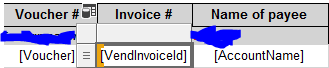
The borders highlighted in yellow are the issue.
it should be a single fields for each row, and because of this border it looks like it's two fields for each row.
I believe the issue is because the next column has a long text which was break down into two lines which expanded the cells of the original table while the nested table was not affected.
I tried using a rectangle, a text box a list but unfortunately neither fixed the issue...
How can I fix this issue?
Any advice is appreciated!
Thanks!


