web
You’re offline. This is a read only version of the page.
close
Skip to main content

Notifications

Announcements

No record found.

Community site session details

Community site session details

Session Id :
Finance | Project Operations, Human Resources, ...
Answered

How to enable/disable buttons on Edit button (in action pane) of a Standard form?

(0) ShareShare
ReportReport
Posted on by 206

Hi experts,

Basically, I have created a custom workflow on item arrival in Inventory Management and I will attach the screenshot below.

I have a requirement to disable few buttons like validate and Post when the workflow stage is in Draft. I have done this part by writing a code in datasource active method and it is working fine but when I click the Edit button or when the form is in edit mode the two buttons(Validate and Post) got enable. I have researched my self and I found the code below for how to add logic to edit button and here is the code:

class WMSJournalTable_Form_EventHandler
{

[FormEventHandler(formStr(WMSJournalTable), FormEventType::Initialized)]
     public static void WMSJournalTable_OnInitialized(xFormRun sender, FormEventArgs e)
     {
         WMSJournalTable_Form_EventHandler myEventHandler = new WMSJournalTable_Form_EventHandler();
         FormRun formRun = sender as FormRun;
         formRun.viewEditModeHelper().EditModeSwitched += eventhandler(myEventHandler.enableButtons);

     }

public void enableButtons()
     {
         info("Inside event handler");

     }

}

When I click on edit button the info message is shown meaning the eventHandler is working fine but now how can I access the FormContols in my enableButtons() method because my requirement is to enable/disable the buttons (Validate and Post). I have also tried to pass the sender as a parameter to enableButtons but it shows some error. So, anyone have any suggestion which can help me out with this?

You any suggestion would be highly appreciated!
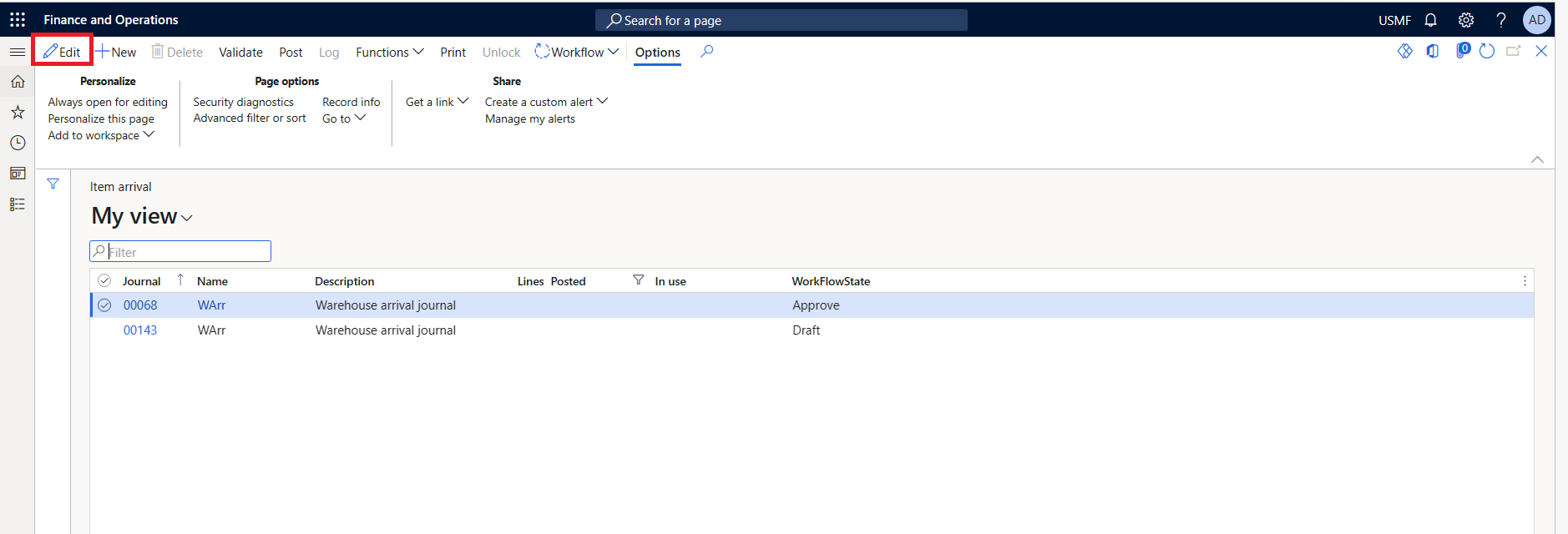
pastedimage1678889917765v1.png

I have the same question (0)
  • Suggested answer
    Mohit Rampal Profile Picture
    12,565 Moderator on at

    Hi Arif, There is a form method 'enableButtonsActive' which should be used for this purpose. You don't need to control those controls based on Edit button. Instead, you can create an Extension class for this form and access the controls directly (For controls where Auto Declaration is Yes)

    For Example

    checkJournal.enabled(wmsJournalTable.Posted);

    You can replace wmsJournalTable.Posted with wmsJournalTable.ApprovalField == WorkflowEnum::Draft

    For fields where Auto declaration is not set to Yes, controls can be accessed as mentioned in below article

    devserra.wordpress.com/.../

    We have extend same method and controlling post button based on some custom fields & conditions.

  • Arif Hussain Profile Picture
    206 on at

    Hi Mohit Rampal ,

    I really appreciate your suggestion. But I could not find the 'enableButtonsActive' method on form. Can you please verify it please.

    Regards,

    Arif

  • Suggested answer
    Mohit Rampal Profile Picture
    12,565 Moderator on at

    Hi Arif, Please verify its same form you are referring

    pastedimage1678953569354v1.png

  • Arif Hussain Profile Picture
    206 on at

    Thank you Mohit Rampal , you really saved my day.

  • Suggested answer
    Mohit Rampal Profile Picture
    12,565 Moderator on at

    Glad, I could help. Let us know if still any issues.

  • Arif Hussain Profile Picture
    206 on at

    Hi Mohit Rampal  again,

    The solution you provided is working fine and I good with that. But for my knowledge, what if we need to add some custom logic when an edit or new button is clicked?

    As mentioned I now know the eventhandlers for this but I am still unable to get the controls in those event handlers. Can you please tell me how to get those?

  • Suggested answer
    Mohit Rampal Profile Picture
    12,565 Moderator on at

    You just need access to formRun and then can access all controls in form Design.

    Check this article

    community.dynamics.com/.../form-event-hander-methods-in-dynamics-365-fo-dyn365fo

    Using Chain of command

    dynamics365musings.com/.../

  • Arif Hussain Profile Picture
    206 on at

    Hi Mohit, again your response is appreciated.

    I know getting the formControl in an eventHanlder and I also know how to extend formControlStr but my issue is that I am unable to get the controls in my public void enableButtons() method as I think it is a delegate. How can I pass the sender of eventHandler as a parameter to my enableButtons. I tried it in simple ways but it was showing an error.

    Please look into my code again. I think you will understand what do I want to achieve.

    Here is a link and screenshot which I followed:

    learn.microsoft.com/.../system-defined-buttons

    pastedimage1678967892010v1.png


    pastedimage1678967917467v2.png

  • Arif Hussain Profile Picture
    206 on at

    Hi sir Mohit Rampal ,

    I am just following if you got a chance to check my above mentioned code. Can you please help me out with this? I would highly appreciate your response.

    Regards,

    Arif

  • Suggested answer
    Mohit Rampal Profile Picture
    12,565 Moderator on at

    Hi Arif, You should use chain of commands instead of event handlers as accessing form controls is more easier. I don't think you need to use these delegates.

    Create an extension class for form and create enableButtonsActive method in extension class and using chain of command you can access all form controls.

    You can see how I have used PostJournal Form control directly in my extension class

    pastedimage1679107166998v1.png

Under review

Thank you for your reply! To ensure a great experience for everyone, your content is awaiting approval by our Community Managers. Please check back later.

Helpful resources

Quick Links

Responsible AI policies

As AI tools become more common, we’re introducing a Responsible AI Use…

Neeraj Kumar – Community Spotlight

We are honored to recognize Neeraj Kumar as our Community Spotlight honoree for…

Leaderboard > Finance | Project Operations, Human Resources, AX, GP, SL

#1
Martin Dráb Profile Picture

Martin Dráb 664 Most Valuable Professional

#2
André Arnaud de Calavon Profile Picture

André Arnaud de Cal... 522 Super User 2025 Season 2

#3
Sohaib Cheema Profile Picture

Sohaib Cheema 303 User Group Leader

Last 30 days Overall leaderboard

Product updates

Dynamics 365 release plans



