web
You’re offline. This is a read only version of the page.
close
Skip to main content

Announcements

No record found.

News and Announcements icon
Community site session details

Community site session details

Session Id :
Service | Customer Service, Contact Center, Fie...
Unanswered

The Estimated Duration Field in Work Order form is losing the value sometimes

(0) ShareShare
ReportReport
Posted on by 347

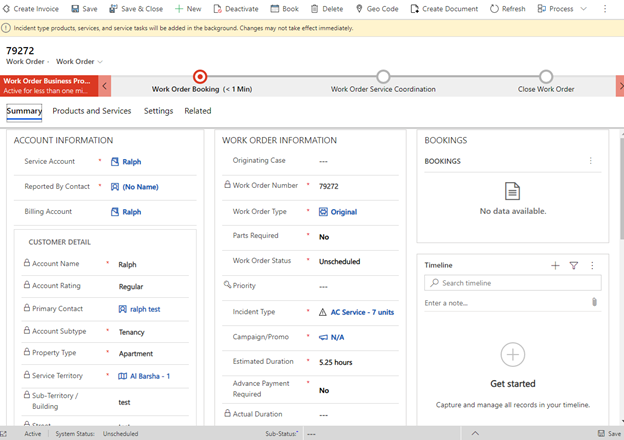
The issue is when we are selecting the incident type from the dropdown in the work order form, the estimated duration field gets auto populated after selection of the incident type. We save the record, everything works fine. But sometimes, if I am refreshing the form for checking if the products and services related to incident type are appearing in the products and services section, the estimated duration field loses its value and becomes empty (even marked as required).

Same happen when we go to schedule board to book this work order, once we book the order, we lose the estimated duration value.

Does it have to do something with the legacy web interface? Because most of the users are still using the old interface, few have started to use the unified interface. I have checked the workflows running at the backend, working fine.

Any help on this would be highly appreciable. I have no clue why its happening like this.

(the below image is just for reference in this image its showing the estimated duration but sometimes if we create a new record, it will lose the value from estimated duration field.)
pastedimage1599116734757v1.png

I have the same question (0)
  • SS-01100907-0 Profile Picture
    Microsoft Employee on at

    Hi,

    It seems like you customized this form and fields. Please share the below information for further verification:

    1. The incident type and estimated duration added manually in the form? Are they custom fields?

    2. Are you sing any workflow or JS to update estimated duration based on incident selection?

  • waleedbinafzal Profile Picture
    347 on at

    Yes, we do have done some customization on the form but these two fields are not custom fields. These are system fields with display names as Incident Type(name: msdyn_primaryincidenttype) and Estimated Duration(name: msdyn_primaryincidentestimatedduration).

    We are not using any custom workflow or JavaScript here. It's the system workflow with the name (Field Service - Copy Incident Items to Work Order) that we are using. It's sometimes doing the job without any issue and sometimes its just missing the estimated duration field.

    Few of the users are using the old legacy interface(not unified interface) that might be the cause of this issue. But unable to figure it out if that is exactly the cause or something else.

Under review

Thank you for your reply! To ensure a great experience for everyone, your content is awaiting approval by our Community Managers. Please check back later.

Helpful resources

Quick Links

Introducing the 2026 Season 1 community Super Users

Congratulations to our 2026 Super Stars!

Meet the Microsoft Dynamics 365 Contact Center Champions

We are thrilled to have these Champions in our Community!

Congratulations to the April Top 10 Community Leaders

These are the community rock stars!

Leaderboard > Service | Customer Service, Contact Center, Field Service, Guides

#1
FSRon Profile Picture

FSRon 23

#2
James White Profile Picture

James White 21

#3
AT-28040446-0 Profile Picture

AT-28040446-0 18

Last 30 days Overall leaderboard

Featured topics

Product updates

Dynamics 365 release plans
