web
You’re offline. This is a read only version of the page.
close
Skip to main content

Notifications

Announcements

No record found.

Community site session details

Community site session details

Session Id :
Dynamics 365 Community / Forums / Finance forum / Data entity change nam...
Finance forum

Data entity change name/label

(0) ShareShare
ReportReport
Posted on by 545

I created a data entity with the wizard.  Everything was fine until I decided to change the label.

Once I changed the label..in the odata area it changed correctly but in dixf it changed to be the class name..not very useful. I built and synced but no luck.

Has anyone had the same issue? Just asking before I start debugging.  I'm on U7

I have the same question (0)
  • Suggested answer
    Mea_ Profile Picture
    60,284 on at

    Hi Norbert Spiteri,

    AX will use entity name instead of a label if there is already different entity with the same label.

  • nspiteri Profile Picture
    545 on at

    Hi Ievgen,

    Thanks for your help, I understand that part.  I'm not sure if it applies in this case.  Let me explain:

    I created a data entity for External Codes using the wizard.

    The wizard set the label as External Code Values so I changed it to External Codes.  Now I get External Codes in the oData but XXXExtCodes in the DIXF.

    I don't think there is an entity already for External Codes, at least I didn't find one when I looked.  It also looks strange that it behaves one way on oData and different on DIXF.

  • nspiteri Profile Picture
    545 on at

    I have an update on this.  After a few hours I checked back in DIXF and now I see the entity twice.  One with the name being the label and one with the name being the actual AOT name.  Remember: this is just in DIXF - in the oData part it works fine.

    I changed the label again, and after a while, I now see three.
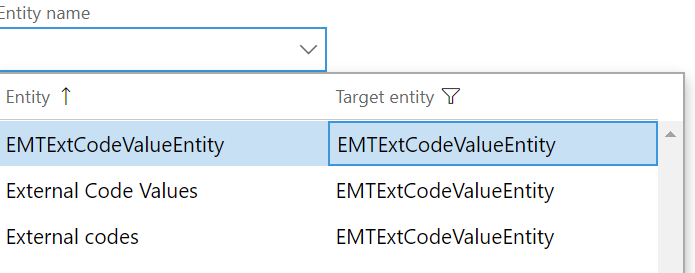
    5736.5516.Capture.PNG

    The source of that dropdown is DMFUtil::lookupEntity and the source is table DMFEntity

    I ran a query on the database: 

    select * from dmfentity where entitytable like 'EMT%'

    and sure enough it gave me 3 rows.  So I just deleted the ones I wasn't using.

    Perhaps it is something from Microsoft's side that they should fix..if I relabel an entity, it should change it on the DMFEntity table

  • Verified answer
    Mea_ Profile Picture
    60,284 on at

    There is a button "Refresh entity list" in a Data import/export framework parameters. Did you try it ?

  • nspiteri Profile Picture
    545 on at

    That would make sense..didn't try it..too late now.

    I'll mark your answer as the suggested answer.  If it doesn't work for someone they can always use my method

  • doninep Profile Picture
    122 on at

    The data entity refresh also fixed this issue for me but I had to manually delete the existing entity with the old label first in the data entity form.  After that the refresh created the entity with the correct label.

Under review

Thank you for your reply! To ensure a great experience for everyone, your content is awaiting approval by our Community Managers. Please check back later.

Helpful resources

Quick Links

November Spotlight Star - Khushbu Rajvi

Congratulations to a top community star!

Forum Structure Changes Coming on 11/8!

In our never-ending quest to help the Dynamics 365 Community members get answers faster …

Dynamics 365 Community Platform update – Oct 28

Welcome to the next edition of the Community Platform Update. This is a status …

Leaderboard > Finance

Last 30 days Overall leaderboard

Featured topics

Product updates

Dynamics 365 release plans
