Hi folks,
Hoping this is an easy one and i'm just being a bit thick. I have created a trigger script on a window (modified) which resides in a custom dictionary (created by our partner). While doing this i found the need to use a global variable from the main Microsoft Dynamics GP dictionary, which i inserted to my trigger script using the Names > Global Variables menu. Problem is, when I try to save the script it doesn't like it. Comes up with a very unhelpful error about a custom field i added to the window (it has a value assigned to it much further down in the script) but as soon as i comment out the global variable it saves and runs perfectly, including assigning the variable to my custom field.
On the 'Resource' tab i have the custom dictionery and have ticked 'modified'
Nothing ticked on the 'Actions' tab
On the Script' tab i have select the custom dictionery and ticked 'modified' under 'Script and Context'
Heres a snippet of code showing my variable and the attempt to assign the global 'Intercomany ID' value :
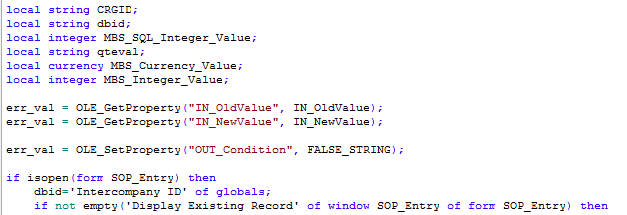
and the error i receive :

Validity is the custom field I added to the window.
I have worked around this using a very cludgey "select DB_NAME()" style sql statement to get the database ID i need but its so....inelegant.
So I guess my question is - can i add these global variables when using a custom dictionary? and if so, how?
If its normally possible and should be working then i'm obviously doing something wrong and that fine, i'll figure it out. I just want to know if i'm banging my head against a wall for nothing!
Please point out if i'm missing any critical information.
Thanks in advance for any assistance.
P.S. if theres a better place to be asking question about GPPT please also point that out to me, i'm a bit new at this!


