web
You’re offline. This is a read only version of the page.
close
Skip to main content

Notifications

Announcements

No record found.

Community site session details

Community site session details

Session Id :
Microsoft Dynamics AX (Archived)

Final Put location is not showing up in the Work generated for Sales orders using WHS in AX 2012 R3

(0) ShareShare
ReportReport
Posted on by

Hi,

I am trying to setup WHS for Sales order picking and delivery. I have set up wave template, work template, location directive. Wave template has Automate Wave creation, Process wave at release to WH and Automate wave release as active.

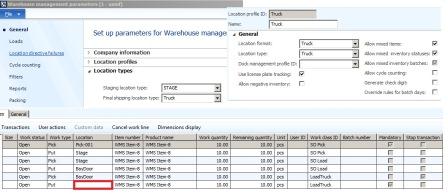
After I reserve the inventory and release the order to the WH, wave and work are created. But when I look at the work instructions for the work that is created, the final Put location is always blank. When I execute the work instructions in the mobile device, I need to manually provide the final put location to complete the work.

I have defined all the needed setups. Attached is the screen shot of the setups.

Can you please help me what setting am I missing.
*This post is locked for comments

I have the same question (0)
  • André Arnaud de Calavon Profile Picture
    300,911 Super User 2025 Season 2 on at

    Hi Balaji,

    The printscreen is very small and unreadable, but check the following:

    - Location directives: Is this setup for the Truck where Multiple SKU is enabled and the Location Directive Action has the query where the truck location is found?

    - Work templates: Please review if this is setup correctly.

    Did you use the Warehouse management setup whitepaper? You can also have a look at some differences in setup by browsing the standard demo database.

  • Ivan (Vanya) Kashperuk Profile Picture
    on at

    post screenshots of your location directive setup for the LoadTruck part

  • Community Member Profile Picture
    on at

    Hi Ivan,

    Thank you for the reply. When I use the location profiles in the AX demo data (BAYDOOR), the final put location is generated in the work instructions. I created a new location profile, location type called 'Truck' and assigned it to a new Location called 'Truck'. The settings on this location profile is identical to BAYDOOR. When I use Truck as my final shipping location in WHS parameter, final Put location is not generated in the Work instructions.

    I have also added the screen shot of Location Directive for Load Truck.

    [View:~/cfs-file.ashx/__key/communityserver-discussions-components-files/33/8156.Load-truck.zip]

  • Suggested answer
    André Arnaud de Calavon Profile Picture
    300,911 Super User 2025 Season 2 on at

    Hi Balaji,

    Please enable the option Multiple SKU on the SO truck Location Directive and see if this was the only missing setup.

  • Verified answer
    Ivan (Vanya) Kashperuk Profile Picture
    on at

    Generally, speaking, Andre is right, you should have 2 location directives, one with MultiSKU, one without for the puts.

    However, I don't think that's the issue here, at least on the screenshot from the 1st post, you seem to only be picking 1 item.

    Which unit are you restricting the location directive line by? Pcs?

    I would suggest you create another line on this location directive, that is not restricted by any unit, and has Allow Split = Yes, with the same query for locations as currently.

    Also, I assume you have "Truck" set on your Work template on the last Put line?

  • Community Member Profile Picture
    on at

    Thank Ivan and Andre.. I followed the suggestions made by Ivan. I am now able to see 'Truck' as my final Put location. Just curious to know, what was the missing setup that caused the issue.

  • Verified answer
    André Arnaud de Calavon Profile Picture
    300,911 Super User 2025 Season 2 on at

    Hi Balaji,

    It could be related to MultipleSKU and the restricting by unit. Have a look at the next article for some additional information: technet.microsoft.com/.../dn553215.aspx

    If you don't allow multiple SKU on a location, there can be only one item number on it. Usually a final destination contains multiple items for delivery.

    The restricting by unit is explained well in the link mentioned above.

    If the answer from Ivan helped you, please verify his answer so the thread will get the status answered.

  • Suggested answer
    Community Member Profile Picture
    on at

    Thanks Andre for your suggestion on Multiple SKU!!

Under review

Thank you for your reply! To ensure a great experience for everyone, your content is awaiting approval by our Community Managers. Please check back later.

Helpful resources

Quick Links

Responsible AI policies

As AI tools become more common, we’re introducing a Responsible AI Use…

Neeraj Kumar – Community Spotlight

We are honored to recognize Neeraj Kumar as our Community Spotlight honoree for…

Leaderboard > 🔒一 Microsoft Dynamics AX (Archived)

#1
Martin Dráb Profile Picture

Martin Dráb 4 Most Valuable Professional

#1
Priya_K Profile Picture

Priya_K 4

#3
MyDynamicsNAV Profile Picture

MyDynamicsNAV 2

Last 30 days Overall leaderboard

Featured topics

Product updates

Dynamics 365 release plans
