web
You’re offline. This is a read only version of the page.
close
Skip to main content

Notifications

Announcements

No record found.

Community site session details

Community site session details

Session Id :
Microsoft Dynamics AX (Archived)

unable to reserve inventory for sales order

(0) ShareShare
ReportReport
Posted on by

Hi everyone,

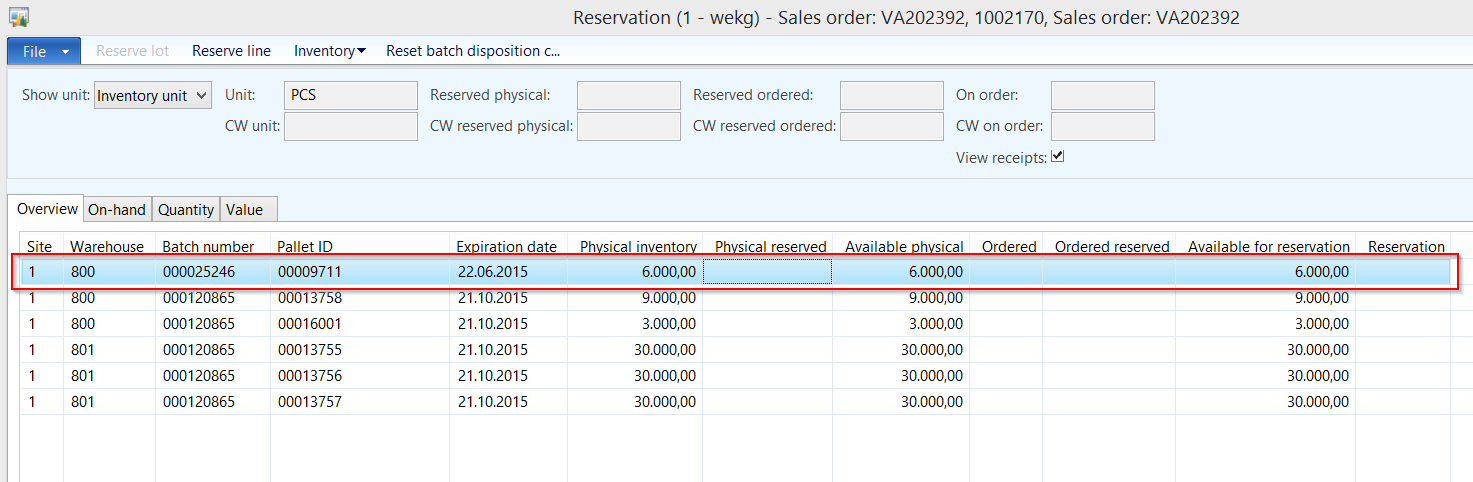
i'm not able to reserve inventory for a sales order. The SO is "Open order" and confirmed, the inventory is available. But if i try to reserve the inventory for the sales line i'm not able to enter a qty. There is no error message or warning either. What did i forget?

Edit:

The order doesn't show up in Inventory and Warehouse management -> Periodic -> Release sales order picking either.

Edit2:

I'm able to reserve another sales line (another item) on the same order. So there is maybe something different with the item. Now the order shows up in "Release sales order picking" too.

Regards

Nils

1106.Inventory_2C202C20_1.png

6886.Reservation.png

*This post is locked for comments

I have the same question (0)
  • Guy Terry Profile Picture
    28,924 Moderator on at

    Sounds like the order is the problem. Tell us more about the order line! Status of the related inventory transaction(s), deliver remainder quantity.

  • Community Member Profile Picture
    on at

    Hi Guy,

    thanks for your reply.

    I got a solution but i must admit i'm not sure how this happened.

    The inventory transaction referenced an output order (which was created before i think) not the sales line. After deleting the output order i could reserve the inventory for this sales line. But what is a possible scenario with this output order thing? I'm new to WMS II, sorry.

    Regards Nils

  • Verified answer
    Guy Terry Profile Picture
    28,924 Moderator on at

    Output orders can be used in non-WHS (R3 Warehouse management) scenarios. They are created when you post a Sales order Picking list (or they can be created manually, but I have never seen anyone actually do this). If the order is not reserved when you post the Picking list, it seems you can't make a reservation against the order. But you can go to Picking list registration and make the reservation there.

    And if you're using 'Consolidated picking', then output orders feed into something called Shipments (in the Inventory module), and you can do things with reservations from there too.

  • Community Member Profile Picture
    on at

    Once the output order was generated for this sales line, i can reserve the inventory for this output order but not for the sales line anymore.

    Am i right assuming that the output order/shipment thing is used for WMS II warehouse management process? Is there a good book covering the "old" WMS II? The one i'm using covers the sales process but it just briefly touches the topic WMS.

  • Community Member Profile Picture
    on at

    Thanks for your explanations.

    Yes i think i "accidentally" created this output order earlier...i remember the dialog :-D.

  • Guy Terry Profile Picture
    28,924 Moderator on at

    Normally, output orders are something that AX creates and looks after and you can ignore them. For learning, it matters if you are using 'Consolidated picking' (which is what some people mean when they say WMSII). Do you know? If you're not, some people would say you are using WMSI!

  • Community Member Profile Picture
    on at

    Hmm "Consolidated picking method" is not checked in item model groups so i guess not. But i know we consolidate multiple orders per customer. The picking process is customized. I trying to find out how it works. The former AX partner delivers it's own mobile interface and they generate WMSOrders/Shipments. The standard picking list is not used. The assistant to create shipments is not used either. I guess the standard shipment-assistant is used to "collect" output orders, right?

    Thanks for your efforts Guy!

    Regards Nils

  • Guy Terry Profile Picture
    28,924 Moderator on at

    As standard, AX creates shipments (of type 'Order picking') per picking list, I think. Users tend to ignore them, and AX takes care of them when you post the picking list registration.

    If you're using Consolidated picking, you will be creating Shipments of type 'Consolidated picking'. You can use the Create Shipment Wizard to create them, but you could also tick 'Automatic shipment creation' on the Shipment template, and AX would create Shipments for you.

  • Suggested answer
    Community Member Profile Picture
    on at

    HI all. 

    I am facing very unpredictable issue, in ax 2012 R2, 

    I can see my all the retail sales, its statement calculated even posted but no impact on my inventory. 

    it happen in my past dated transaction and now current is working ok but due to those statement my inventory has out and I am unable to fix. 

    can anyone help me to figure this out. 

    Thanks.

Under review

Thank you for your reply! To ensure a great experience for everyone, your content is awaiting approval by our Community Managers. Please check back later.

Helpful resources

Quick Links

Responsible AI policies

As AI tools become more common, we’re introducing a Responsible AI Use…

Neeraj Kumar – Community Spotlight

We are honored to recognize Neeraj Kumar as our Community Spotlight honoree for…

Leaderboard > 🔒一 Microsoft Dynamics AX (Archived)

#1
Priya_K Profile Picture

Priya_K 4

#1
Martin Dráb Profile Picture

Martin Dráb 4 Most Valuable Professional

#3
Ali Zaidi Profile Picture

Ali Zaidi 2

Last 30 days Overall leaderboard

Featured topics

Product updates

Dynamics 365 release plans