web
You’re offline. This is a read only version of the page.
close
Skip to main content

Notifications

Announcements

No record found.

Community site session details

Community site session details

Session Id :
Finance | Project Operations, Human Resources, ...
Suggested Answer

Duty related to free text invoice posting

(0) ShareShare
ReportReport
Posted on by 102

Hi, 

I am in the process of creating a custom role for Sales Ledger (Accounts Receivable) and have granted the following duties:
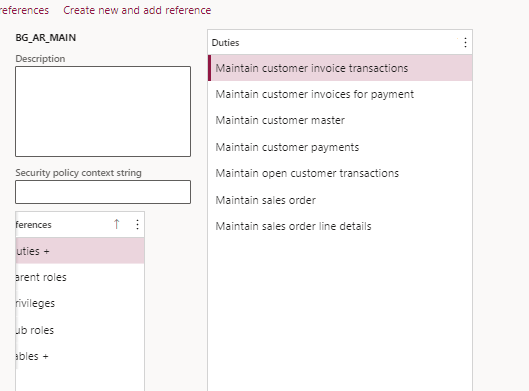
pastedimage1636635219840v2.png

I have tested this role and can create a free text invoice, however i am unable to post it, when i try i get the error below:
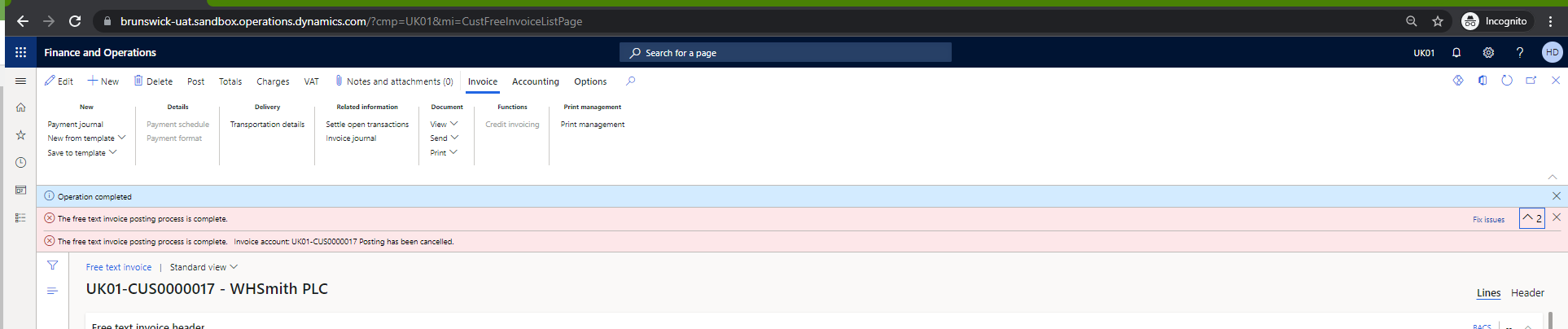
pastedimage1636635198836v1.png

Is there duty i am missing? or is there a table i am missing? 

It doesn't give me message details to see what the error could be. I have ensured the default duty "Maintain customer invoice transactions" has been assigned, but still no joy. 

Please kindly advise

Hetal 

I have the same question (0)
  • Suggested answer
    Ludwig Reinhard Profile Picture
    Microsoft Employee on at

    Hi Hetal,

    If you click the Options tab then you should find a security configuration button that gives you insights into the roles, duties, etc. that you need to process the transaction.

    Best regards,

    Ludwig

  • Hetal Gore Profile Picture
    102 on at

    Thanks Ludvig.

    Is there no other way to see what is required to complete the posting?

  • Suggested answer
    André Arnaud de Calavon Profile Picture
    301,130 Super User 2025 Season 2 on at

    Hi Hetal,

    Is it possible to post the invoice with the system administrator rights? If so, it is somewhere related to security. If the system administrator is not able to post it and gets the same error, then it is a functional or technical issue.

    Can you inform us about the outcome of testing it with the system administrator security role?

  • Hetal Gore Profile Picture
    102 on at

    Thanks André.

    As system admin, i was able to post the free text invoice.

    My issue was related to a missing FD, so i filled it in and posted so all works now.

    But in general is the Security diagnostics under the options menu the best way to see which Role/Duty/Privilege is related to that screen? But what about processes and reports? how can i see what security is required for that? Also how about Tables, do you know what each table does?

    Sorry for all the questions just trying to understand a bit better

  • Suggested answer
    André Arnaud de Calavon Profile Picture
    301,130 Super User 2025 Season 2 on at

    Hi Hetal,

    For processes and reports, you can read my blog to learn a workaround to get this information: How to find action and output menu item names for security diagnostics - Dynamicspedia

    Usually, the tables will inherit permissions from the form menu item; unless overridden by table permissions or if the table has settings related to the Table permissions framework.

Under review

Thank you for your reply! To ensure a great experience for everyone, your content is awaiting approval by our Community Managers. Please check back later.

Helpful resources

Quick Links

Responsible AI policies

As AI tools become more common, we’re introducing a Responsible AI Use…

Neeraj Kumar – Community Spotlight

We are honored to recognize Neeraj Kumar as our Community Spotlight honoree for…

Leaderboard > Finance | Project Operations, Human Resources, AX, GP, SL

#1
Martin Dráb Profile Picture

Martin Dráb 451 Most Valuable Professional

#2
André Arnaud de Calavon Profile Picture

André Arnaud de Cal... 428 Super User 2025 Season 2

#3
BillurSamdancioglu Profile Picture

BillurSamdancioglu 239 Most Valuable Professional

Last 30 days Overall leaderboard

Product updates

Dynamics 365 release plans



