web
You’re offline. This is a read only version of the page.
close
Skip to main content

Notifications

Announcements

No record found.

Community site session details

Community site session details

Session Id :
Customer experience | Sales, Customer Insights,...
Suggested Answer

Time without date PCF control issue

(0) ShareShare
ReportReport
Posted on by 700

Hi,

We have requirement to show only time so we tried to use "Time without date" but we are facing issue.

We have configured below PCF control.
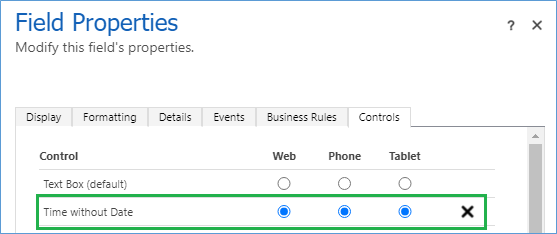
5187.Untitled1.png

We are able to see time as shown below.
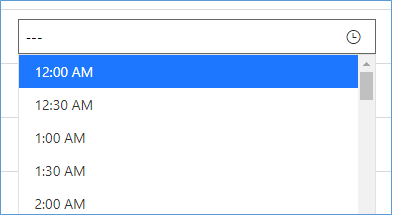
4540.Untitled2.png

When select it then nothing happen and when we check in console then it throws below error.

2671.Untitled.png

Anyone facing this issue and know how to resolve it.

Thanks!

I have the same question (0)
  • Suggested answer
    Nya Profile Picture
    29,060 on at

    Hi,

    I have tried to reproduce your issue but failed.

    pastedimage1633674699282v1.png

    The value can be selected and saved normally.

    And I did some search about the error message.

    The results seem to have nothing with the PCF control.

    Please refer to the following article to see if it can help you.

    [Fix]-A record with these values already exists. A duplicate record cannot be created. Select one or more unique values and try again…and it’s consequenes.. – ECELLORS CRM Blog (wordpress.com)

  • Balasaheb Profile Picture
    700 on at

    Hi Nya,

    Thanks for your response. You can replicate it by select record that does not have any value. Create new record or update existing record that does not have value in it.

    It is working at our end as well when date field has value prior to activate control.

    Please check and let us know if you able to replicate and have solution for it.

    Also one question what field you selectd for "display_name_Input" while configure control.

    Thanks!

    Balasaheb

  • Suggested answer
    Ruben Aghajanyan Profile Picture
    on at

    Hi,

    If this questions is still actual, you can try to use a custom pcf control from here.

    marketplace.bevercrm.com/.../TimePicker

    It has the same UI as standard Dynamics 365 CE fields.

    Regards,

    Ruben

  • Suggested answer
    Sven Vervynckt Profile Picture
    115 on at

    Hey Guys!

    We've had the same issue with the Time without date control and found a workaround without using a 3rd party PCF Control. 

    As it's a time ONLY picker, we're assuming we're not intrested in the Date itself. Therefore we've created a busines rule that gives the field a default value. 

    0412.business_5F00_rule.png

    The drawback is that you can't show the field in a view, as it would show the "hardcoded" date. 

    Hope it helps!

    Kind regards

    Sven V. 

Under review

Thank you for your reply! To ensure a great experience for everyone, your content is awaiting approval by our Community Managers. Please check back later.

Helpful resources

Quick Links

Responsible AI policies

As AI tools become more common, we’re introducing a Responsible AI Use…

Neeraj Kumar – Community Spotlight

We are honored to recognize Neeraj Kumar as our Community Spotlight honoree for…

Leaderboard > Customer experience | Sales, Customer Insights, CRM

#1
Tom_Gioielli Profile Picture

Tom_Gioielli 70 Super User 2025 Season 2

#2
Gerardo Rentería García Profile Picture

Gerardo Rentería Ga... 43 Most Valuable Professional

#3
Daniyal Khaleel Profile Picture

Daniyal Khaleel 32 Most Valuable Professional

Last 30 days Overall leaderboard

Product updates

Dynamics 365 release plans



