
You’re offline. This is a read only version of the page.



 574
574
I setup a sales order with Drop Shipment.
I run Requesition worksheet to create associated purchase orders
item tracking code = Lot number.
Item (order tracking policy)= Tracking & Action Msg.
Item Reserve = Optional
When I try to set lot numbers to the item in the purchase order I get beloved message:
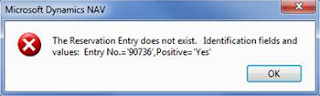
(this is a different screen capture, the real one is similar but Positive = No)
When I dive into Reservation Entry table, I can see that due to Order Tracking Policy configured for the item (Tracking & Action Msg.), original entry of the purchase order line has been distributed among new sales orders, in other words, the purchase line has been "soft-assigned" (not hard reservation) to sales lines, and that causes the error message.
When I delete those reservation entries and restore purchase quantity to its original value in the order line, I can insert lot number and error message does no show up.
I wonder if this is not a bug, since a reservation entry created from a drop shipment should not be "tracked" since it is completely "reserved" for the sales order?
How should I avoid this error?
Where should I say to de item tracking management codeunit not to track a purchase order that is a drop shipment?
NB.- Item setup must remain the way it is now.
*This post is locked for comments
I have the same question (0)






 Share
Share Report
 All responses (
 Answers (

