web
You’re offline. This is a read only version of the page.
close
Skip to main content

Notifications

Announcements

Community site session details

Community site session details

Session Id :
Microsoft Dynamics NAV (Archived)

Can't split new line when doing the put away transaction

(0) ShareShare
ReportReport
Posted on by 255

Dear All,


I have some problem when doing split line function in the warehouse good handling order by order/inventory put aways, when I reach number 19999 or 29999 or 49999 the following warning is appear, is this a bugs in dynamic navision or my setting is wrong.

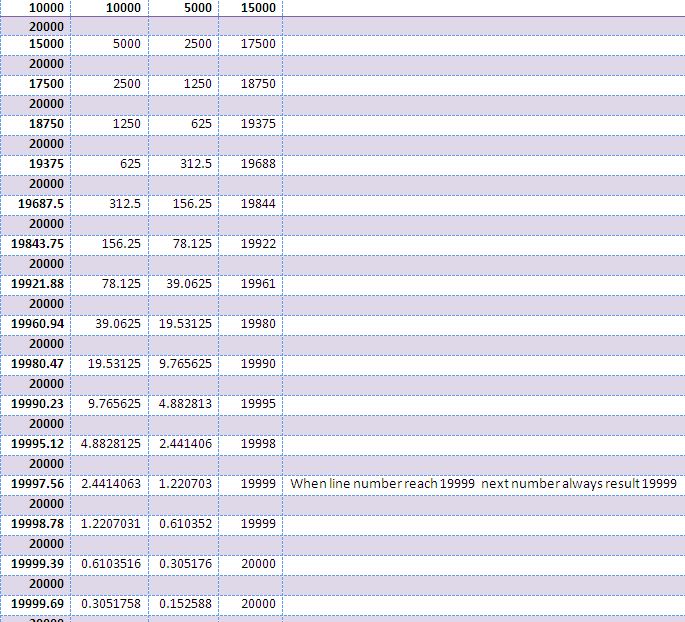
Look at the line number 19999 item RM super Rice, when I want split it again to 480 the warning is appear "the warehouse activity line alraady exist".

for information :

location setup of this transaction  : 

- require put away = Yes

- require pick = Yes

- bin mandatory = Yes


I Have analyze this problem and I found wrong logic in table cause by this code 

........


LineSpacing :=

    (NewWhseActivLine."Line No." - WhseActivLine."Line No.") DIV 2


.......

you can get that code on Table 5767 Warehouse Activity Line\SplitLine(WhseActivLine).

Look at the following figure, when line number reach 19999, navision system can't add new line number. is this a bugs, is there a hotfix for patching this bugs.


Thanks for your help :)

Regards,


Prima

*This post is locked for comments

I have the same question (0)
  • Prima Hanum Profile Picture
    255 on at

    Hi All,

    No Answers ....

  • Neville Foyn Profile Picture
    4,320 on at

    Yes this is exactly how NAV splits lines, it always puts the new record between the 2 records you are splitting, and if you split enough times it will run out of numbers, that is not a bug, it just how it works,

    The reason for this is you may add a line between the 2 (Below the 15 000 line was added between the 2) you now have the opportunity to add another record between the 10 000 and the 15 000 (So 12 500), if you had made the new record 10 001 you could no longer split between the 10 000 and the 10 001

    10 000

    (12 500)

    15 000

    (17 500)

    20 000

    If you are running out of numbers (And it looks like you are adding the records with code) why don't you just specify the line number as the first +1 then you will have the full 9 999 lines to work with? this functionality was made for users manually adding lines, for coders you should add your own line numbers

  • Prima Hanum Profile Picture
    255 on at

    Ok,  your explanation is clear enough for me, but in the fact i can't specify line numbers manually when do split line in put away. did you mean i should change the code in code unit?

  • Verified answer
    Neville Foyn Profile Picture
    4,320 on at

    Hi

    What i meant is that if you are creating the lines using code

    (Are you a developer that has written functionality into nav to create these lines?)

    Then specify the line number in your code as it creates the new lines and don't use the split lines functionality at all

    If you are a user and you are capturing the lines manually (by typing them in) i would suggest that you ask your development partner to make the line number visible on the page and editable, then when you add lines in you can change the line number yourself to be what ever works best (so probably previous line + 1)

  • Prima Hanum Profile Picture
    255 on at

    I am not a developer, and also not a user, i am just new in functional and technical navision (customer level).

    your suggestion is ok. because basicly it is dificult for my user to split line using basic numbering logic. there is more than 350 lines must be create in one transaction. I think make the number increament +1 is the best solution.

    Thanks for your suggestion,

    Prima  

  • Neville Foyn Profile Picture
    4,320 on at

    Glad to help :)

Under review

Thank you for your reply! To ensure a great experience for everyone, your content is awaiting approval by our Community Managers. Please check back later.

Helpful resources

News and Announcements

Season of Giving Solutions is Here!

Quick Links

Responsible AI policies

As AI tools become more common, we’re introducing a Responsible AI Use…

Neeraj Kumar – Community Spotlight

We are honored to recognize Neeraj Kumar as our Community Spotlight honoree for…

Leaderboard > 🔒一 Microsoft Dynamics NAV (Archived)

#1
HoangNam Profile Picture

HoangNam 7

Last 30 days Overall leaderboard

Featured topics

Product updates

Dynamics 365 release plans



