web
You’re offline. This is a read only version of the page.
close
Skip to main content

Notifications

Announcements

No record found.

Community site session details

Community site session details

Session Id :
Microsoft Dynamics AX (Archived)

Coverage failed for co product Product A; no related formula version

(0) ShareShare
ReportReport
Posted on by

Hi All,

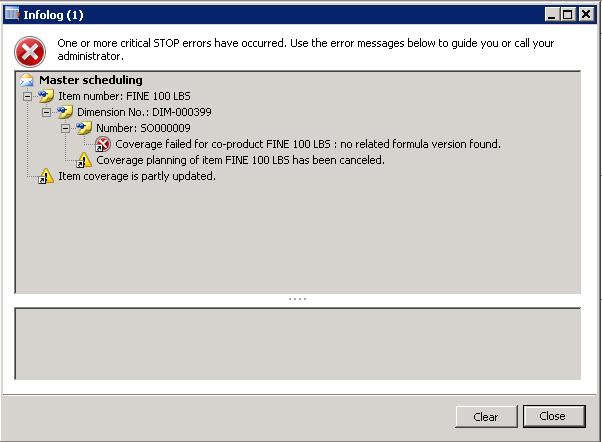
I encountered this error when I simulate master planning for a co-product item from a formula item. I have for example a Sales Order for a co-product which is Product A of 10 pcs. then I run Master scheduling to see if a planned Batch Order will be generated, but I came along with this error.

"Coverage Failed for co-product A: no related formula version found. Coverage planning item Product A has been cancelled". 
 

Thanks and best regards. 

*This post is locked for comments

I have the same question (0)
  • guru sankar Profile Picture
    75 on at

    check you formula item. even i encoded this issue.

    i created an new formula item which is not an CW item BOM to it. then this issue got resolved.

    try the same.

  • Suggested answer
    guru sankar Profile Picture
    75 on at

    check you formula item and co-product item. try to create new formula and co-product item with you CW and try the same.

  • GannaParkh Profile Picture
    10 on at

    Hello,

    try to set Planning Formula for co-product (Item coverage form, general tab)

  • Community Member Profile Picture
    on at

    I have had the same problem but found that the Plan>Item Coverage settings had a default of transfer.

    Check all your site specific or defaults are the right warehouses, that the planned order type in item coverage is "production" (not transfer), if it is you may want to try clicking the override and changing it to production.

    I believe this is caused by creating formulas etc. without having first set the item coverage and site settings.

    OFC, I do not know your specific warehouse or manufacturing structure so I would try it in a test/development account first.

    hope it helps.

  • Guy Terry Profile Picture
    28,924 Moderator on at

    <much later>

    The time I've seen this, I was planning a co-product, and the items were planned at Site dimension only. However, the by-product on the formula had Site and Warehouse defined. Removing the warehouse caused the error to disappear.

Under review

Thank you for your reply! To ensure a great experience for everyone, your content is awaiting approval by our Community Managers. Please check back later.

Helpful resources

Quick Links

Responsible AI policies

As AI tools become more common, we’re introducing a Responsible AI Use…

Neeraj Kumar – Community Spotlight

We are honored to recognize Neeraj Kumar as our Community Spotlight honoree for…

Leaderboard > 🔒一 Microsoft Dynamics AX (Archived)

#1
Martin Dráb Profile Picture

Martin Dráb 4 Most Valuable Professional

#1
Priya_K Profile Picture

Priya_K 4

#3
MyDynamicsNAV Profile Picture

MyDynamicsNAV 2

Last 30 days Overall leaderboard

Featured topics

Product updates

Dynamics 365 release plans



