web
You’re offline. This is a read only version of the page.
close
Skip to main content

Notifications

Announcements

No record found.

Community site session details

Community site session details

Session Id :
Microsoft Dynamics NAV (Archived)

Unable to export to excel in NAV 2016 (using Citrix environment)

(0) ShareShare
ReportReport
Posted on by

Hi, 

I'm accessing NAV 2016 using Citrix environment - but having problem to export the extraction data to excel format, where when I click Print & Send > Microsoft Excel - no box of Excel message prompt out (to ask me where the location to save/ open this data). 
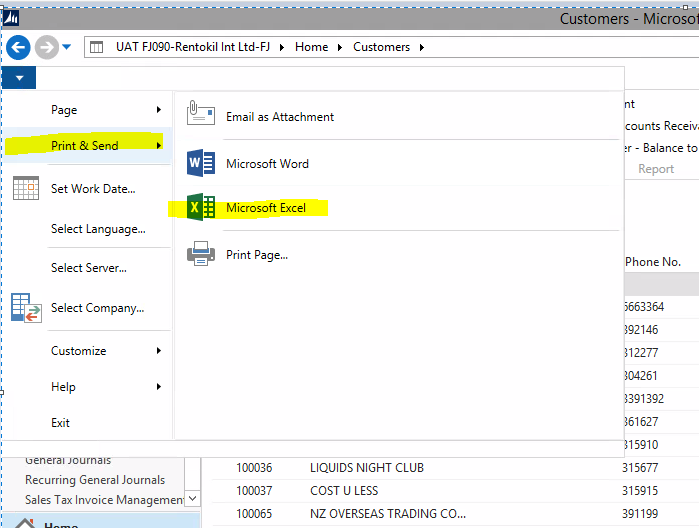
70481.Citrix-export.PNG

Supposed after click Microsoft Excel - this box will prompt out:-
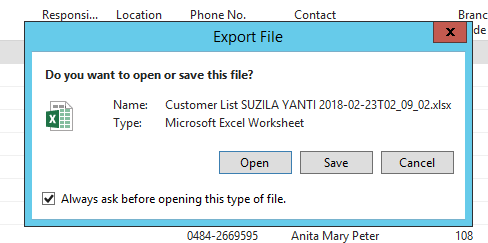
7801.5635.excel-error.PNG

But for my case - nothing prompt out/ excel file also not opening when click export to Excel. Rapidstart (export to excel function) is working fine. Need an advise in this matter - why this issue occured ? Is it related to Excel on my Citrix profile configuration problem ?

Thanks a lot !!

*This post is locked for comments

I have the same question (0)
  • Hannes Holst Profile Picture
    5,767 on at

    Hi,

    Not sure how far the development of Citrix has become until now.

    A couple of years ago, the Citrix-environment was encapsulated from the local PC.

    So, the applications running in Citrix were not able "to see" the applications of the local PC.

    I guess, you do not have Excel installed in the Citrix-environment. In RapidStart you have the option to save the file. Using "Print & Send", NAV tries to open Excel directly.

  • Community Member Profile Picture
    on at

    Thanks Hannes for the suggestion. I have try to contact my local IT guys and ask them to reset my Citirx password - and surprisingly it able to sort out my Send to Excel issue. I'm not sure what happen but I believe it related to Citrix profiling. Thanks for your great help

  • Suggested answer
    RockwithNav Profile Picture
    8,600 Super User 2025 Season 2 on at

    Hey,

    Resetting your Citrix password  wont help, it's all about perquisites that's been need to get it exported into excel. Please  ask your IT Guy to install reinstall excel in your system and too cross verify all NAV Prerequisites are installed.

  • Suggested answer
    Andrey Baludin Profile Picture
    3,941 on at

    Check that you have NAV Excel Add-in (Excel - Options). If not - activate it pressing Go button and selecting it there.

    excel.JPG

Under review

Thank you for your reply! To ensure a great experience for everyone, your content is awaiting approval by our Community Managers. Please check back later.

Helpful resources

Quick Links

Responsible AI policies

As AI tools become more common, we’re introducing a Responsible AI Use…

Neeraj Kumar – Community Spotlight

We are honored to recognize Neeraj Kumar as our Community Spotlight honoree for…

Leaderboard > 🔒一 Microsoft Dynamics NAV (Archived)

Last 30 days Overall leaderboard

Featured topics

Product updates

Dynamics 365 release plans
