web
You’re offline. This is a read only version of the page.
close
Skip to main content

Announcements

No record found.

News and Announcements icon
Community site session details

Community site session details

Session Id :
Finance | Project Operations, Human Resources, ...
Suggested Answer

different label values in different languages for the same report

(1) ShareShare
ReportReport
Posted on by 1,271

Hello,

I have duplicated the standard report "CustCollectionJour" and changed design a bit. I have created a custom additional field in the temp table and I show it value in the report. The label for the field is pointed out in the textbox expression in the report design like that

pastedimage1677506083849v2.png 

Custom Label file "ASM:" is for the swedish language and this works only when I launch the report for the swedish language. It does make sense.

When I launch it for the "en-us" languageid it shows this. It doesn't understand label for Swedish language and it also does make sense.
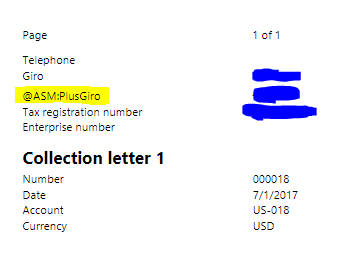
pastedimage1677506459440v3.png

Is there any way to fix this? I need the same label to be shown for the swedish version of the report and for the english version. For the standard report labels system somehow does this automatically. 

Thanks.

  • Suggested answer
    GirishS Profile Picture
    27,843 Moderator on at

    Hi Azat Mukhametzyanov,

    I think you need to create label file for different languages.

    You can use LCS translation service to create label file for different languages.

    Thanks,

    Girish S.

  • dark_knight Profile Picture
    1,271 on at

    thanks. sorry but didn't quite understand. is there any instruction or link?

  • Suggested answer
    GirishS Profile Picture
    27,843 Moderator on at

    You need to pass the sweedish label file to lcs translation service. Lcs translation service will give you a desired language you selected during setup.

    I searched for a blog but not found related to it.

    Refer to this community thread and follow the links mentioned in the thread.


    Thanks,

    Girish S.

  • GNRS1990 Profile Picture
    18 on at
    Can you please let me know how you extended to display the report? I tried delegate and extending printmgmt but still doesnt show report.
     

Under review

Thank you for your reply! To ensure a great experience for everyone, your content is awaiting approval by our Community Managers. Please check back later.

Helpful resources

Quick Links

Season of Sharing Community Challenge Winners!

Congratulations to our community stars!

Women in Power Builds Momentum

Expanding mentorship, skilling, and AI innovation

Congratulations to the July Top 10 Community Leaders

These are the community rock stars!

Leaderboard > Finance | Project Operations, Human Resources, AX, GP, SL

#1
Martin Dráb Profile Picture

Martin Dráb 426 Most Valuable Professional

#2
CU10121822-0 Profile Picture

CU10121822-0 358

#3
André Arnaud de Calavon Profile Picture

André Arnaud de Cal... 353 Super User 2026 Season 2

Last 30 days Overall leaderboard

Product updates

Dynamics 365 release plans
