web
You’re offline. This is a read only version of the page.
close
Skip to main content

Notifications

Announcements

No record found.

Community site session details

Community site session details

Session Id :
Microsoft Dynamics AX (Archived)

AX Roles & Active Directory group

(0) ShareShare
ReportReport
Posted on by

Hi everyone,

I have created a job which generates some CSV files with security reports. The problem comes up when we manage the privileges through Active Directory groups, because within the Users&Roles CSV file doesn’t appear any record related to those users that are contained into the AD groups, just only those records about the AD group roles.

Here is an example:

  • I have created this user (AD group) into AX:
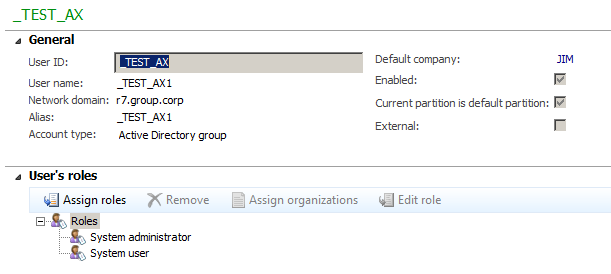
ax-group.png

  • I added the user alfonso.aliaga to that AD group:
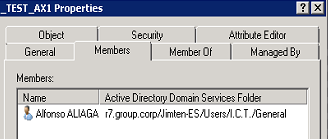
ad_5F00_group.png

  • The CSV Users&Roles contains the AD Group roles but it doesn’t contain any record about the user alfonso.aliaga


¿Could anyone explain me which is the relationship within the AX between “Active Directory User” and “Active Directory Group”?

So many thanks in advance,

Alfonso.

*This post is locked for comments

I have the same question (0)
  • Suggested answer
    Martin Dráb Profile Picture
    237,884 Most Valuable Professional on at

    When the user logs into AX for the first time, a user record gets created for him/her in AX in a similar way as if you create it manually. There is a record in UserInfo table etc. If the user never logged into AX, there is nothing inside AX and if you want to know member of the AD group, you have to look into AD itself.

  • André Arnaud de Calavon Profile Picture
    301,035 Super User 2025 Season 2 on at

    Hi Alfonso,

    In addition: The AD group is used to have role templates in AX 2012. When you have setup an AD group, also the user himself needs to be setup in AX 2012 like Martin mentioned. When he logs in for the first time, a user account with anID starting with a '$' will be created. To prevent this you can add the user manually in the list of AX users. When he then logs in, he will also have access to the roles as setup in the AD group. ALso you can rename the user ID when required.

  • Community Member Profile Picture
    on at

    Yes, and I'm able to see it into the UserInfo table as well as AX list, but the user doesn't have any role relationship, at least at SecurityUserRole neither AX:

    ax_5F00_res1.png

    ax_5F00_res1.png

    ax_5F00_res2.png

    But the roles are well applied to alfonso.aliaga user.

  • Community Member Profile Picture
    on at

    Thanks André, but what we want to avoid is the AX user administration. What we really want to reach is a users management based in AD groups in order to be able to move users between departments without the necessity of perform a manually role assigment.

    We have just reached it but we are unable to export a security report with roles per user, only roles per group.

  • Martin Dráb Profile Picture
    237,884 Most Valuable Professional on at

    Roles are configured on group - that's the point, isn't it?

    Nevertheless you can assign additional permissions for the user, if you want.

  • Martin Dráb Profile Picture
    237,884 Most Valuable Professional on at

    You might want to read my old article User account type (AX2012). It explains all things you asked about so far.

  • Community Member Profile Picture
    on at

    Yes, that's the point :)

    But we don't need to add new roles to an specific user, I know we can, what we need is to know which roles are applied to a user through the group it belongs.

    I don't know if there is a record within the AX database with the relationship between the user and the group or the roles are assigned during the authentication process depending on the AD group that the user belongs.

  • Verified answer
    Martin Dráb Profile Picture
    237,884 Most Valuable Professional on at

    Use the following X++ code:

    UserId userId = ...;
    List roles = new SysUserManagement().getRolesForUser(userId);

    Notice that the method is an entry point, therefore you can call it from outside AX through a web service, if needed.

    I don't know whether it's anywhere inside AX database and it doesn't matter, because you can't depend on such implementation details anyway.

  • André Arnaud de Calavon Profile Picture
    301,035 Super User 2025 Season 2 on at

    There are no details for the AD user roles assigned to a user in the AX database. This because a user can be added or removed from AD groups. AX is not aware of that administration. So runtime it will find out which roles are available for a user.

    Also note that using AD user group users will not enforce Segregation of Duties if a user is assigned to multiple AD groups.

  • Community Member Profile Picture
    on at

    So many thanks Martin, that code works!!!

Under review

Thank you for your reply! To ensure a great experience for everyone, your content is awaiting approval by our Community Managers. Please check back later.

Helpful resources

Quick Links

Responsible AI policies

As AI tools become more common, we’re introducing a Responsible AI Use…

Neeraj Kumar – Community Spotlight

We are honored to recognize Neeraj Kumar as our Community Spotlight honoree for…

Leaderboard > 🔒一 Microsoft Dynamics AX (Archived)

#1
Martin Dráb Profile Picture

Martin Dráb 4 Most Valuable Professional

#1
Priya_K Profile Picture

Priya_K 4

#3
MyDynamicsNAV Profile Picture

MyDynamicsNAV 2

Last 30 days Overall leaderboard

Featured topics

Product updates

Dynamics 365 release plans



