web
You’re offline. This is a read only version of the page.
close
Skip to main content

Announcements

No record found.

News and Announcements icon
Community site session details

Community site session details

Session Id :
Microsoft Dynamics AX (Archived)

Project Purchase Invoice error "The state of the source document or source document line could not be updated."

(0) ShareShare
ReportReport
Posted on by 4,624

Hi All,

I have created Purchase Order for Project from Project Management and Accounting Details. But i am going to post Invoice it is giving me below error :
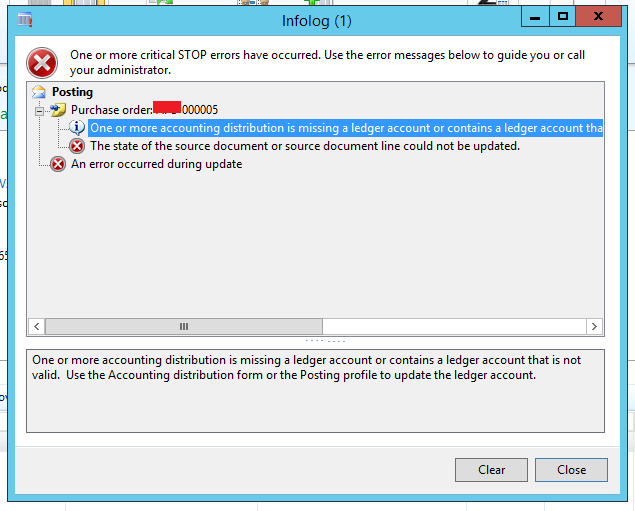
ProjectPurchase-error.PNG

I have searched over internet about this error, but not successful yet. I would like to show you Distribution for my PO line (PO Line >Financial > Distribute amount ) which is showing red mark see below:
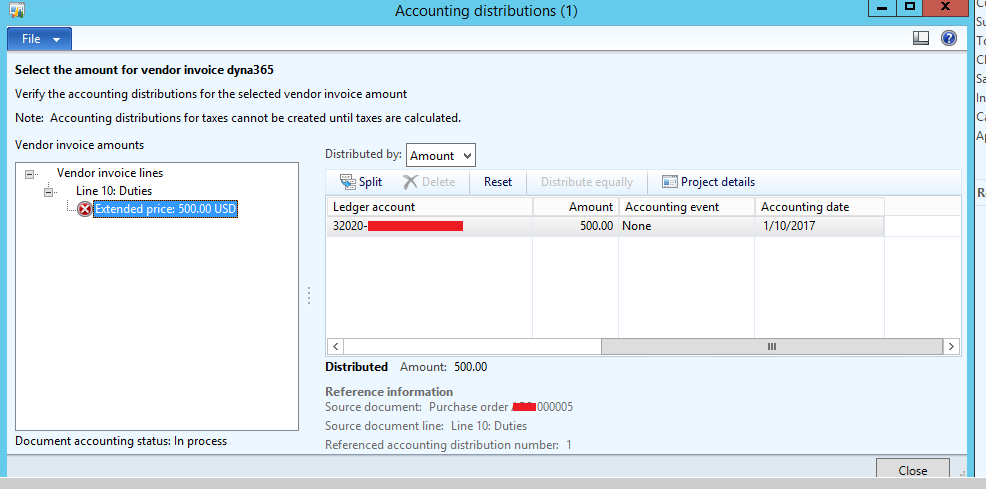
Project-Purchase.PNG

Please help me on this.

*This post is locked for comments

I have the same question (0)
  • Suggested answer
    Ludwig Reinhard Profile Picture
    Microsoft Employee on at

    Hi,

    Can you check the following:

    1) That the item that you purchase has a project category assigned (please check from the released product form and the project tab)

    2) That all accounts are setup in the inventory posting matrix under inventory-setup-posting-posting (purchase tab).

    Best regards,

    Ludwig

  • Verified answer
    Brandon Wiese Profile Picture
    17,788 on at

    This can be caused by an invalid combination of main account and financial dimensions per your account structures and dimension validation setup.

    It's clearly not a case of strictly missing main account, for which you would get an additional warning message.

    You could probably most easily check the combination by using it in a general journal, which should product much clearer validation warnings.

  • Rohin Profile Picture
    4,624 on at

    Thanks Brandon & Ludwig,

    @ Brandon Wiese - Thanks , exactly it was due to Invalid Combination of Main Account and Financial Dimension. Now It is posted.

    @Ludwig - Thanks, PO was not related to  Inventory Items . It has Procurement Category.

    Now , I am also putting the Sales Price in PO Line and try to post PO . Now it giving me error of Validate Financial Dimension for one of revenue account (In which Sales value going to be post). Where to Put Financial Dimension for that revenue account in PO even i have put the Financial Dimension already in PO form.

  • Suggested answer
    Ludwig Reinhard Profile Picture
    Microsoft Employee on at

    Hi Visvash Walia,

    For the AP summary account, the financial dimension is entered in the purchase order header in the financial tab. (This will be the account that is credited).

    The financial dimensions that are used for recording the debit transaction is specified in the invoice line details section and there the financial dimensions tab.

    Best regards,

    Ludwig

  • Rohin Profile Picture
    4,624 on at

    Hello  Ludwig,

    Thank you!

    Financial Dimension is already entered in Purchase Order Header still it giving error. I would like to know if Post PO with Sales price so below account going to hit :

    Cost : debit ( Financial Dimension is entered on PO Line)

    AP Summary Account : credit (Financial Dimension is entered on PO header)

    Revenue Sales : credit  ( ??)

    Please help on this

  • Suggested answer
    Ludwig Reinhard Profile Picture
    Microsoft Employee on at

    Hello Visvash Walia,

    The cost and the revenue transaction are determined by the financial dimension that is recorded at the PO line level.

    Best regards,

    Ludwig

  • Rohin Profile Picture
    4,624 on at

    Thanks Ludwig ,

    I have entered already in PO Line Level. But it not works for me. Let me try again with doing some changes. Hope for the Best.

Under review

Thank you for your reply! To ensure a great experience for everyone, your content is awaiting approval by our Community Managers. Please check back later.

Helpful resources

Quick Links

Introducing the 2026 Season 1 community Super Users

Congratulations to our 2026 Super Stars!

Congratulations to our 2025 Community Spotlights

Thanks to all of our 2025 Community Spotlight stars!

Leaderboard > 🔒一 Microsoft Dynamics AX (Archived)

#1
Joris dG Profile Picture

Joris dG 5

#2
Alexey Lekanov Profile Picture

Alexey Lekanov 2

#2
Henrik Nordlöf Profile Picture

Henrik Nordlöf 2 User Group Leader

Last 30 days Overall leaderboard

Featured topics

Product updates

Dynamics 365 release plans
