web
You’re offline. This is a read only version of the page.
close
Skip to main content

Notifications

Announcements

No record found.

Community site session details

Community site session details

Session Id :
Customer experience | Sales, Customer Insights,...
Suggested Answer

Customer Journey is still live even after completing the requirements

(0) ShareShare
ReportReport
Posted on by 10

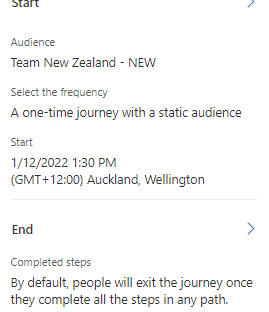
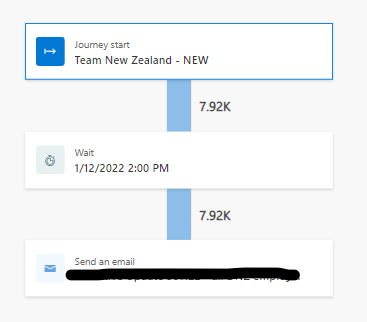
Hi, I created some customer Journeys which simply send emails to a set of users. All my Journeys gets completed after the email is rolled out after some time but one Journey(created on 1st Dec) has completed the supposed course of action and is still showing in LIVE state and there's literally no difference in how this journey was created wrt other journeys.
pastedimage1673597704930v1.pngpastedimage1673600603214v4.png

Please suggest

Q1 why this Journey has not completed yet and

Q2 how long does a Journey actually take to change it's state from Live to Completed after completing the supposed course of action.

Thanks, Nik.

I have the same question (0)
  • Suggested answer
    Naveen Ganeshe Profile Picture
    3,397 User Group Leader on at

    Hello,

    It's difficult to say exactly why the one Journey you created on December 1st is still in a LIVE state without more information about the specific Journey and its configuration. However, here are a few potential reasons:

    Q1.

    • One possibility is that there is a delay or error in the email sending process, which is preventing the Journey from completing.
    • Another possibility is that the Journey is configured to wait for a specific event, such as a form submission or website visit, before it can complete.
    • There might be some issue with the specific contacts that are in the Journey, it's worth checking the contact records and making sure that all of them are valid and active.

    Q2.

    • The duration of a Journey depends on a variety of factors, including the number of contacts in the Journey, the complexity of the Journey's steps, and any delays or errors that may occur.
    • Typically, a Journey should transition to a Completed state soon after all of the Journey's steps have been completed. However, if there are any delays or errors, it may take longer.
  • Nikhil_Pareek Profile Picture
    10 on at

    Hi Naveen,

    Thanks for the prompt response.

    My Journey configuration literally starts and sends a basic mail (mentioning that we are testing and have no links associated) and that's it. The target group has received the email. Also, the same number of contacts were sent another mail from a similar journey (just the change of mail and exactly similar Journey) which actually shows the status as completed, so I guess that eliminates the case where the user group could have a problem.

    I really appreciate you helping out and if you have any pointers that I should ponder upon, please do let me know. Thanks!

    Nik.

  • Suggested answer
    Naveen Ganeshe Profile Picture
    3,397 User Group Leader on at

    Hi Nikhil,

    can you also check if the start and end dates are the same for all your journey?

  • Nikhil_Pareek Profile Picture
    10 on at

    Hi,

    The start dates are different and I've no end dates in the Journeys.

  • Naveen Ganeshe Profile Picture
    3,397 User Group Leader on at

    Is it possible for you to share the screenshot of your journey? also, the general tab's screenshot

  • Nikhil_Pareek Profile Picture
    10 on at

    I've added the screenshot of the Journey in the Original post. Couldn't post the General tab as this was a real time Journey(similar to others), so didn't have an option for that.

  • Suggested answer
    Naveen Ganeshe Profile Picture
    3,397 User Group Leader on at

    Everything looks good to me. I am not sure then what else can be the cause of this. you can raise a MS ticket for further support

Under review

Thank you for your reply! To ensure a great experience for everyone, your content is awaiting approval by our Community Managers. Please check back later.

Helpful resources

Quick Links

Responsible AI policies

As AI tools become more common, we’re introducing a Responsible AI Use…

Neeraj Kumar – Community Spotlight

We are honored to recognize Neeraj Kumar as our Community Spotlight honoree for…

Leaderboard > Customer experience | Sales, Customer Insights, CRM

#1
Tom_Gioielli Profile Picture

Tom_Gioielli 170 Super User 2025 Season 2

#2
#ManoVerse Profile Picture

#ManoVerse 70

#3
Jimmy Passeti Profile Picture

Jimmy Passeti 50 Most Valuable Professional

Last 30 days Overall leaderboard

Product updates

Dynamics 365 release plans



